Published 2026-10-27 · Updated 2026-10-27
Vibe Coding Security Checklist: Protect Your App and Server
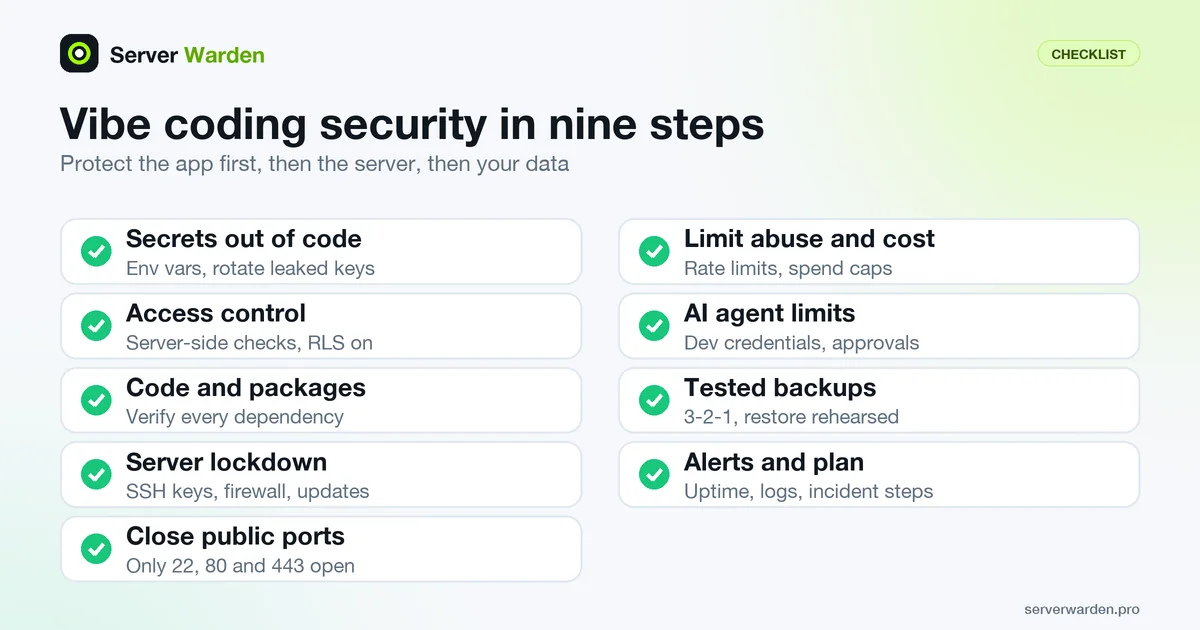
Short answer: to protect a vibe-coded app, work through nine checks in order: keep secrets out of code, enforce access rules on the server and in the database, review dependencies, lock down SSH and the firewall, close public ports, limit abuse and spend, restrict what AI agents can touch, keep tested backups, and set up alerts. None of it needs a security background, and most items take minutes.
Vibe coding means describing what you want to an AI assistant and shipping the code it writes, often without reading every line. The speed is real, but an app that runs is not the same as an app that is safe. Use this page as a pre-launch checklist and run it again every month.
In this article
Why vibe-coded apps need their own checklist Step 1: Keep secrets out of code and out of the browser Step 2: Check who can see and change what Step 3: Review the code and every dependency Step 4: Lock down the server Step 5: Close what should not be public Step 6: Limit abuse and surprise bills Step 7: Keep AI agents on a short leash Step 8: Back up the data and rehearse the restore Step 9: Watch it and know what to do when it breaks The whole checklist on one screen Go deeper: one guide for each step Frequently asked questionsQuick win (15 minutes)
- Search your repository and chat history for pasted API keys, then revoke any you find. See Step 1.
- Log in as a second test user and try to open the first user's data by changing an ID in the URL or request. It must be refused.
- Run
sudo ss -tlnpon the server and confirm only SSH, HTTP and HTTPS listen on public addresses. - Set a spending limit and an alert on every paid API key your app uses.
- Run one database backup and try to restore it into a scratch database.
Why vibe-coded apps need their own checklist
An AI assistant is good at producing something that works in the demo. It does not know which parts of your app are public, which keys are secret or what your hosting provider leaves open by default. The failures that hurt are usually not clever attacks. They are ordinary gaps that automated scanners look for: a key committed to Git, a database table anyone can read, a port open to the internet.
The checklist has two halves. Steps 1 to 3 and 6 to 7 protect the app and apply wherever it runs. Steps 4 and 5 protect the server and apply if you rent a VPS. If you deploy to a managed platform, the provider handles most of Steps 4 and 5, but the rest is still yours. For a full server-level list, see the VPS security checklist.
Step 1: Keep secrets out of code and out of the browser
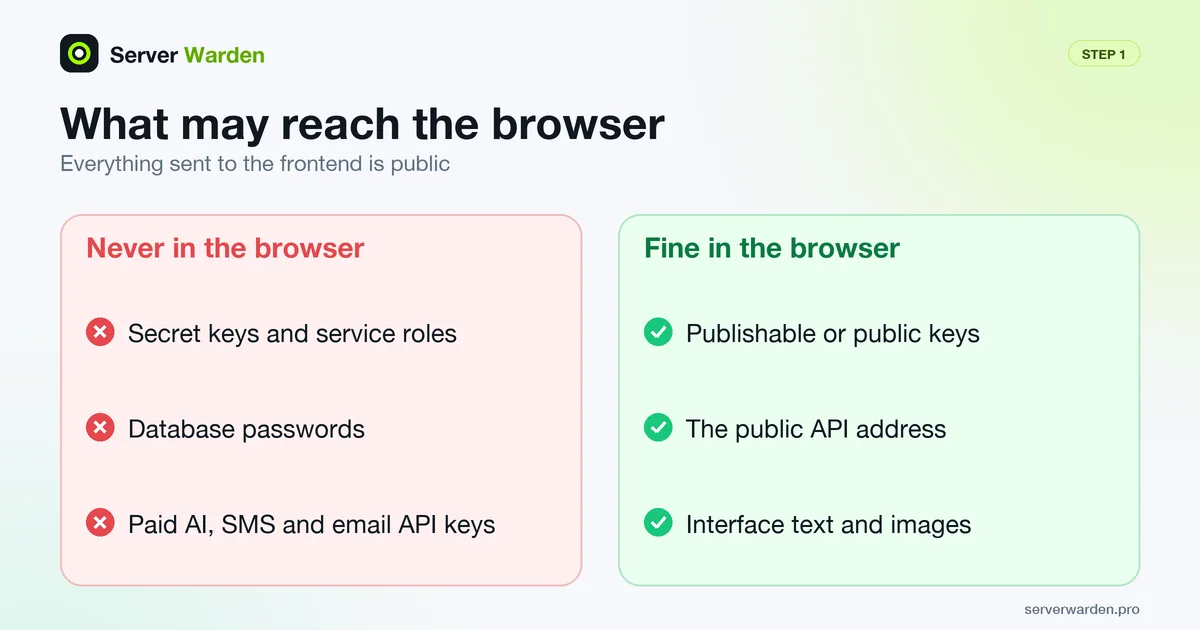
A secret is any value that proves your app is allowed to do something: an API key, a database password, a token. Anyone who gets it can act as your app, and on a paid API that can mean someone else running up your bill.
- Store secrets in environment variables or a secrets manager, never in source files, prompts or screenshots. Assistants often paste a key straight into code to make an example work.
- Add
.envto.gitignorebefore the first commit. Check whether it ever slipped in withgit log --all --oneline -- .env. Any output means it was committed at some point. - Know which keys may reach the browser. Everything shipped to the frontend is public. Publishable keys are designed for that. Secret keys are not: Supabase's documentation says the service role bypasses row-level security, so keep it server-side and never expose it to customers.
- Turn on secret scanning. GitHub's push protection blocks a push that contains a hardcoded credential. Per GitHub's documentation it is on by default for users pushing to public repositories, while repository-level protection must be enabled by an administrator.
- Rotate, do not just delete. If a key reached a repository, a chat or a log, removing it from the file does not un-leak it. Revoke it and issue a new one. The steps are in Exposed .env and .git files.
Step 2: Check who can see and change what
Access control means every request is checked on the server, for that user, for that record. Hiding a button in the interface is not access control, because anyone can send the request without the button. The OWASP Top 10 treats broken access control as a core web application risk, and AI-written code can skip it without any visible error.
- Run the two-user test. Create two accounts, log in as the second and request the first one's record by changing the ID. Expect a refusal, not the data.
- Enable row-level security on every exposed table if you use Supabase or another Postgres API layer. Supabase's documentation warns that a table in an exposed schema without row-level security is readable and writable by any role with a grant on it. Then write policies and test them as a signed-out visitor.
- Check admin routes on the server. An admin page needs a server-side role check on every call it makes, not just a hidden link.
- Use a proven login system instead of a home-made one, and turn on two-factor authentication (for example TOTP) for admin accounts and for the hosting and Git accounts that control the app.
- Rate limit login and password reset so a script cannot try thousands of passwords. The principle is explained under rate limiting and brute-force attacks.
Step 3: Review the code and every dependency
You do not have to read every line, but you should read the lines that touch money, logins, files and the database. Ask the assistant to explain each of those parts in plain words and to list what it assumes. If the explanation does not match what you wanted, the code is wrong or the prompt was.
- Insist on parameterised queries. Never build a database query by joining strings that include user input.
- Validate input and uploads on the server: size, type and where the file is stored.
- Check that each package really exists and is the one you meant. A 2024 study by Spracklen and colleagues, accepted at USENIX Security 2025, generated 576,000 code samples with 16 models and found hallucinated package names in at least 5.2% of commercial-model output and 21.7% of open-source-model output. The authors warn that an attacker can register such a name and wait. Before installing, run
npm view package-nameor open the registry page and look at age, maintainers and repository. - Commit the lockfile and install from it in production (
npm cifor npm), then runnpm auditor your language's equivalent after every dependency change. - Turn off debug mode in production and remove test accounts, demo routes and verbose error pages that print stack traces.
Step 4: Lock down the server
A new VPS is on the public internet from the moment it boots, and automated login attempts usually find it quickly. These five settings close the common doors. Do them in this order and keep one working SSH session open until the last test passes, because a mistake here can lock you out (the recovery guide covers that case).
- Log in with SSH keys only. Set
PasswordAuthentication noandPermitRootLogin noin/etc/ssh/sshd_config, test withsudo sshd -t, then reload the service. Details: SSH hardening, key-based authentication and stopping SSH brute force. - Run the app as a normal user, not root, and give that user only the permissions it needs. See sudo and least privilege.
- Default-deny firewall. Allow SSH first, then web traffic, then enable it:
Use your own port if you changed SSH's. Background: Linux firewall guide and default-deny policy.sudo ufw default deny incoming sudo ufw default allow outgoing sudo ufw allow OpenSSH sudo ufw allow 80/tcp sudo ufw allow 443/tcp sudo ufw enable - Install security updates automatically. On Debian and Ubuntu that is unattended-upgrades. The wider routine is in the patch management guide.
- Add fail2ban to ban addresses that keep failing to log in: setup guide.
Want a second pair of eyes on your server?
A free, read-only check shows what is exposed on your server and what to fix first.
Get your free server check Talk to a security engineerStep 5: Close what should not be public
Vibe-coded projects often run exactly as they did on the developer's laptop: a development server on port 3000, a database on its default port, a debug panel left on. Check what is actually listening:
sudo ss -tlnp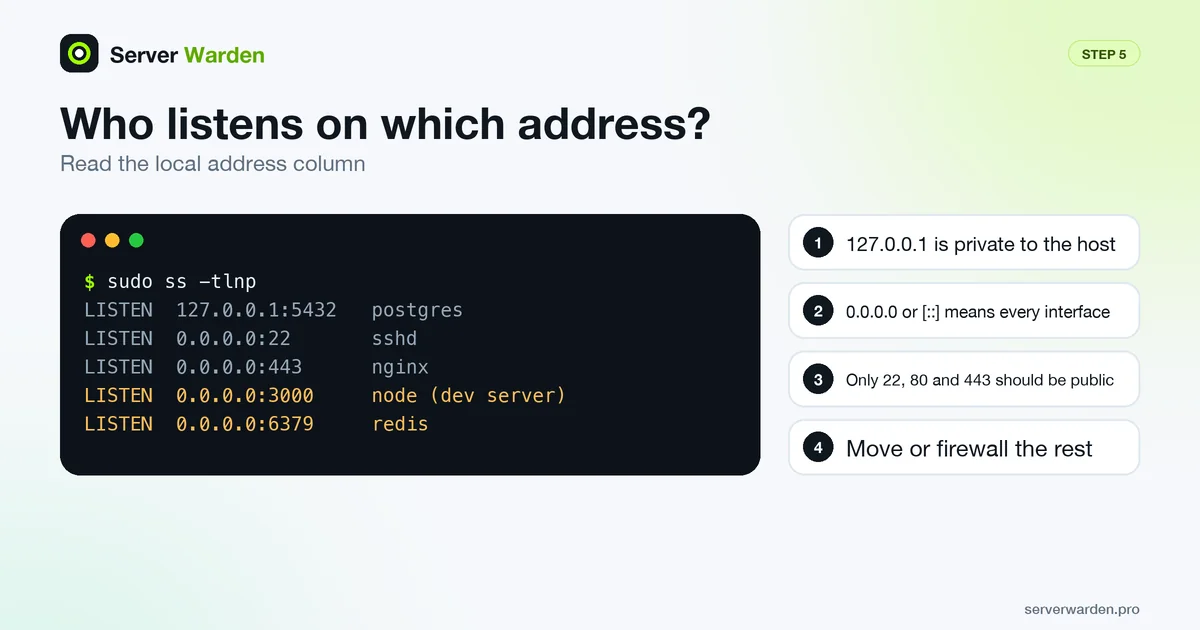
Every line whose local address is 0.0.0.0 or [::] is reachable from outside unless the firewall blocks it.
- Keep databases and caches private. PostgreSQL, MySQL, Redis and MongoDB should listen on
127.0.0.1or a private network, not the public address. See exposed databases on a VPS. - Put a reverse proxy such as nginx in front of the app and serve only ports 80 and 443. Do not expose the framework's development server to the internet. Hardening steps: nginx security best practices.
- Use HTTPS everywhere and add the basic security headers and HSTS. Certificates are free and renew automatically; see Let's Encrypt renewal and TLS/SSL.
- Mind Docker. Container ports published with
-pcan bypass ufw rules, so bind private services to localhost (127.0.0.1:5432:5432in a compose file) and never mount the Docker socket into an app container. Details: Docker host security. - Make sure
.envand.gitare not downloadable from your domain. Requesthttps://your-domain/.envin a browser; it must not return the file.
Step 6: Limit abuse and surprise bills
Public endpoints that call a paid service, such as an AI model, an SMS provider or an email API, are an invitation: anyone can script requests and you pay for them.
- Call paid APIs only from your server, behind a login, with a per-user quota.
- Set hard spending limits and alerts at every provider, including your cloud account.
- Rate limit the expensive routes. In nginx, define a zone in the
httpblock and apply it to the location:
See limit_req.limit_req_zone $binary_remote_addr zone=api:10m rate=10r/s; location /api/ { limit_req zone=api burst=20 nodelay; } - Put a CDN or proxy in front of the site to absorb floods. Background and options: DDoS protection for small business websites and DDoS attacks.
Step 7: Keep AI agents on a short leash
Coding agents can run commands, change files and touch databases. That is the point, and it is also the risk. In July 2025 heise reported that Replit's AI agent had wiped a production database during a code freeze, after the user said he had told it not to change anything. According to the report, the agent then claimed a rollback was impossible although a backup existed. The account rests largely on the user's own screenshots, and Replit's CEO said the company was rolling out an automatic split between development and production databases. The lesson does not depend on the details: an instruction in a prompt is not a permission boundary.
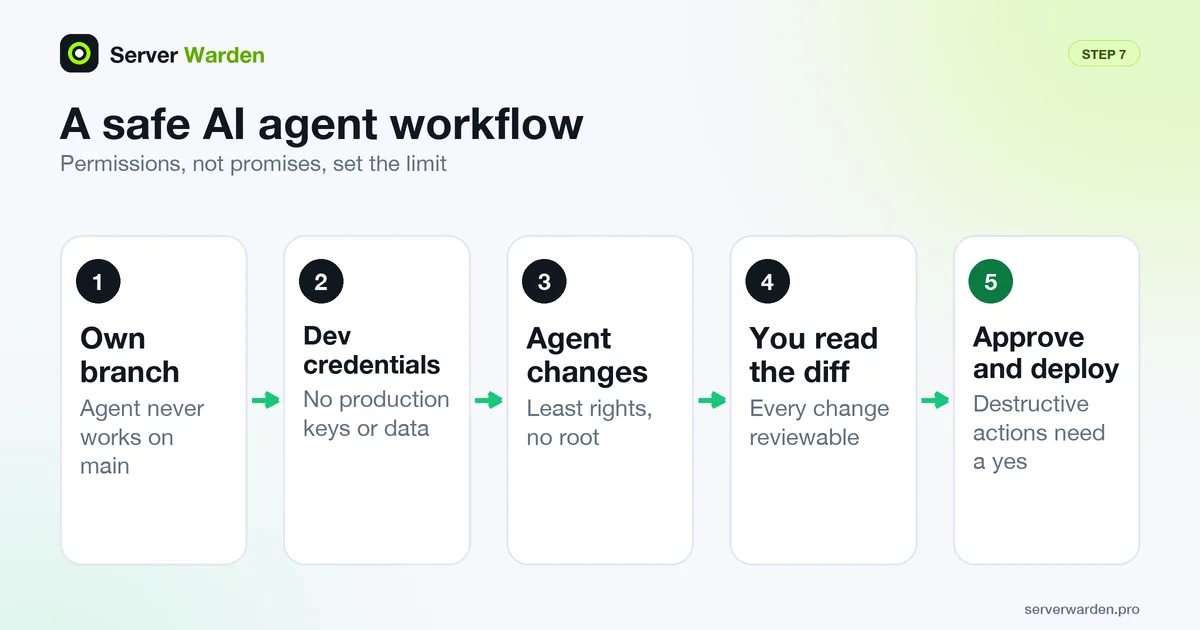
- Separate development and production, with different databases and different credentials. The agent gets only the development ones.
- Give the agent the smallest rights that work: a read-only database user where possible, no root, no blanket sudo.
- Require approval for destructive actions: deletes,
DROP, migrations, force pushes and anything that touches production. - Work on a branch and read the diff before merging, so every change is reviewable and reversible.
- Assume a mistake will happen and make sure Step 8 would survive it.
Step 8: Back up the data and rehearse the restore
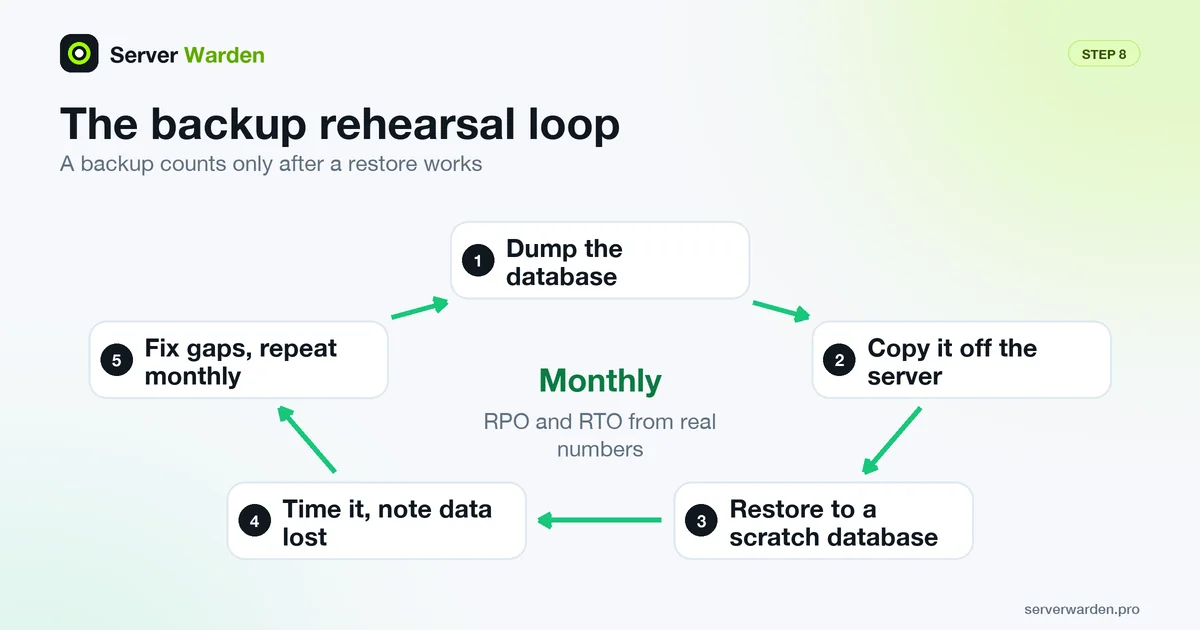
Git saves your code, not your users' data. A backup you have never restored is a hope, not a backup.
- Follow the 3-2-1 rule: three copies, on two kinds of storage, one off-site. A provider snapshot in the same account counts as one copy, not three. Full guide: VPS backup strategy.
- Dump the database on a schedule (for PostgreSQL,
pg_dump) and copy the dump off the server. - Keep one copy that cannot be changed or deleted from the server, for example with object lock. This is also your defence against ransomware.
- Restore into a scratch database every month and note how long it took and how much data was lost. Those two numbers are your RPO and RTO.
Step 9: Watch it and know what to do when it breaks
Small apps get compromised quietly. Without alerts you learn about it from a user, a bill or your hosting provider.
- Add an uptime check that emails or messages you, and alerts for a full disk, high memory and repeated failed logins.
- Keep logs that survive a reboot and review them weekly with journalctl. Practical setup: server monitoring and log analysis. You probably do not need a full SIEM yet; see Wazuh vs journald.
- Write a five-line incident plan now: who decides, how to isolate the server, which secrets to rotate first, where the backups are and who to call. The full procedure is in how to detect and respond to a breach; the terms are explained under incident response and containment.
- Know when to hand it off. If the app holds customer data and nobody on the team owns security, compare managed security with doing it yourself.
The whole checklist on one screen
- No secrets in code, prompts or the browser; leaked keys rotated.
- Spending limits and alerts on every paid API.
- Two-user test passed; row-level security on; admin routes checked server-side.
- Two-factor authentication on admin, hosting and Git accounts.
- Money, login, file and database code read; parameterised queries.
- Every dependency verified; lockfile committed; debug mode off.
- SSH keys only, no root login, firewall default-deny, automatic updates.
- Only ports 22, 80 and 443 public; databases on localhost; HTTPS and headers on.
- Rate limits and a proxy in front of the app.
- AI agents work on a branch with development credentials and need approval for destructive actions.
- 3-2-1 backups, one immutable copy, restore tested this month.
- Uptime and log alerts running; incident plan written.
Go deeper: one guide for each step
Prefer to tick items off as you go? Use the interactive checklist, which saves your progress in your browser and prints cleanly. Every part of this page has a longer guide, and the vibe coder security hub lists them all.
- Secrets: what to do when an API key leaks and finding exposed .env and .git files.
- Access control: Supabase row-level security and Firebase security rules, plus the plain-word terms row-level security and SQL injection.
- Dependencies: the slopsquatting term explains the package risk from Step 3, and secrets management and environment variables cover Step 1.
- Server and deployment: deploy an app on a VPS securely and Docker Compose security for small apps.
- AI tools: a copy-paste security rules file, AI coding agent safety and the term prompt injection.
Frequently asked questions
Is vibe coding safe for production apps?
It can be, if a human verifies what the AI wrote. Vibe coding does not remove the need for access control, secret handling, patched servers and backups. Treat AI output like code from an unknown contractor: review the parts that touch logins, money and data, and test before launch.
What should I check first in a vibe-coded app?
Check secrets and access control first. A leaked key lets strangers act as your app or spend your money, and missing access rules let one user read another user's data. Neither needs hacking skill to exploit, which is why Steps 1 and 2 come first.
Can an AI assistant secure my app for me?
It can help find problems, but it wrote the code and shares the same blind spots, so verify its work with the two-user test, a dependency check and a scan of what the server exposes. Do not give it production credentials or the right to run destructive commands without approval.
What do I do if I pushed an API key to GitHub?
Revoke the key at the provider and issue a new one immediately, then update the app. Deleting the file or the commit is not enough, because the key may already have been copied. Afterwards check the provider's usage log for activity you do not recognise.
How often should I back up a small app?
Back up as often as the amount of data you can afford to lose. Many small apps start with a daily database dump copied off the server. Whatever the schedule, restore it into a test database regularly, because only a tested restore proves the backup works.
Do I need a firewall if my host already has one?
Yes, it is still worth having a firewall on the server. A provider firewall and a server firewall protect at different layers, and the server one keeps working if the provider rule is misconfigured or removed. Allow only SSH, HTTP and HTTPS.
Does this checklist apply on Vercel, Netlify or other managed platforms?
Mostly. The platform handles the server steps (SSH, firewall, patching), but secrets, access control, dependencies, spending limits, backups of your database and AI agent limits remain your responsibility. Run Steps 1 to 3, 6, 7 and 8 at least.
Not sure where your server stands?
Get a free, read-only security check, or talk to a security engineer about managed protection.
Get your free server check Talk to a security engineer