Environment variables
Environment variables are named text values that the operating system hands to a program when it starts, such as PORT or DB_HOST. Apps read them instead of hardcoding settings, which keeps configuration and credentials out of the source code. The twelve-factor method recommends them for config that differs between deploys, while OWASP warns they are weak for high-value secrets.
What environment variables are
An environment variable is a name and a text value, like PORT=3000, that exists in the process the app runs in. The twelve-factor app method defines config as everything likely to vary between deploys, such as database addresses and credentials, and says it should be strictly separated from code. Its test is whether the codebase could be made open source at any moment without compromising any credentials.
In Node.js the values appear in process.env, and, as the Node.js documentation notes, they are always strings, so you convert them yourself:
const port = Number(process.env.PORT) || 3000;
const dbHost = process.env.DB_HOST;
The same code then runs on your laptop and on the VPS with different settings, and you never edit the source to switch.
The .env file and .gitignore
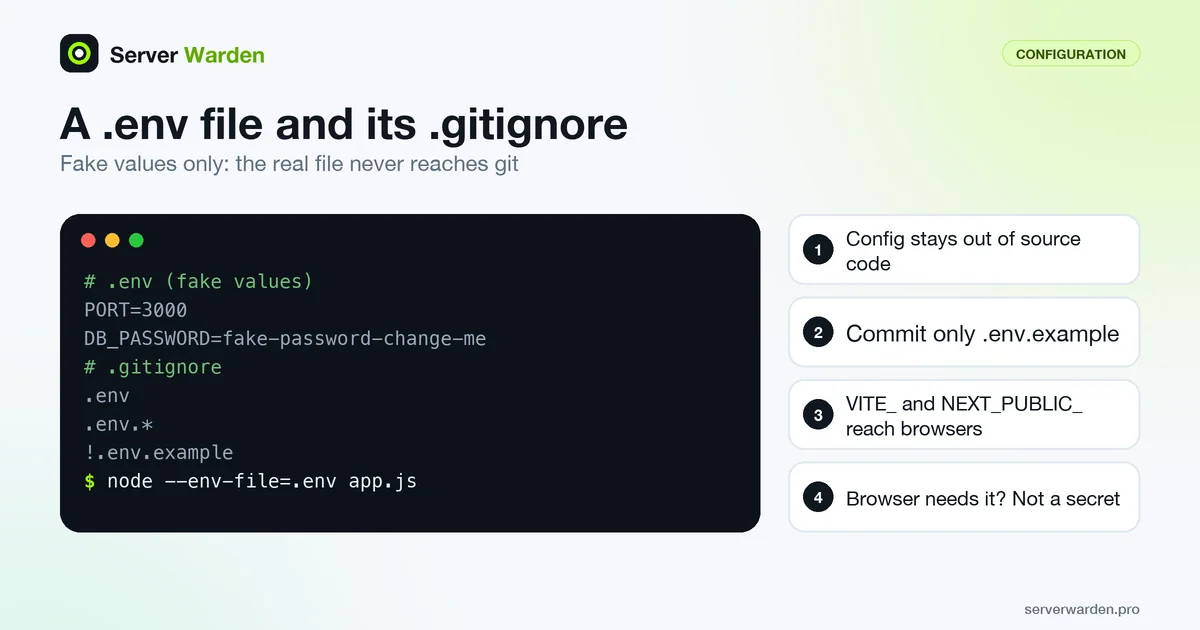
Typing variables into a terminal for every run is tedious, so tools read them from a .env file of NAME=value lines. Recent Node.js versions can load one with node --env-file=.env app.js. A file with fake values looks like this:
PORT=3000
DB_HOST=localhost
DB_PASSWORD=fake-password-change-me
API_KEY=fake_key_0000
The real file must never reach git. Add these lines to .gitignore, and commit a copy named .env.example with placeholder values so others know which names to set:
.env
.env.*
!.env.example
A warning from the Git documentation: files already tracked by Git are not affected by .gitignore. If .env was committed once, run git rm --cached .env and then treat every value in it as leaked and rotate it. See what to do after a leaked API key.
Frontend variables are public
Beginners often assume that anything in .env is hidden. Frameworks that build browser code work differently. The Vite documentation says variables prefixed with VITE_ are exposed in client-side source code after bundling and must not contain sensitive information such as API keys. In Next.js, variables prefixed with NEXT_PUBLIC_ are inlined into the JavaScript sent to the browser at build time, while other variables stay in the server environment.
The rule of thumb is simple: if the browser needs the value, it is not a secret. A public database key is acceptable only when access is protected by rules such as row-level security. Anything that can spend money or read all data belongs in server code behind your own API. Check this before launch with the vibe coding security checklist, and search the finished build folder, usually dist or build, for the key value with grep.
Where environment variables leak
Environment variables are convenient, not private. OWASP's Secrets Management Cheat Sheet says they are generally accessible to all processes and may be included in logs or system dumps, and advises against using them unless other methods are not possible.
- Logs and error pages. Never print
process.envor the whole environment while debugging. - Images and repositories. Never bake values into Docker
ENVorARGlines or commit them to git. - Exposed files. A
.envfile served by the web server leaks everything; see exposed .env and .git files. - Broad access. Keep the file at mode 600 and run the app as an unprivileged user.
For high-value credentials, move to mounted secret files or a secrets manager, as described under secrets management.
Related terms: Secrets management, Least privilege, VPS, Vibe coding, Row-level security (RLS).
Frequently asked questions
What are environment variables?
They are named text values, such as PORT or DB_HOST, that the operating system passes to a program when it starts. Apps read them to get configuration and credentials without having them written into the source code.
Is a .env file the same as environment variables?
No. A .env file is a plain text file of NAME=value lines. Tools such as Node.js with --env-file, or frameworks like Vite and Next.js, read it and load the values into the environment of your app.
Should I commit my .env file to git?
No. Add .env to .gitignore and commit only a .env.example file with placeholder values. If a real .env was already committed, remove it from tracking and rotate every secret it contained.
Why can I see my variable in the browser?
Because your framework inlined it into client code. Variables with prefixes such as VITE_ or NEXT_PUBLIC_ are meant for the browser, so they are public and must never hold secrets.
Are environment variables a safe place for secrets?
They are fine for ordinary config. For high-value secrets OWASP advises against them unless other methods are not possible, because they are generally accessible to all processes and can end up in logs or dumps.
Want to see where your own server stands?
Run the free, read-only server check, or open the Security Lab and watch the detect, contain, recover, verify loop in action.
Get your free server checkOpen the Security Lab