Row-level security (RLS)
Row-level security (RLS) is a PostgreSQL feature that restricts which rows of a table a given user can read or change. You enable it on a table and write rules called policies with CREATE POLICY. With RLS on and no policy, ordinary roles see nothing. Supabase apps rely on it to keep users out of each other's data.
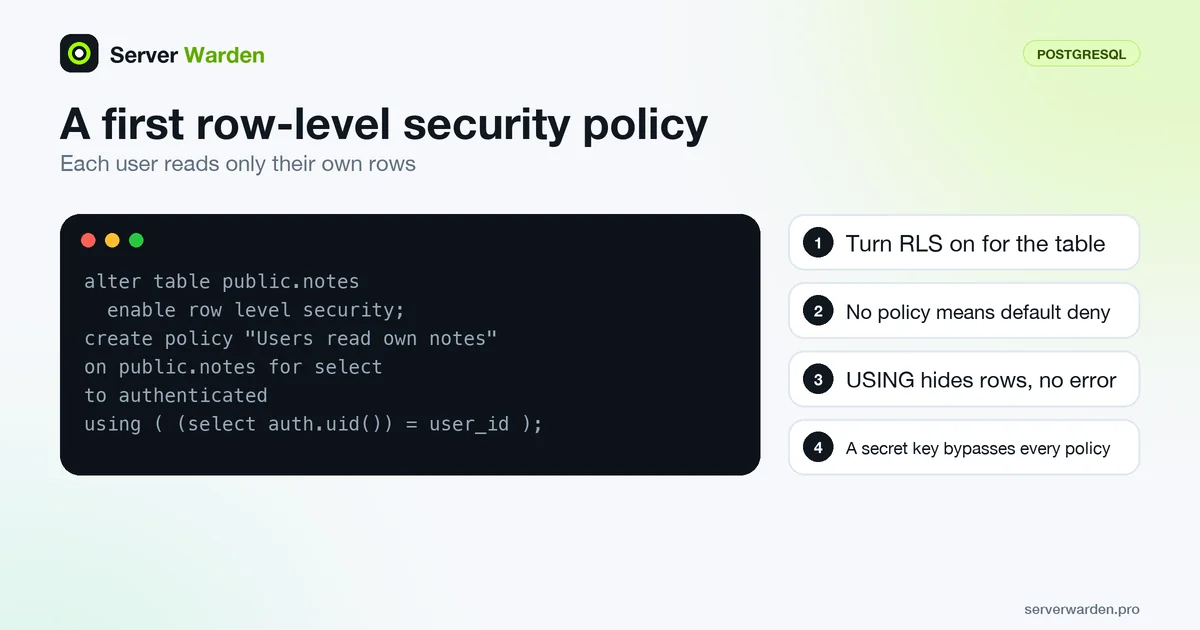
What row-level security does
Row-level security (RLS) lets the database itself decide which rows each user may see or change, instead of trusting every query your app sends. In PostgreSQL you switch it on per table with ALTER TABLE ... ENABLE ROW LEVEL SECURITY and describe the rules with CREATE POLICY. According to the PostgreSQL documentation, if no policy exists for the table, a default-deny policy is used and no rows are visible or can be modified. See default-deny policy for the same idea elsewhere.
Some roles skip the checks. Superusers and roles with the BYPASSRLS attribute always bypass row security, and table owners normally bypass it as well, unless the table also has FORCE ROW LEVEL SECURITY. That is why an app should connect as a role with least privilege, not as the owner or a superuser.
Your first policy
This example, written in the style of the Supabase RLS guide, lets each signed-in user read and add only their own rows in a notes table that has a user_id column:
alter table public.notes enable row level security;

create policy "Users read own notes"
on public.notes for select
to authenticated
using ( (select auth.uid()) = user_id );

create policy "Users add own notes"
on public.notes for insert
to authenticated
with check ( (select auth.uid()) = user_id );
USING filters existing rows: rows for which it is false or null are silently left out, with no error. WITH CHECK validates new or changed rows and makes the command fail if it is false. Write one policy per command (select, insert, update, delete), and test with two different accounts.
Why it matters for Supabase and vibe-coded apps
In a typical Supabase app the browser talks to the database through an API using a public key. That is safe only because of RLS. The Supabase docs say the publishable key can only reach what RLS allows, while a secret key bypasses every policy and must stay in backend code. Without RLS, the docs warn, a table in an exposed schema is readable and writable by any role with a grant on it.
AI assistants often create tables and make the app work, but nobody asks who can read the rows. Before launch, check every table in an exposed schema. The Supabase row-level security checklist walks through it, and the Firebase security rules checklist covers the equivalent in Firebase. The wider launch list is the vibe coding security checklist.
Common RLS mistakes
- Open policies. A policy such as
to anon using ( true )exposes every row. Use it only for data that is meant to be public. - Signed-out users.
auth.uid()returns null when nobody is signed in, soauth.uid() = user_idfails silently. Supabase suggests addingauth.uid() IS NOT NULLto make the intent explicit. - Views. Supabase notes that views bypass RLS by default. On Postgres 15 and later, create them with
security_invoker = true. - Grants. Policies do not remove existing grants, so revoke what a role should not have.
- Secret key in the frontend. It skips every policy. Treat it like a secret.
- Disabling RLS to fix empty results. Empty data after enabling RLS is default deny at work. Add the missing policy instead.
Related terms: Least privilege, Default-deny policy, Secrets management, Vibe coding, SQL injection.
Frequently asked questions
What is row-level security?
It is a PostgreSQL feature that applies rules, called policies, to individual rows of a table so that each user sees and changes only the rows allowed for them. It is switched on per table with ALTER TABLE ... ENABLE ROW LEVEL SECURITY.
What happens if I enable RLS but write no policies?
The PostgreSQL documentation says a default-deny policy is used, so no rows are visible or can be modified for ordinary roles. Table owners and roles that bypass RLS are not affected.
Does the Supabase secret key respect RLS?
No. Supabase states that a secret key bypasses every Row Level Security policy, so it must only be used in backend code you control and never in a browser or mobile app.
Why do I get empty results after enabling RLS?
Rows that fail a USING expression are silently filtered out rather than raising an error, and with no matching policy nothing passes. Add a policy for the role and command you need instead of turning RLS off.
Is RLS enough to secure my app?
No. It controls which rows a role can reach, but you still need authentication, tight grants, safe handling of secret keys and protection against injection. RLS is one layer, not the whole defence.
Want to see where your own server stands?
Run the free, read-only server check, or open the Security Lab and watch the detect, contain, recover, verify loop in action.
Get your free server checkOpen the Security Lab