Published 2026-10-27 · Updated 2026-10-27
Supabase Security Checklist: RLS, Keys and Storage
Short answer: to secure a Supabase app, enable row-level security (RLS) on every table in an exposed schema, write one policy per operation, keep the secret key out of the browser, test as a signed-out visitor, lock down Storage buckets and run the Security Advisor before launch. Supabase's documentation says a table in an exposed schema without RLS is readable and writable by any role with a grant on it.
Row-level security is a Postgres feature that attaches rules to a table so each request can only see or change the rows those rules allow. This page is the Supabase-specific part of the wider vibe coding security checklist. Run it before launch and again after every schema change.
In this article
What Supabase exposes and why RLS is essential Step 1: Turn on RLS for every exposed table Step 2: Write policies, one per operation Step 3: Know your keys: publishable vs secret Step 4: Test as a visitor and as another user Step 5: Check views and functions that skip RLS Step 6: Lock down Storage buckets Step 7: Harden Auth Step 8: Let the Security Advisor find what you missed The pre-launch routine on one screen Frequently asked questionsQuick win (20 minutes)
- Open the Security Advisor and fix every finding named "RLS disabled in public". See Step 8.
- Run one request against your REST endpoint with only the publishable key and confirm it returns no private rows. See Step 4.
- Search your frontend code and repository for the secret key (it starts with
sb_secret_) or the legacyservice_rolekey. - Check that every Storage bucket holding user files is private, and that policies limit each user to their own folder.
- Make sure the Site URL and the redirect allow list point to your real domain, not only to localhost.
What Supabase exposes and why RLS is essential
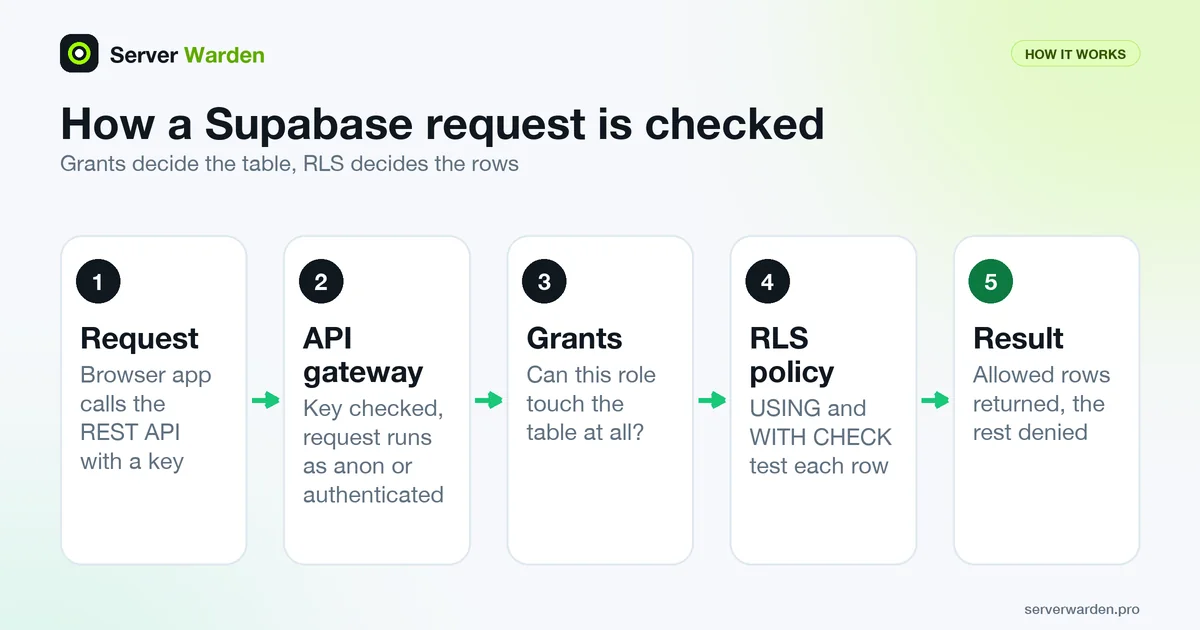
Supabase gives every project a REST API (the Data API) at an address of the form https://YOUR_PROJECT_REF.supabase.co/rest/v1/. The API guide says it is provisioned behind an API gateway with key-auth enabled and works with Postgres's row-level security. Your browser app calls it directly, so no server of yours stands between the visitor and the database. The database rules are the only check.
Access is decided in two layers, as the Securing your API page puts it: grants control whether a role can access an object at all, and RLS controls which rows the role can access. The roles you will meet are anon (a request with no signed-in user) and authenticated (a signed-in user).
The same page warns that new objects in the public schema have, on existing projects, been granted to these roles automatically, which makes them reachable through the Data API even when you did not intend it. So a table created by an AI assistant can be open before anyone writes a policy. Lovable's documentation uses Supabase as the app backend and advises confirming that every table has RLS policies before going live.
Supabase's guide Hardening the Data API has the statements used below. For key habits in general, see secrets management and environment variables.
Step 1: Turn on RLS for every exposed table
The Row Level Security guide says to enable RLS on every table in an exposed schema. Tables created in the Dashboard Table Editor have it on. Tables created with SQL, a migration or other tools do not, and AI assistants usually use SQL.
alter table public.notes enable row level security;Once RLS is on, the docs say no data is accessible through the API with a publishable key until you create policies. Do not "fix" an empty result by turning RLS off again.
- Enable RLS on every table and view the Data API can reach, including small lookup tables.
- Expose less. Supabase recommends a dedicated schema such as
apifor exposed objects, with internal tables in schemas that are not exposed. If your app never uses the Data API, you can turn it off. - Grant only what each role needs. A missing grant gives error
42501(permission denied): grant deliberately, not everything. - Know the October 2026 change. Per Supabase's changelog, new tables in
publicstop being exposed automatically: existing projects switch on 30 October 2026, and existing tables keep their grants. Each new table then needs an explicitgrant, RLS and policies in the same migration. Run the check query from the hardening guide, because defaults differ by project age.
To remove Data API access from a table, the changelog gives:
revoke all on table public.your_table from anon, authenticated, service_role;Step 2: Write policies, one per operation
A policy is a rule attached to a table. USING decides which existing rows an operation can see or affect (select, delete, the old row of an update). WITH CHECK decides whether a new or changed row is allowed (insert, the new row of an update). Example table public.notes, where every row belongs to a user:
create table public.notes (
  id bigint generated always as identity primary key,
  user_id uuid not null references auth.users (id),
  body text not null
);

alter table public.notes enable row level security;

grant select, insert, update, delete on table public.notes to authenticated;

create policy "Users read own notes" on public.notes
  for select to authenticated
  using ( (select auth.uid()) = user_id );

create policy "Users add own notes" on public.notes
  for insert to authenticated
  with check ( (select auth.uid()) = user_id );

create policy "Users edit own notes" on public.notes
  for update to authenticated
  using ( (select auth.uid()) = user_id )
  with check ( (select auth.uid()) = user_id );

create policy "Users delete own notes" on public.notes
  for delete to authenticated
  using ( (select auth.uid()) = user_id );
The grant line is needed where new tables are not granted automatically (Step 1) and skips anon on purpose. auth.uid() returns the signed-in user's ID. The update policy has both parts so a user cannot hand a row to someone else.
- One policy per operation. The docs advise against
for allbecause it hides which operation a rule covers. Anupdatealso needs a matchingselectpolicy. - Name the role with
to.to anon using ( true )exposes every row the role can reach through grants. Use it only for data meant to be public. auth.uid()is null for signed-out visitors, so the comparison matches nothing. Anonymous sign-ins in Supabase Auth get theauthenticatedrole, so "authenticated" does not always mean a registered person.- Never base access on
user_metadata, which users can change. The docs point toapp_metadata. - Performance: the docs recommend
(select auth.uid())overauth.uid()so Postgres can cache it, and an index on the columns policies filter on.
Concepts behind this are in the glossary entry on row-level security and the principle of least privilege.
Step 3: Know your keys: publishable vs secret
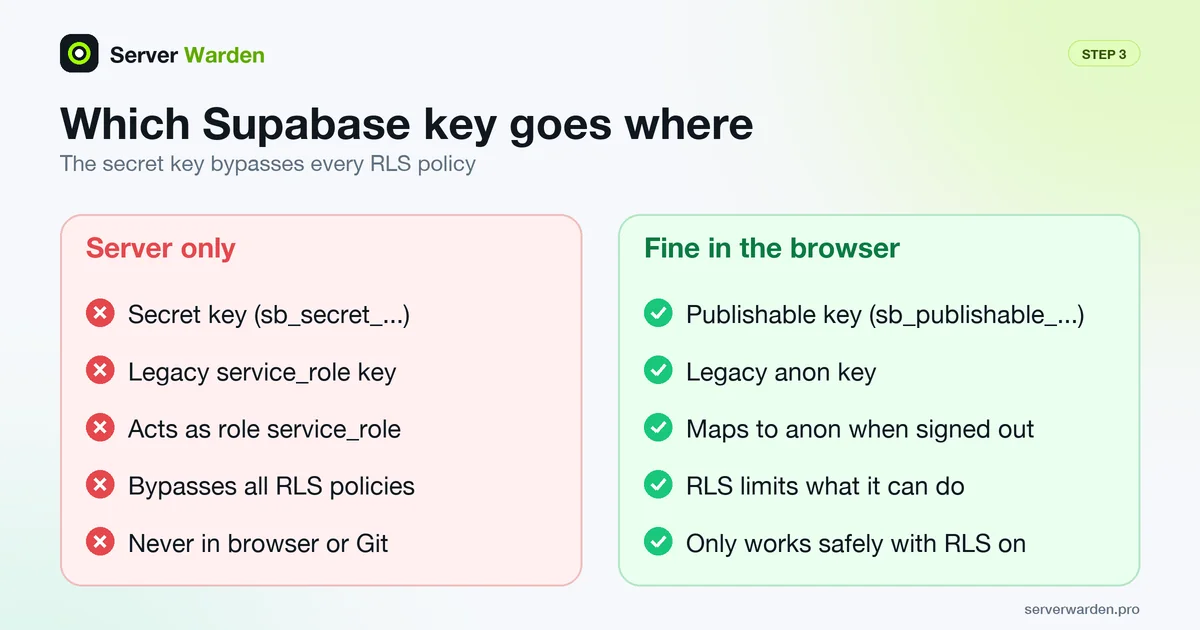
The API keys guide describes two kinds of key. Which one ends up in your frontend decides how bad a leak is.
- Publishable key (starts with
sb_publishable_): the docs call it safe to expose in a web page, app or source code. It maps to theanonrole when nobody is signed in, and RLS limits what it can do. This is the only key browser code should hold. - Secret key (starts with
sb_secret_): for backend components only (servers, Edge Functions). It maps toservice_roleand, per the docs, bypasses every RLS policy. Never put it in a browser, a shipped app or source control, not even on localhost. - Legacy keys: the older
anonandservice_rolekeys are the legacy versions of the publishable and secret keys. Both systems work side by side, and the docs say the legacy keys are being deprecated by the end of 2026. - Store the secret key as a server secret. Keep it out of source control and CI scripts and use your tool's secrets storage. Details: exposed .env and .git files and deploying an app to a VPS securely.
- Do not rely on the browser block. A secret key used from a browser gets HTTP 401, but the docs add that an attacker can still use a leaked key from other tools.
If a secret key leaks, fix the cause, then rotate in the docs' order: create the new key, replace the old one everywhere, confirm every component uses it, and only then delete the old one (deletion cannot be undone). A legacy key is deactivated instead, which is reversible. Full response: what to do when an API key leaks.
Step 4: Test as a visitor and as another user
Do not trust a policy you have not tried to break. Test from the outside, with only the public key. The Supabase quickstart shows the request shape: table name after the REST address, key in the apikey header.
curl 'https://YOUR_PROJECT_REF.supabase.co/rest/v1/notes?select=*' -H "apikey: YOUR_PUBLISHABLE_KEY"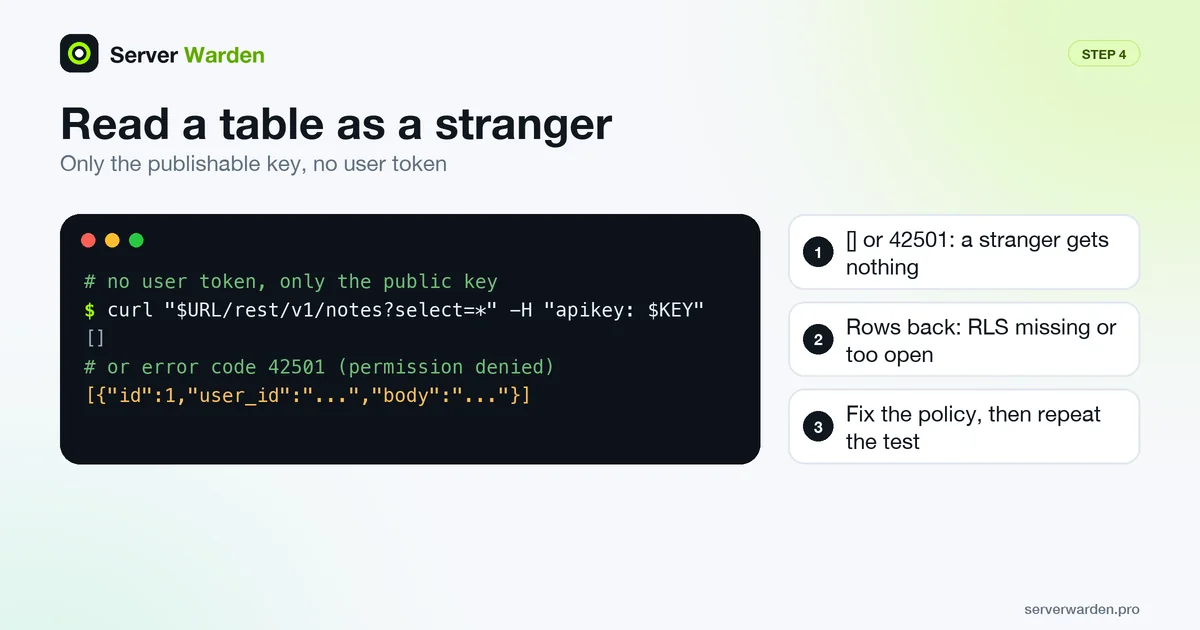
No user token is sent, so this is a signed-out visitor. Fill in your project reference and publishable key. A safe result:
- Safe: an empty list
[]for private tables, or a permission error such as42501. A stranger gets nothing. - Unsafe: any rows from a table that holds user data. Enable RLS, add policies, repeat.
Next, test as a specific user. Simplest is the two-user test from the vibe coding checklist: sign in as user B and try to open user A's note by ID. You can also reproduce a request in SQL: the docs switch identity with set role and the JWT claims. This transaction undoes itself (use two real user IDs):
begin;
set local role authenticated;
set local request.jwt.claims to '{"role":"authenticated","sub":"USER_A_UUID"}';

select * from public.notes;   -- expect only user A's rows
insert into public.notes (user_id, body)
  values ('USER_B_UUID', 'test');   -- expect a row-level security error

rollback;
For repeatable checks the docs describe pgTAP tests run with supabase test db.
The SQL editor pitfall. Do not test a policy with a plain select in the SQL editor. The docs explain that a table's owner and roles with BYPASSRLS are not subject to policies, which is why the same query still returns rows in the SQL editor while the API returns none. Switch role first, as above, or test through the API.
Want a second pair of eyes on your stack?
A free, read-only check shows what is exposed on the server that runs your app and what to fix first.
Get your free server check Talk to a security engineerStep 5: Check views and functions that skip RLS
RLS protects tables. Two things can walk around it.
- Views. The docs say views bypass RLS by default because they are usually created by the
postgresuser. On Postgres 15 and later, create the view withsecurity_invoker = trueso it obeys the policies of the underlying tables. On older versions, revokeanonandauthenticatedaccess or keep the view in an unexposed schema.create view public.my_notes with (security_invoker = true) as select id, body from public.notes; - Functions. The docs state that RLS does not apply to functions, so grant
executeonly to the roles that need to call them. For asecurity definerfunction (one that runs with its owner's rights), review it carefully, pin itssearch_path, schema-qualify names, and never create it in a schema that is exposed in the API settings.
Step 6: Lock down Storage buckets
Supabase Storage keeps files in buckets, and access to the files is controlled with RLS policies on the storage.objects table, as the Storage access control guide explains. By default, uploads to buckets are not allowed without policies, and the bucket fundamentals say buckets are private by default.
- Treat "public bucket" as "anyone with the link can read." The docs say a public bucket effectively bypasses access controls for retrieving and serving files, and that anyone who has the asset URL can read the file. Uploading, deleting, moving and copying are still checked. Keep invoices, IDs and user uploads in private buckets.
- Write policies per operation. An upload needs an
insertpolicy. Replacing a file (upsert) also needsselectandupdate. - Scope users to their own folder. The docs use
storage.foldername(name)to check the first folder in the path:
Reading files needs a matchingcreate policy "Users upload to own folder" on storage.objects for insert to authenticated with check ( bucket_id = 'user-files' and (storage.foldername(name))[1] = (select auth.uid()::text) );selectpolicy with the same condition. - Avoid broad
selectpolicies on public buckets. The Security Advisor has a check named "public bucket allows listing", because clients can then enumerate every file in the bucket.
Step 7: Harden Auth
RLS only works if you can trust who the user is. These settings come from Supabase's production checklist and Auth guides.
- Require email confirmation. The Auth email guide says it is on by default on hosted projects and off by default in local development and self-hosted projects, so check the setting you actually run.
- Use your own SMTP server for production. The built-in email service is limited to 2 emails per hour and best-effort.
- Set the Site URL and redirect allow list to your real domain. The redirect URLs guide calls the Site URL critical for email confirmations and password resets and recommends exact paths in production. Keep wildcards such as
**for development and previews. - Offer multi-factor authentication where the data is sensitive. Supabase Auth supports MFA with an authenticator app (TOTP) or phone messaging, and a restrictive policy can require it with
(select auth.jwt()->>'aal') = 'aal2'. Turn it on for your own Supabase account too (two-factor authentication). - Limit one-time codes and abuse. The checklist recommends an OTP expiry of 3600 seconds or lower, removing test phone numbers, and CAPTCHA on sign-up, sign-in and password reset. Add rate limiting on your own endpoints.
Step 8: Let the Security Advisor find what you missed
The database advisors are checks you can run from the Security Advisor page in the dashboard or with supabase db advisors. Some findings are intentional, so compare each with your access model first. Look for:
- 0013 RLS disabled in public (error): the docs say anyone with your project URL can read, edit and delete all data in the table. Enable RLS.
- 0010 Security definer view (error): a view that ignores RLS. Recreate it with
security_invoker=on. - 0002 Auth users exposed (error): a view exposes users' personal information. Use a profiles table.
- 0008 RLS enabled, no policy (info): nothing can be read or written through the API. Add a policy.
- 0011 Function search path mutable (warning): set a fixed search path.
- 0025 Public bucket allows listing (warning): drop the broad
selectpolicy or make the bucket private.
The advisor does not know your business rules: a policy of using ( true ) still exposes everything, which is why Step 4 matters. If the app holds customer data and nobody owns security, get a second opinion; see managed security vs DIY.
The pre-launch routine on one screen
Run this before the first real user and after every schema or Auth change. On Firebase instead? See the Firebase security rules checklist. For AI assistants that write your migrations, see AI coding assistant security rules.
- RLS is enabled on every table and view the Data API can reach.
- One policy per operation, roles named with
to, nousing ( true )on private data; grants explicit and minimal. - Only the publishable key is in the frontend; the secret key is a server secret and was never committed.
- A request with only the publishable key returns nothing private; the two-user test passed.
- Views use
security_invoker;security definerfunctions are reviewed. - Buckets with user files are private, with per-folder policies.
- Email confirmation on, Site URL and redirect list correct, MFA offered where data is sensitive.
- Security Advisor shows no errors you cannot explain.
- Database backups exist and a restore was tried. See the 3-2-1 backup strategy.
More for vibe coders: see the vibe coder security hub for every guide in this series, or tick items off in the interactive checklist.
Frequently asked questions
What is Supabase row level security?
Row-level security (RLS) is a Postgres feature that attaches rules to a table so each request can only read or change the rows the rules allow. Without RLS, a table in an exposed schema is readable and writable by any role with a grant on it.
Is the Supabase anon key safe to expose?
Supabase documents the publishable key, and the legacy anon key it replaces, as safe to put in a web page or app, because RLS limits what it can do. That only holds if RLS is enabled with correct policies on every exposed table. The secret key, and the legacy service_role key, must never be exposed.
What do I do if my Supabase service role key leaked?
Fix how it leaked, create a new secret key, replace the old one everywhere, confirm each component uses the new one, then delete the old key. For a legacy key, deactivate it, which can be reversed if you missed a client.
How do I check if my Supabase tables are publicly readable?
Send a request to the REST address of a table with only the publishable key and see whether it returns rows. Also open the Security Advisor and look for the finding "RLS disabled in public". An empty list or a permission error means a stranger gets nothing.
Why does my query work in the SQL editor but return nothing in my app?
The SQL editor runs with rights that bypass policies, because the table owner and roles with BYPASSRLS are not subject to them. Your app runs as the anon or authenticated role, so it sees only what policies allow. Add a policy, and test by switching role in SQL or by calling the API.
Do I still need RLS if my app only uses Supabase through my own server?
If your server connects to Postgres directly and the Data API is not used, Supabase says you can turn the Data API off. If the Data API stays on, enable RLS anyway, since anything reachable through it is protected only by grants and policies.
Are public Storage buckets safe?
Only for files meant for everyone. Supabase documents that a public bucket bypasses access controls for reading files, so anyone with the file URL can fetch it, while uploads and deletes are still checked by policies. Keep user documents in private buckets with per-user folder policies.
Not sure where your server stands?
Get a free, read-only security check, or talk to a security engineer about managed protection.
Get your free server check Talk to a security engineer