Rate limiting
Rate limiting is restricting how many requests or connection attempts a single source can make within a given time window, used to slow down brute-force and scraping attempts without blocking legitimate users outright.
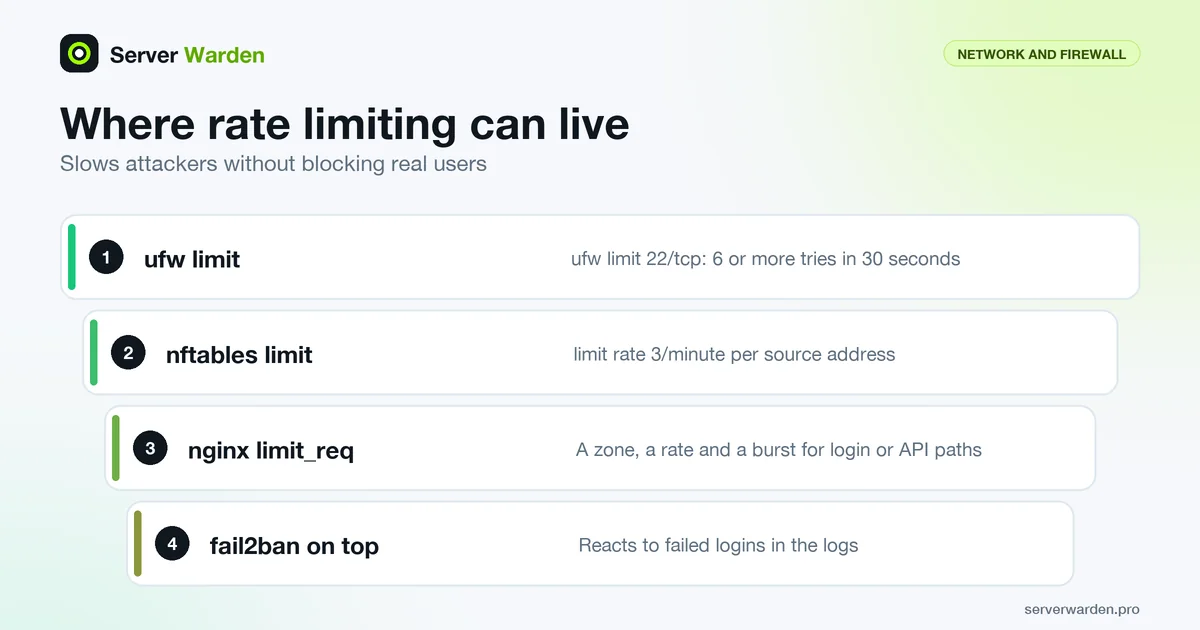
Where it fits alongside other defenses
Rate limiting does not stop a brute-force or scraping attempt outright; it slows it down enough that the attack becomes impractical, while still letting legitimate users who occasionally mistype a password through without being locked out.
Common places to apply it
SSH login attempts, web application login forms, and API endpoints are the three most frequently targeted surfaces, and each typically needs its own rate limit tuned to normal usage patterns for that specific service.
Our DDoS protection guide for small businesses covers rate limiting at the web server and application layer.
Rate limiting HTTP requests in nginx
nginx implements request limiting in the ngx_http_limit_req_module. You define a shared zone keyed by client address, then apply it to the locations that need it, such as a login form:
limit_req_zone $binary_remote_addr zone=login:10m rate=1r/s;

server {
    location /login {
        limit_req zone=login burst=5;
        limit_req_status 429;
    }
}
Several details from the module documentation decide how this behaves. The burst size is zero by default, and requests above the rate but within the burst are delayed rather than refused, unless you add nodelay. Beyond the burst, the request is rejected, with status 503 by default. Changing that with limit_req_status to 429 follows RFC 6585, which defines "Too Many Requests" and allows a Retry-After header. One megabyte of zone holds about 8 thousand states on 64-bit platforms, and when it is full the least recently used state is removed.
Tune the numbers before enforcing them. The limit_req_dry_run on; directive, available since nginx 1.17.1, counts excess requests without limiting anything, so you can read the log and see who would have been blocked. If a CDN or proxy sits in front of nginx, the key would be the proxy's address unless you restore the real client address first. More hardening is in the nginx security guide.
Limiting connection attempts in the firewall
Rate limiting can also live below the web server, which protects services that do not speak HTTP. With ufw, the built-in limit action denies an address that attempts 6 or more connections within 30 seconds, as the ufw manual describes:
sudo ufw limit 22/tcpWith nftables you get finer control. The nftables wiki shows a per-source SSH limit that tracks each address in a dynamic set whose entries expire after 60 seconds of inactivity, and accepts at most 3 new connections per minute from it:
set my_ssh_ratelimit {
    type ipv4_addr
    timeout 60s
    flags dynamic
}
ct state new tcp dport 22 update @my_ssh_ratelimit { ip saddr limit rate 3/minute } accept
Connections over the rate do not match the accept rule and fall through to the chain's drop policy (see default deny policy). The nft manual explains that the limit statement uses a token bucket, with a default burst of five packets.
The limit of this approach is that it counts attempts, not outcomes. It cannot tell a mistyped password from an attack, and an office behind one address shares one budget. Pair it with fail2ban, which reacts to failed logins in the logs, and see the DDoS protection guide for the traffic-level view.
Related terms: fail2ban, Brute-force attack, DDoS attack, WAF, limit_req.
Frequently asked questions
Does rate limiting replace the need for a firewall?
No, they solve different problems. A firewall controls which connections are allowed to reach a service at all; rate limiting controls how fast an already-allowed connection can repeat an action.
Can rate limiting block legitimate users by mistake?
Yes, if set too aggressively, particularly for users sharing a single outbound IP address such as an office network. Limits should be tuned against real traffic patterns, not just guessed.
What is a typical tool used for this on Linux?
fail2ban is the most common choice for SSH and other log-based services, while nginx and most web frameworks have their own built-in rate-limiting modules for HTTP traffic.
Which HTTP status code should a rate limit return?
RFC 6585 defines 429 Too Many Requests for this case and allows a Retry-After header. nginx returns 503 by default, so set limit_req_status 429 if you want clients and tools to recognise it as a rate limit.
How do I choose rate limit values without breaking real users?
Measure first. In nginx, limit_req_dry_run counts excess requests without blocking them, so you can review logs against real traffic before enforcing. Use a burst allowance so that short legitimate spikes pass.
Want to see where your own server stands?
Run the free, read-only server check, or open the Security Lab and watch the detect, contain, recover, verify loop in action.
Get your free server checkOpen the Security Lab