Published 2026-10-27 · Updated 2026-10-27
Leaked an API Key on GitHub? What to Do in the First Hour
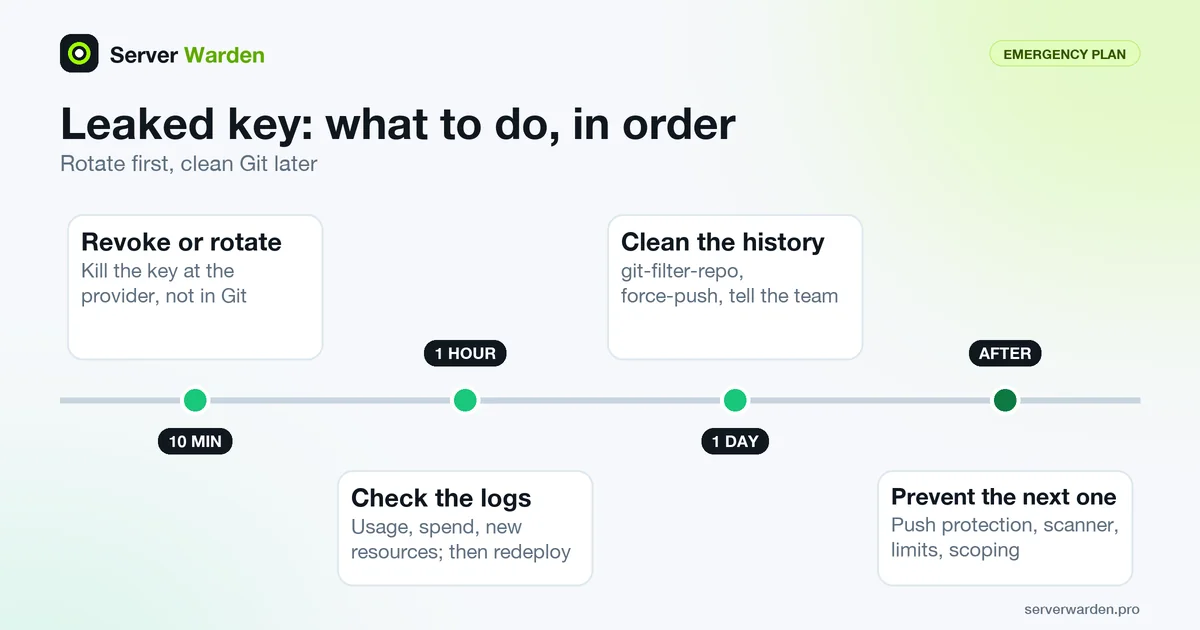
Short answer: revoke or rotate the leaked key at the provider first, within minutes, before you touch Git. Deleting the file or the commit does not undo a leak, because the key may already have been copied. Then check the provider's usage logs, deploy the new key, and only afterwards clean the Git history and add scanning so it cannot happen again.
To rotate a key means to create a replacement and stop the old one from working. A secret is any value that proves your app may do something: an API key, a database URL with a password, a token. This page is an emergency timeline: the first 10 minutes, the first hour, the first day and the days after. If you want the wider picture first, read the vibe coding security checklist.
In this article
First 10 minutes: revoke or rotate the key First hour: what could the key do, and did anyone use it? Put the new key in the app and redeploy Check the server and the app for signs of misuse First day: clean the Git history, after rotation Other places a secret hides What not to do Afterwards: stop the next leak Frequently asked questionsQuick win (10 minutes)
- Revoke or rotate the leaked key at the provider now. Do not start with Git. See the first 10 minutes.
- Open the provider's usage or request logs and look for traffic, spend or resources you do not recognise.
- Put the new key in an environment variable or secrets manager, redeploy, and confirm the old key is refused.
- Run
git log --all --oneline -- .envto see whether the file was ever committed on any branch. - Only after the key is dead, plan the history cleanup and turn on push protection.
First 10 minutes: revoke or rotate the key
Do this before anything else, even before you look at the repository. GitHub's documentation on removing sensitive data from a repository says that when the data is a secret, the first step is to revoke or rotate it, and that once it is revoked it can no longer be used for access. Rewriting Git history cannot reach copies that already exist in other people's clones, forks or scanners, so only a dead key ends the risk.
Each provider words this differently. Use the vendor's own documentation, and prefer the fastest option that makes the old key stop working:
- OpenAI: create a replacement, update your apps, then revoke the old key. The production best practices describe that order for routine rotation. In a live leak, revoke first and accept a short outage.
- Anthropic: the authentication docs say to disable or delete any key you suspect has leaked. Disabling is reversible, deleting is permanent.
- Stripe: the key best practices say to rotate an exposed secret or restricted key immediately, even if you are not sure anyone saw it. Rotation lets you choose when the old key stops working; for a leak, pick the earliest option. Follow Stripe's compromised key checklist, and rotate every other key that sat in the same file.
- AWS: the AWS Security Blog post What to do if you inadvertently expose an AWS access key recommends disabling the credentials rather than deleting them as a first step, because disabling can be undone if an application breaks.
- Supabase: the API keys docs say to delete a leaked key immediately, and warn that blocking it in the browser is not enough because an attacker can use the key from other tools. Deleting a secret key is permanent, so have the new one ready. The service role bypasses row-level security, which is why this key matters so much.
- Google Cloud and Firebase service account keys: Google's key management guidance says that if a key was committed to a repository you must delete it in IAM as quickly as possible, because source control keeps a permanent record of changes.
- Database URL or password: change the password in the database or at your host, then update every connection string. The URL carries the password, so it is a secret like any key.
If you are unsure which keys were in the file, rotate all of them. Rotating a key you did not need to rotate costs minutes. Missing one can cost much more.
First hour: what could the key do, and did anyone use it?
Once the key is dead, work out the damage. Two questions matter: what was the key allowed to do, and what did it do while it was exposed? AWS lists the same order of thinking: determine what the credentials can access, invalidate them, then review the account for residual access and check logs.
- Write down the key's power. A restricted or read-only key limits the damage. An unrestricted secret key or an admin cloud key does not. Stripe notes that restricted keys exist precisely to limit what a thief can do.
- Read the provider's usage records for the exposure window, from the commit time until revocation. Look for requests at odd hours, from places you do not use, or in volumes you did not cause. Stripe keeps request logs you can view even after a key is deleted, OpenAI shows key usage on its usage page, Anthropic offers a Usage and Cost API by workspace, and AWS points to CloudTrail and S3 bucket logs.
- Look for things that should not exist: new cloud users and keys, new servers, new webhooks, changed payout destinations or connected accounts (Stripe lists these in its checklist), rows or files you did not write.
- If data could be changed or deleted, compare it with a backup from before the exposure. See the 3-2-1 backup guide.
- Keep the evidence. Save the logs and the commit hashes before you clean anything. You will need them if you have to contact the provider or customers.
If the provider shows activity you do not recognise, tell the provider's support, and treat the incident as real. Stripe's checklist, for example, covers reversing unauthorised payouts and refunding fraudulent charges, and asks you to start quickly.
Put the new key in the app and redeploy
Now bring the app back with a key that has never been public.
- Store the new key outside the code. Use an environment variable or your platform's secrets manager, not a source file. Background: environment variables and secrets management.
- Update every place the old key lived: production, staging, CI settings, serverless platforms and teammates' machines. Supabase's docs advise confirming that every component uses the new key before retiring the old one.
- Redeploy or restart so the running app reads the new value. Providers that manage keys for you generally still require a redeploy, as Stripe's docs note for managed keys.
- Confirm the old key is refused. Stripe documents that a request with an expired key returns an authentication error. Make one test call with the old key and expect a failure.
- Do not forget companion secrets. A Stripe webhook signing secret is separate from the API keys, so check whether it was in the same file.
The full routine for a first deployment is in how to deploy an app to a VPS securely.
Check the server and the app for signs of misuse
If the leaked secret could reach your server (an SSH private key, a deploy token, a database password, a cloud key that manages the machine), look for what an intruder usually leaves behind. These commands only read information; they change nothing. Run them over SSH on the server:
last -a | head -20
sudo ss -tlnp
ps aux --sort=-%cpu | head -10
sudo cat /root/.ssh/authorized_keys
sudo crontab -l
ls /etc/cron.d
They show recent logins, what listens on the network, the busiest processes, the SSH keys allowed to log in as root, and scheduled jobs.
- Unexpected processes using lots of CPU, especially with random names or running from
/tmp. - New SSH keys in authorized_keys that you did not add, and logins from addresses you do not recognise.
- New cron jobs, users or listening ports that you cannot explain.
- Unfamiliar entries in the logs. On Debian and Ubuntu,
sudo journalctl -u ssh --since "2 days ago"shows SSH activity; see journalctl and server monitoring and log analysis.
If anything looks wrong, stop treating this as a leaked key and start treating it as a break-in. Follow the breach response guide, and read about incident response and containment first. If everything looks clean, you still rotated the key, which is the part that mattered.
Not sure whether a leak reached your server?
A free, read-only check shows what is exposed on your server and what to fix first.
Get your free server check Talk to a security engineerFirst day: clean the Git history, after rotation
History cleanup comes after rotation, never before. GitHub's page says that once a secret is revoked or rotated, rewriting history "may not be warranted", and GitHub's secret scanning docs say the same: removing secrets from history is time-intensive and often unnecessary once the credential is revoked. Clean up if you want to remove the file for hygiene, or if the data is not a rotatable secret, such as personal data.
First, find out whether the file was ever committed, on any branch:
git log --all --oneline -- .env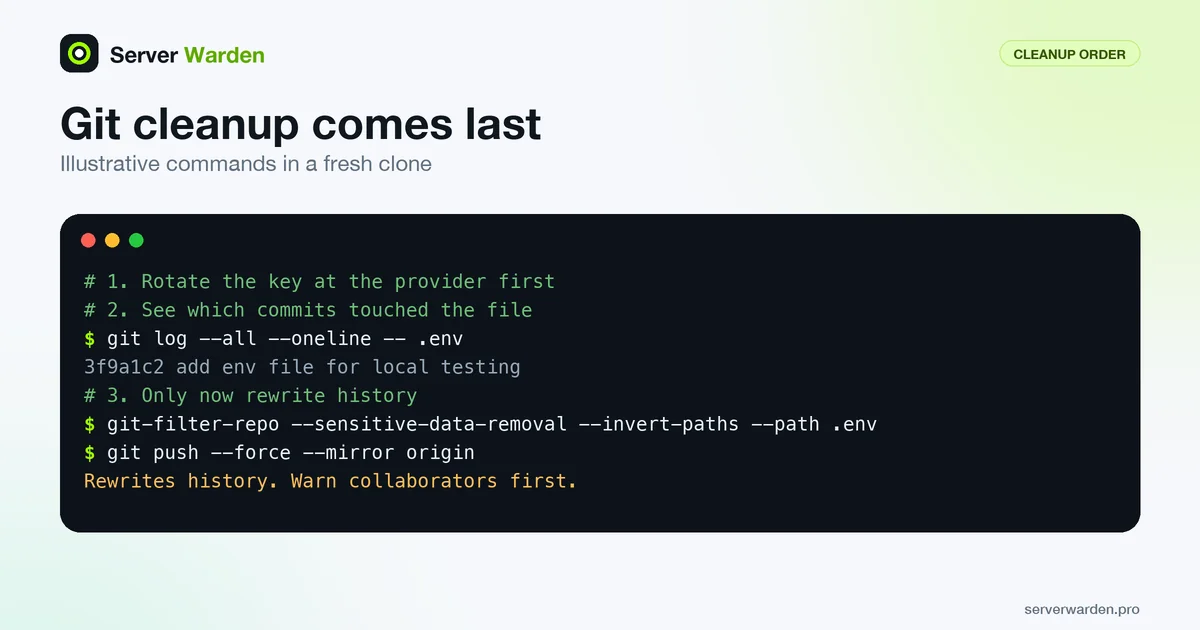
Any output means it was. To search for a key value itself, use git's pickaxe option, which finds commits that add or remove a string. Use a short, non-secret part such as the key prefix:
git log --all --oneline -S"PREFIX_OF_THE_KEY"Next, stop tracking the file going forward and ignore it. This does not touch old commits:
git rm --cached .env
echo ".env" >> .gitignore
To remove the file from every commit, GitHub recommends git-filter-repo, which the git project also recommends over the older git filter-branch. You need version 2.47 or later, which has the --sensitive-data-removal flag. Warning: this rewrites history and cannot be undone after the force push. Tell your collaborators first. Work in a fresh clone:
git clone https://github.com/YOUR-USERNAME/YOUR-REPOSITORY
cd YOUR-REPOSITORY
git-filter-repo --sensitive-data-removal --invert-paths --path .env
The path must be the full path inside the repository, and if the file lived at other paths earlier, add another --path for each. To replace text instead of deleting a file, GitHub shows --replace-text with a file listing the strings; check the git-filter-repo manual for its format. BFG Repo-Cleaner is an older alternative, but the git-filter-repo README says BFG is limited to a few kinds of rewrites, so this guide uses git-filter-repo.
Verify that the secret is gone from history before pushing. GitHub also suggests counting affected pull requests with grep -c '^refs/pull/.*/head$' .git/filter-repo/changed-refs, and discarding the clone if the number is higher than you expect. Then push:
git push --force --mirror originRead these caveats from GitHub's documentation before you do:
- Commit hashes change for the affected commits and everything after them, and signatures on commits and tags are removed.
- Pushes to
refs/pull/will fail, because GitHub marks them read-only. If other refs fail, branch protection may be the cause. - Collaborators must discard old clones and re-clone, or rebase, not merge, their branches. One merge commit can bring the old history back.
- If the commit exists in a fork, it stays reachable there. You must ask the fork owner to remove it.
- Pull requests and cached views by commit hash can still show the old data. GitHub Support can remove cached views and references in pull requests. Give them the repository name, the number of affected pull requests and the "First Changed Commit(s)" printed by the tool. GitHub notes that Support only helps when the risk cannot be handled by rotating credentials.
- Merge or close open pull requests before you rewrite, as GitHub recommends.
Other places a secret hides
Fixing the repository is not the end. A secret that was in one place was probably copied into others. Search each of these, and treat any hit as a reason to rotate again if it holds a live key:
- Other branches, tags and stashes. The
--allin the commands above covers branches and tags. Old.envfiles often sit in a long-dead branch. - A committed
.envor example file with real values. Details on blocking and finding these on a web server: exposed .env and .git files. - CI and deploy logs. Build output sometimes prints environment values. Search recent logs for the key prefix and shorten log retention if you can.
- Docker image layers. Docker's documentation says build arguments and environment variables are inappropriate for secrets because they persist in the final image. Use build secret mounts instead, and rebuild images that were pushed to a registry. See Docker host security and Docker Compose deploy security.
- Frontend bundles. Vite's documentation says variables prefixed with
VITE_are exposed in client-side source code, and warns that they must not hold secrets. Anything compiled into the browser bundle is public, so rotate it and move the call to your server. - Screenshots, screen recordings and shared documents. A key visible in a bug report or a tutorial video counts as published.
- Chat histories, support tickets and issue threads, including the AI assistant chats where you pasted an error with the key in it.
- AI assistant context. A key in a project file, prompt or memory of a coding assistant is another copy that you do not fully control. Rotate it, and follow the AI coding assistant security rules so keys stay out of the context.
What not to do
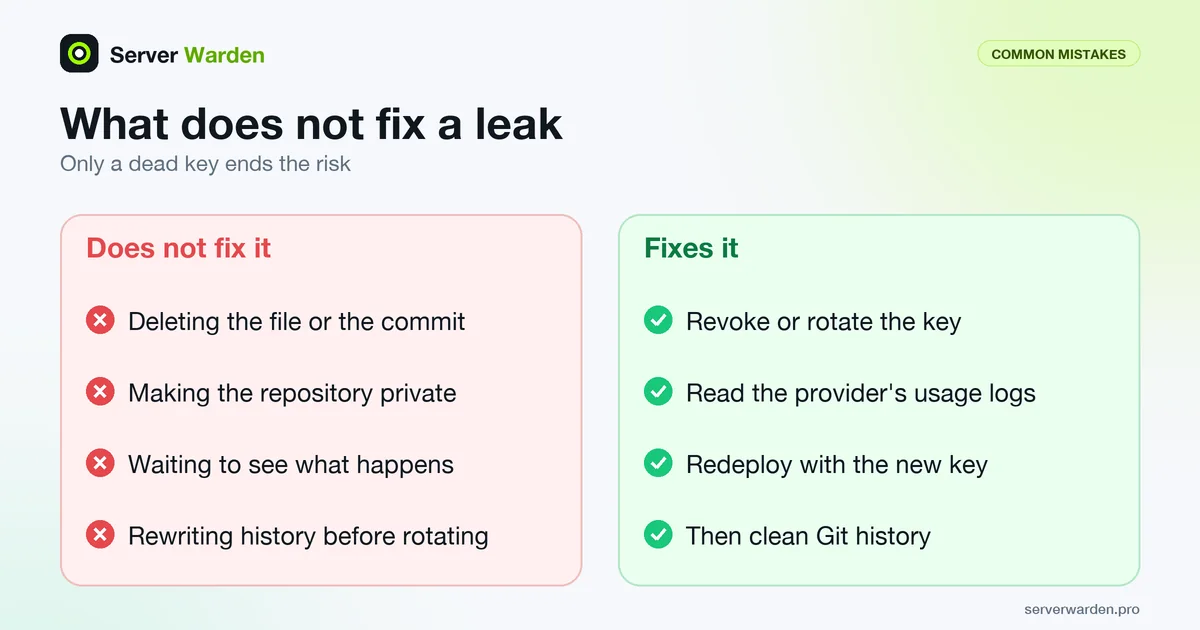
These are the usual panic moves. Each one feels like progress and fixes nothing.
- Do not just delete the file or the commit. Google's guidance explains why: most source control systems keep a permanent record of changes, and copies may already exist. Only the provider can make the key useless.
- Do not wait to see if anything happens. Stripe's documentation says bad actors continuously scan public repositories for keys, and that you should rotate immediately even if you are not sure anyone saw the key.
- Do not rewrite history before you rotate. It looks like a fix, takes an hour, and leaves a working key in every copy.
- Do not make the repository private and call it done. That does not recall clones, forks or scraped copies made while it was public.
- Do not paste the key into an AI chat or a forum to ask for help. That creates one more copy. Replace the value with a placeholder such as
YOUR_API_KEYbefore you ask.
Afterwards: stop the next leak
Once the fire is out, spend an hour on prevention. These changes are cheap, and several are already built into the tools you use.
- Ignore secrets before the first commit. Put this in
.gitignore, and commit a.env.examplethat contains only fake values:.env .env.* !.env.example - Turn on GitHub's protections. Per GitHub's push protection docs, push protection for users is enabled by default and stops you from pushing secrets to public repositories. Repository-level push protection is disabled by default and must be enabled by a repository administrator (or an organization owner or security manager), and it requires GitHub Secret Protection. By default anyone with write access can bypass it by giving a reason, so treat a warning as a stop sign. Secret scanning is free on public repositories; for private ones it needs Secret Protection on GitHub Team or Enterprise Cloud.
- Add a pre-commit scanner so a secret is caught on your own machine. Gitleaks scans history with
gitleaks git -vand files withgitleaks dir -v ., and its README documents a pre-commit hook; runpre-commit installafter adding the config. TruffleHog is a second option; its--results=verifiedfilter shows only credentials it confirmed valid by testing them against the service's API.
That is the snippet from the gitleaks README; runrepos: - repo: https://github.com/gitleaks/gitleaks rev: v8.24.2 hooks: - id: gitleakspre-commit autoupdateto pick the current release. - Set spending limits and alerts on every paid key. OpenAI offers spend alerts and hard limits that stop API traffic, and Anthropic lets you cap monthly spend per workspace.
- Scope keys to the minimum. Stripe recommends restricted keys, AWS recommends roles or federation, and Supabase recommends a separate secret key per backend component so one leak means rotating one key. This is least privilege.
- Use separate keys for development and production. Stripe has separate sandbox and live keys, and Anthropic documents separate workspaces for development, staging and production. Give coding agents and teammates only the development ones.
- Prefer short-lived credentials. Anthropic supports Workload Identity Federation with short-lived tokens and key expiry, AWS recommends roles that use temporary credentials, and Google recommends attached service accounts over keys.
For the wider picture of how this fits with server security, see the VPS security checklist. If nobody on your team owns security and a leak like this would hurt customers, compare managed security with doing it yourself.
More for vibe coders: see the vibe coder security hub for every guide in this series, or tick items off in the interactive checklist.
Frequently asked questions
I leaked an API key on GitHub. What do I do first?
Revoke or rotate the key at the provider immediately, before you touch Git. Then check the provider's usage logs for activity you do not recognise, put the new key in your app and redeploy. Clean the Git history only after the old key is dead.
Is my API key safe if the repository is private?
Not necessarily. Stripe's documentation notes that even private repositories can be exposed through development environments, and a key can also leak through logs, screenshots or chats. If a real key was committed, rotate it, because rotation costs minutes.
Does deleting the commit or the file remove the leak?
No. Source control keeps a record of changes, and the key may already have been cloned, forked or scraped. GitHub's guidance for secrets is to revoke or rotate them first, and it says rewriting history may not even be warranted afterwards.
How do I remove a secret from Git history?
After rotating the key, use git-filter-repo version 2.47 or later with the --sensitive-data-removal flag in a fresh clone, then force-push with git push --force --mirror origin. Tell collaborators first, because the rewrite changes commit hashes and they must re-clone or rebase.
How can I tell if someone used my leaked key?
Read the provider's usage or request logs for the time between the commit and revocation, and look for unfamiliar traffic, spend, new resources or changed data. For AWS, the AWS guidance points to CloudTrail and S3 bucket logs. Also check your server for new SSH keys, cron jobs and processes.
Will GitHub or my provider revoke a leaked key automatically?
Sometimes, but do not rely on it. GitHub notifies the provider when it detects a supported partner secret so the provider can act, and Stripe says it may deactivate exposed keys, yet neither guarantees detection. Rotate the key yourself.
Do I need to contact GitHub Support after cleaning the history?
Only if you need cached views or pull request references removed. GitHub Support can remove them when you give the repository name, the number of affected pull requests and the First Changed Commit. GitHub notes it helps only when rotating credentials cannot mitigate the risk.
Not sure where your server stands?
Get a free, read-only security check, or talk to a security engineer about managed protection.
Get your free server check Talk to a security engineer