authorized_keys
authorized_keys is the file listing which public keys are allowed to log in to a given account over SSH. If this file is writable by anyone other than its owner, an attacker who gains any foothold can add their own key and keep access even after the original vulnerability is fixed.
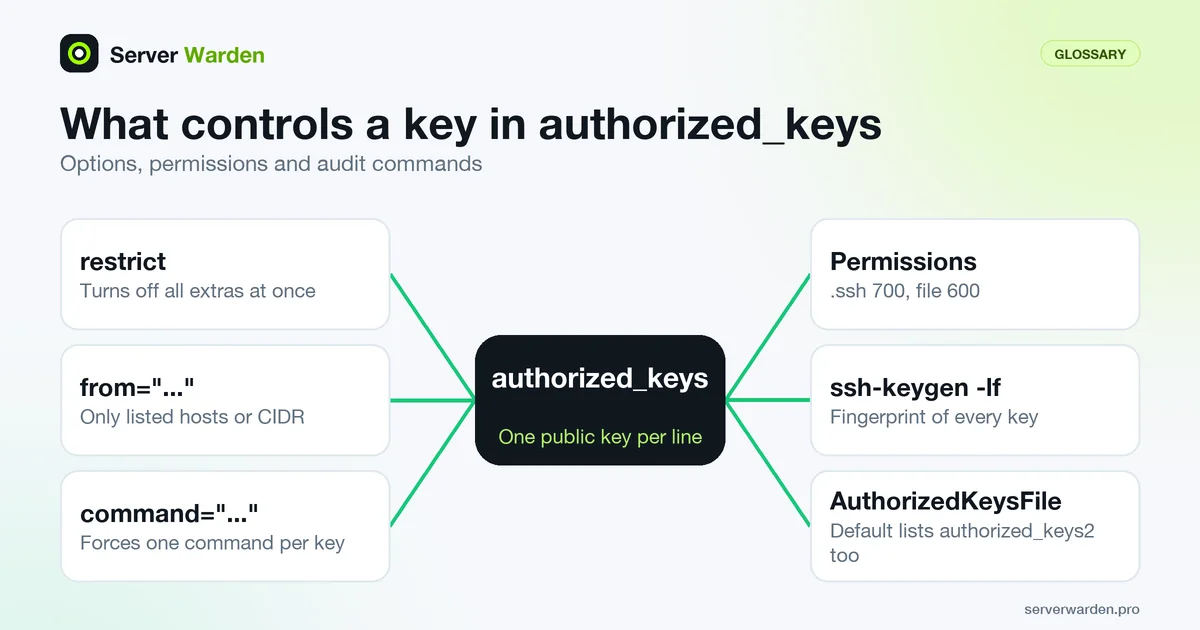
Why file permissions matter here
SSH silently refuses to use an authorized_keys file, or the .ssh directory containing it, if the permissions are too open. This is a deliberate safeguard against a misconfigured server letting any local user add themselves a backdoor key.
A common source of leftover access
Old keys accumulate in this file over time, for former employees, decommissioned automation scripts, or contractors whose engagement ended months ago. Nobody notices until an audit or an incident specifically goes looking.
For how to audit keys and tighten SSH access, see our SSH hardening guide.
Restrict what each key can do
A line in authorized_keys can carry options before the key type, and they let you give a key less power than a full login. The sshd manual lists them. restrict switches on all restrictions at once: it turns off port, agent and X11 forwarding, terminal allocation and the user's ~/.ssh/rc script, including restrictions added in future versions. You then re-enable only what the key needs. from="..." accepts the key only from matching host names or addresses, and CIDR notation is supported. command="..." forces one command whenever the key is used and ignores what the client asked for.
restrict,from="203.0.113.0/24",command="/usr/local/bin/run-backup" ssh-ed25519 AAAA... backup@nasOptions are separated by commas with no spaces, and the key follows after a space. This pattern suits automation such as backup pulls and deploy jobs: if that key leaks, it can only run one job from one network, not open a shell. The command the client originally requested is available to your script in SSH_ORIGINAL_COMMAND, so validate it instead of passing it to a shell. Note that a ForceCommand in sshd_config can override a per-key command. Per-key restrictions are a practical way to apply least privilege to service keys.
Audit the keys on a server
Start with who is actually allowed in. On a current OpenSSH, ssh-keygen -lf pointed at an authorized_keys file prints one line per key with its fingerprint and comment, which gives you something to compare with your inventory:
sudo ssh-keygen -lf /home/alice/.ssh/authorized_keys
sudo sh -c 'ls -l /root/.ssh/authorized_keys /home/*/.ssh/authorized_keys'
sudo sshd -T | grep -i authorizedkeysfile
Treat the comment as a label, not proof: anyone can write any text there, so the fingerprint is what identifies a key. Check every account, including root, and look at the setting in the last command. Per the sshd_config manual, the default is .ssh/authorized_keys .ssh/authorized_keys2, so a forgotten second file can hold keys too. The same manual says StrictModes defaults to yes, which makes sshd refuse files whose permissions are too open.
The log entry for a successful key login normally includes the key type and fingerprint, so you can check which key was really used. If you find a key nobody can explain, do not simply delete it. Treat it as possible persistence and follow the breach response guide first.
Related terms: Key-based authentication, SSH, sshd_config, UID 0, ssh-copy-id, ssh-keygen.
In the news: CVE-2026-35414 is a recent OpenSSH bypass that involved the same authorized_keys principals restriction this glossary entry covers.
Frequently asked questions
What permissions should this file and its directory have?
The .ssh directory should be 700 and authorized_keys should be 600, both owned by the account they belong to.
Can one file list multiple keys?
Yes. Each line is a separate authorized key, so a single account can allow several people or devices to log in independently.
How often should this file be reviewed?
At minimum whenever someone leaves the team or a service is decommissioned, and ideally as part of a routine periodic access review.
Does the comment at the end of a key line prove who owns the key?
No. The comment is free text that anyone with write access can set to anything. Identify a key by its fingerprint, which ssh-keygen -lf prints, and match it against your own record of who holds which key.
Where does sshd look for authorized keys?
By default in .ssh/authorized_keys and .ssh/authorized_keys2 inside the account home directory, as set by AuthorizedKeysFile. These files are only checked for valid users, and sshd -T shows the value your server really uses.
Want to see where your own server stands?
Run the free, read-only server check, or open the Security Lab and watch the detect, contain, recover, verify loop in action.
Get your free server checkOpen the Security Lab