DDoS attack
A DDoS attack (Distributed Denial of Service) is an attempt to make a server or service unavailable by overwhelming it with traffic from many sources at once, rather than trying to break in.
Why small businesses get targeted too
DDoS attacks do not require a specific reason. Many are launched by automated botnets testing which targets go down easily, or as a distraction while a separate intrusion attempt happens elsewhere, regardless of the target's size.
What a server operator can and cannot do alone
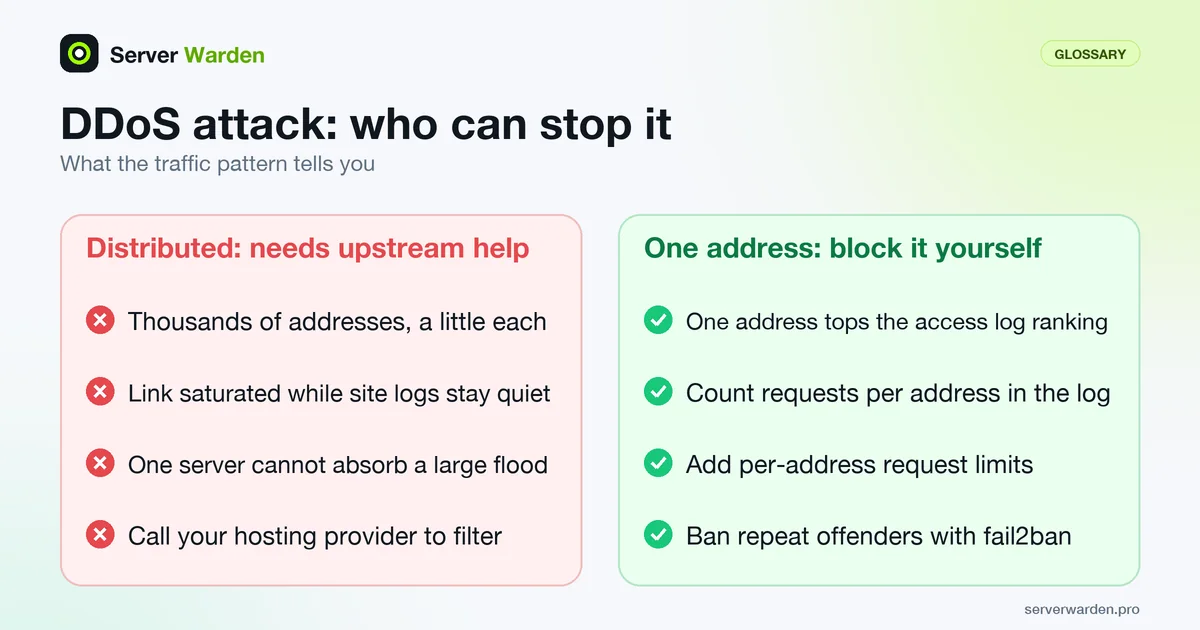
A single server, however well configured, generally cannot absorb a large-scale volumetric attack on its own bandwidth. Mitigating a serious DDoS attempt usually requires upstream filtering from the hosting provider or a dedicated DDoS protection service in front of the server.
For practical, budget-friendly defenses, read our DDoS protection guide for small businesses.
Telling an attack from a busy day
The CISA guidance on denial-of-service attacks lists the visible symptoms as unusually slow network performance, one site being unavailable, or no sites being reachable at all, and points out that ordinary faults and maintenance look exactly the same. So confirm with data before you react. On a Linux VPS, three quick looks usually separate the cases:
ss -s
ip -s link show
awk '{print $1}' /var/log/nginx/access.log | sort | uniq -c | sort -rn | head
The first command summarises socket counts. The second shows per-interface packet and byte counters, so run it twice a few seconds apart to see the rate. The third ranks client addresses in an nginx access log (the usual path on Debian and Ubuntu, adjust it to your setup). One address dominating the list is abuse you can block yourself. Thousands of addresses sending a little each, or a saturated link while the log stays quiet, point to a distributed attack that needs help upstream. Keep a normal-day baseline, as described in the log monitoring guide, so you know what unusual looks like.
The first hour of a real attack
Work through a short, fixed order rather than improvising:
- Rule out planned maintenance or a provider outage, then contact your hosting provider or internet provider. CISA lists this as a first step because they can check whether their own network is the target and filter traffic before it reaches you.
- Copy the access and error logs to another machine before log rotation touches them. You will want them for the provider ticket and for the review afterwards.
- Apply the server-side limits that fit the pattern you saw: per-address request limits for application abuse (see the DDoS protection guide) and a fail2ban ban for repeat offenders.
- Keep watching the rest of the machine. CISA warns that attackers sometimes use a denial-of-service attack as a distraction for a second, quieter intrusion, so check recent logins and follow the breach response guide if anything looks off.
Keep your provider's escalation contact and web console details somewhere you can reach even when SSH to the server is not working. For the scale of attacks seen across the internet, read the Cloudflare H1 2026 report breakdown.
Not every large outage is an attack: see how the Yandex data center incidents separated DDoS, internal faults and physical strikes.
Related terms: Volumetric attack, Protocol attack, Application-layer attack, Rate limiting, SYN flood, Botnet.
In the news: Cloudflare's H1 2026 DDoS report recorded a 31.4 Tbps attack, though the median attack a small server actually faces looks nothing like that record.
Frequently asked questions
Can a firewall stop a DDoS attack by itself?
Only smaller, less sophisticated attempts. Large volumetric attacks exceed what a single server's network connection can handle regardless of firewall rules, and need to be stopped further upstream.
How quickly does a DDoS attack usually start affecting a service?
It can be near-instant. Once attack traffic exceeds available bandwidth or server resources, legitimate requests start failing or timing out within seconds to minutes.
Is DDoS protection something I need even on a small VPS?
It is worth having basic protections regardless of size, since attacks are frequently untargeted and automated rather than a response to how big or well-known a business is.
How do I know whether I am being attacked or just getting more visitors?
Look at who is sending the traffic and what it asks for. Genuine growth usually spreads across many pages and follows a campaign or news item, while an attack tends to hit the same few URLs, come from unusual clients, or saturate the network link while the site logs stay quiet.
Who should I contact first during a DDoS attack?
Your hosting provider or internet provider. CISA lists this as an early step, because they can tell whether their network is affected and can filter traffic upstream, which you cannot do from the server itself.
Want to see where your own server stands?
Run the free, read-only server check, or open the Security Lab and watch the detect, contain, recover, verify loop in action.
Get your free server checkOpen the Security Lab