Slopsquatting
Slopsquatting is a supply chain attack in which someone registers a package name that AI coding assistants tend to hallucinate, so a developer who installs the suggested dependency gets malicious code instead of an error. The name blends "AI slop" and typosquatting. Socket credits the term to Seth Larson of the Python Software Foundation.
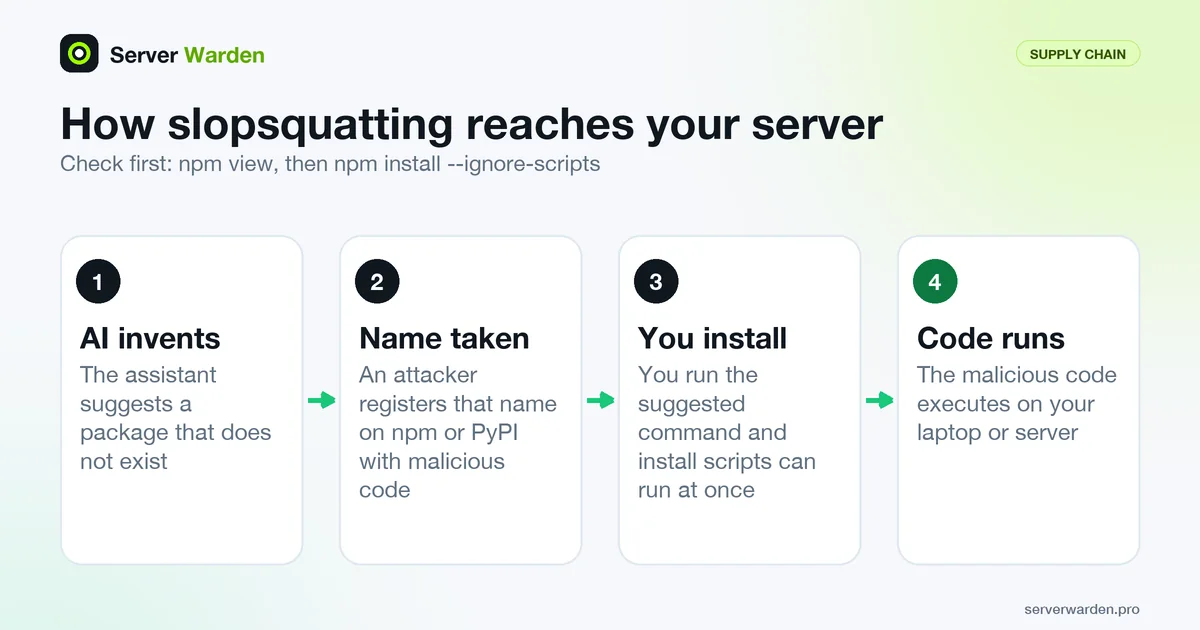
How slopsquatting works
AI assistants sometimes recommend packages that do not exist, a problem called package hallucination. Slopsquatting exploits it. An attacker collects names that models tend to invent, registers them on a public registry such as npm or PyPI with malicious code inside, and waits for someone to run the install command the assistant suggested. The word blends "AI slop" and typosquatting, and Socket's write-up says it was coined by Seth Larson, Developer-in-Residence at the Python Software Foundation.
The difference from ordinary typosquatting is that the victim does not mistype anything. The assistant supplies the name and sounds confident, and vibe coding makes it easy to paste the command without checking. Installing a package can run its install scripts straight away, so a bad dependency may execute code on your laptop or server at install time, before your app even starts.
What the research found
The paper "We Have a Package for You!" (Spracklen et al., accepted to USENIX Security 2025) measured package hallucination in code-generating models. The authors tested 16 popular models and produced 576,000 code samples in two programming languages.
- Hallucinated packages averaged at least 5.2% for commercial models and 21.7% for open-source models.
- Across the study there were 205,474 unique hallucinated package names.
- In a repeat test, 43% of hallucinated packages appeared in all 10 re-runs of the same prompt, so the invented names can be predictable.
These are lab measurements of model behaviour, not counts of real attacks, and results differ by model and prompt. The authors also tested mitigations such as retrieval augmentation, self-refinement and fine-tuning, which reduced hallucinations but are things model builders apply, not something you can switch on in your project.
How to check a package before installing it
Treat every dependency an assistant adds as unreviewed until you have looked at it. Ask the registry before you install:
npm view some-package name version time.created repository.url maintainers
npm install --ignore-scripts some-package
If npm view returns a 404, the name is unregistered, which is exactly what a slopsquatter waits for. If it exists, check that it is not brand new, that the repository link is real and matches the project you meant, and that the maintainers look plausible. A familiar-sounding name is not proof.
The --ignore-scripts option makes npm skip the lifecycle scripts in package.json, such as postinstall, which removes the most common way for a package to run code at install time. It does not stop malicious code from running later when you import the package, so reading the package page still matters. For Python, open the project page on PyPI and apply the same checks.
Defences for AI-assisted projects
- Review dependency changes. Make every new line in
package.jsonorrequirements.txta review item, and write a rule for your assistant to ask before adding one. See AI coding assistant security rules. - Use lock files. A lock file pins what you already vetted. npm's npm ci installs from it and exits with an error if it disagrees with
package.json. - Limit the damage. Run installs as an unprivileged user or in a container, so a malicious script has little to reach. See least privilege and containment.
- Verify, vet and monitor. Socket recommends confirming that a package exists and is legitimate, vetting unusual packages and install scripts, and monitoring dependencies continuously.
- Restrict agents. An agent that installs packages on its own needs clear limits; see the AI coding agent safety guide.
The vibe coding security checklist includes a dependency check.
Related terms: Vibe coding, Prompt injection, Least privilege, Containment.
Frequently asked questions
What is slopsquatting?
It is an attack where someone registers a package name that AI coding assistants tend to invent, so developers who install the suggested dependency receive malicious code. The word combines AI slop and typosquatting.
How is slopsquatting different from typosquatting?
Typosquatting relies on a human mistyping a real package name. Slopsquatting relies on an AI assistant suggesting a name that never existed, so the developer follows the assistant's advice and makes no typing mistake.
How often do AI models suggest packages that do not exist?
It varies by model. The USENIX Security 2025 paper found averages of at least 5.2% for commercial and 21.7% for open-source models across 576,000 code samples, and 205,474 unique invented names.
How can I tell whether a suggested package is real and safe?
Check the registry with a command such as npm view, confirm the repository link and maintainers, look at how old the package is, and install with scripts disabled first. When anything looks odd, do not install it.
Does a lock file protect me from slopsquatting?
Only partly. It stops later installs from silently changing to a different version, and npm ci errors on a mismatch. It does not vet a package the first time you add it, so that first review is still on you.
Want to see where your own server stands?
Run the free, read-only server check, or open the Security Lab and watch the detect, contain, recover, verify loop in action.
Get your free server checkOpen the Security Lab