TLS / SSL
TLS / SSL are the cryptographic protocols that encrypt traffic between a browser and a server. TLS is the current standard; SSL is its outdated predecessor and should no longer be used.
Why 'SSL' is still used even though it is outdated
SSL stands for Secure Sockets Layer, and TLS stands for Transport Layer Security.
SSL, the original protocol, has known vulnerabilities and has been formally deprecated for years. TLS is its modern replacement, but the term "SSL" persists in everyday usage, certificate naming and product names out of habit.
What actually needs checking, not just installing
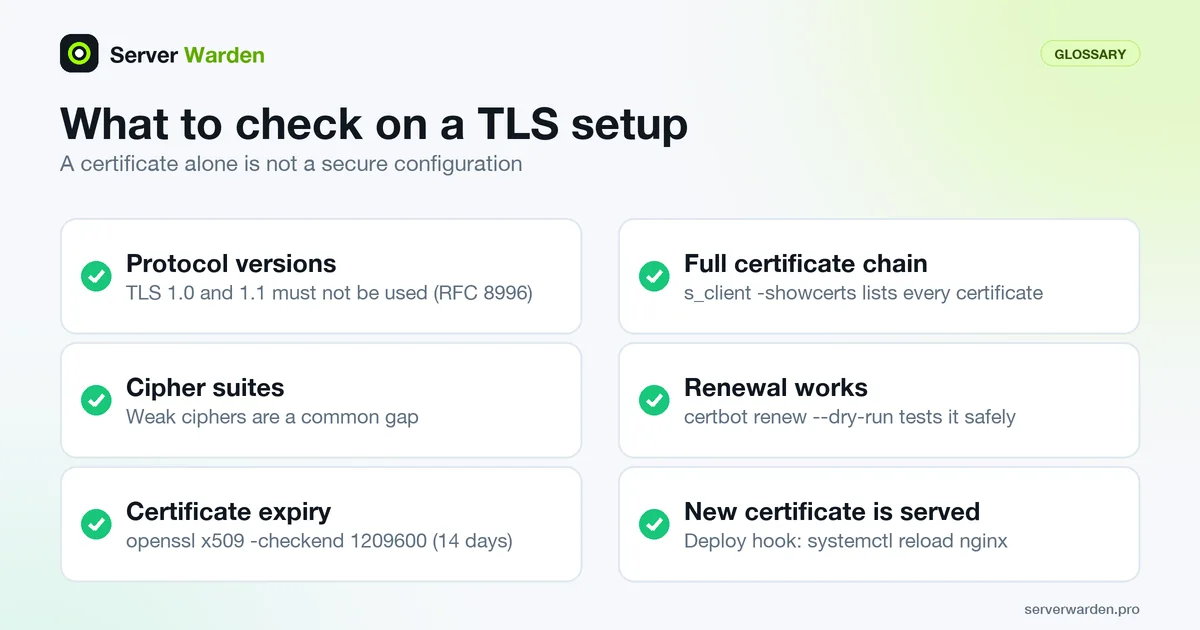
Having a certificate installed is not the same as having it configured securely. Outdated protocol versions, weak cipher suites, and certificates nearing expiration are all common gaps on servers that technically "have HTTPS" but are not actually well configured.
Our nginx security guide covers TLS versions, ciphers and certificate settings.
Checking a live server from the command line
You can inspect what a server really presents with openssl s_client. Replace example.com with your own domain and run it from another machine:
openssl s_client -connect example.com:443 -servername example.com -brief </dev/null
openssl s_client -connect example.com:443 -servername example.com -showcerts -verify_return_error </dev/null
nmap --script ssl-enum-ciphers -p 443 example.com
The s_client manual explains the options. -servername sets the SNI name, which matters when one IP address serves several certificates. -brief prints a short summary including the negotiated protocol, and -showcerts lists every certificate the server sends, so you can confirm that the intermediate certificate is included. -verify_return_error makes a verification problem abort the handshake instead of being ignored.
To confirm that old protocol versions are refused, do not rely on forcing -tls1_1 from your own machine: a recent OpenSSL client may refuse that version itself, so a failure proves nothing about the server. The ssl-enum-ciphers script tries each cipher and lists what the server actually accepts. It is an intrusive script, so run it only against servers you own. RFC 8996 states that TLS 1.0 and 1.1 must not be used.
Renewal, expiry and the forgotten reload
Certificate problems are usually operational, not cryptographic: a renewal that fails quietly, or one that succeeds while the web server keeps serving the old file. Certbot's documentation gives the building blocks. certbot certificates lists what is installed, certbot renew --dry-run tests renewal against the Let's Encrypt staging server without saving anything, and a deploy hook runs only after a successful renewal:
sudo certbot certificates
sudo certbot renew --dry-run
sudo certbot renew --deploy-hook "systemctl reload nginx"

echo | openssl s_client -connect example.com:443 -servername example.com 2>/dev/null \
  | openssl x509 -noout -enddate -checkend 1209600
nginx reads certificates when it loads its configuration, and a reload starts new workers with the new configuration, as the nginx control documentation describes. The hook is the reliable way to make that happen. The last command prints the expiry date and, according to the x509 manual, -checkend exits nonzero if the certificate expires within the given number of seconds (1209600 is 14 days), so a cron job can alert on it. Shorter lifetimes make this monitoring more important, see Let's Encrypt 45-day certificates and the nginx security guide.
Related terms: nginx, Security headers, WAF, ssl_protocols, HSTS.
In the news: Let's Encrypt is phasing out 90-day certificates in favor of 45-day and 6-day options, a change that can break renewal automation built around a fixed interval.
Frequently asked questions
Should I still support old SSL protocol versions for compatibility?
No. SSL 2.0 and 3.0, and increasingly early TLS versions, are considered insecure and should be disabled in favor of modern TLS versions only.
How do I check if my TLS configuration is actually secure, not just present?
Free online tools like SSL Labs' server test analyze protocol versions, cipher suites and certificate details, and highlight specific weaknesses beyond just confirming a certificate exists.
Does using TLS protect against every type of attack?
No. It protects data in transit between the browser and server from interception or tampering, but does nothing against server misconfiguration, weak credentials, or vulnerabilities in the application itself.
How do I confirm my server sends the full certificate chain?
Run openssl s_client -connect yourdomain:443 -servername yourdomain -showcerts, which lists every certificate the server sends. The server certificate should be followed by its intermediate certificate, and adding -verify_return_error makes any verification problem abort the handshake.
If I use Cloudflare, is the connection to my own server encrypted?
It depends on the SSL/TLS mode. Cloudflare documents that in Flexible mode traffic from Cloudflare to the origin is not encrypted, Full does not validate the origin certificate, and Full (strict) does. Cloudflare recommends Full or Full (strict) where possible.
Want to see where your own server stands?
Run the free, read-only server check, or open the Security Lab and watch the detect, contain, recover, verify loop in action.
Get your free server checkOpen the Security Lab