Published 2026-11-09 · Updated 2026-11-10
Nuclei vs reNgine vs Uptime Kuma: Which to Self-Host
Short answer: for 2 or 3 domains on one small VPS, use Uptime Kuma to watch uptime and certificate expiry, add a scheduled Nuclei run with Notify to catch exposed files and known issues, and add an outside port scan. Add reNgine only if your subdomains keep multiplying: it is a heavy reconnaissance platform, and its latest GitHub release dates from September 2024.
These are three free, self-hosted tools that answer different questions. This is the decision guide of the self-hosted external security monitoring cluster. Nuclei is a command-line scanner driven by community templates, Uptime Kuma is a web dashboard that checks whether things answer, and reNgine is a web platform that maps your attack surface, everything of yours the internet can reach. Commands target Ubuntu or Debian with Docker.
In this article
Only scan what you own Three tools, three different jobs Side by side: what each tool checks Side by side: install, alerts, schedule, licence Maintenance status on 9 November 2026 What we ran and what we saw The stack for 2 or 3 domains on one VPS When reNgine is worth its weight What none of these cover, and what to do next Frequently asked questionsQuick win (15 minutes)
- Write down your first question: is the site up, is a certificate expiring, is a file exposed, did a port open, or is there a forgotten subdomain?
- Run
docker run --rm projectdiscovery/nuclei:latest -versionand confirm it prints an engine version (see what we ran). - Start Uptime Kuma bound to loopback only with the README command in the test section, so the dashboard is not public.
- List every domain and subdomain you own. If there are only a handful of names, you do not need reNgine yet.
- Decide where the monitor runs: one on the server it watches goes silent when that server goes down.
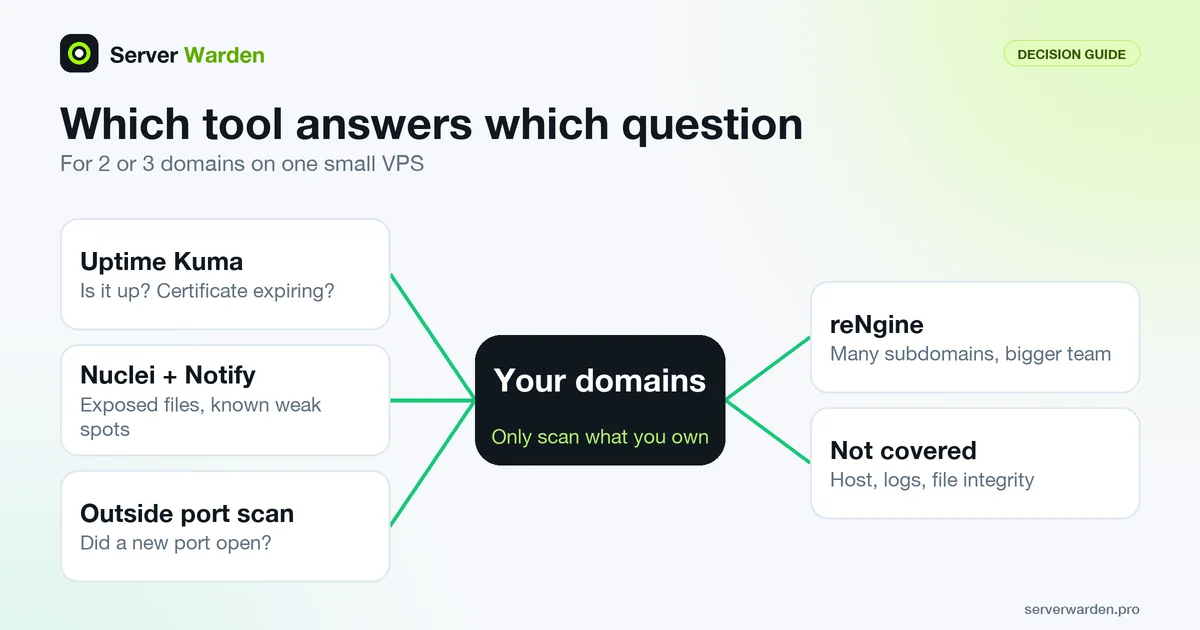
Only scan what you own
Only scan what you own. Everything in this guide is for domains and servers that belong to you or that you are explicitly allowed to test. Scanners send many requests, and they look the same to a provider whether the owner or a stranger runs them.
Scanners also generate traffic that your hosting provider or a CDN such as Cloudflare may notice, log or rate limit. Scan at a low rate from a machine you control, and read your provider terms first (we did not verify any provider policy). Nuclei sends up to 150 requests per second by default, says its README, and the -rl flag lowers that.
Three tools, three different jobs
The word "monitoring" hides three different jobs.
- Uptime Kuma asks: does it still answer, and is the certificate about to expire? It rechecks the same targets on a timer and tells you when a state changes.
- Nuclei asks: does this URL or host match a known weak spot, such as an exposed
.envfile or a vulnerable admin panel? It runs once when you start it, so you schedule it yourself. Notify is a separate small tool from the same project that forwards output to Telegram and other chats. - reNgine asks: what do I own on the internet that I forgot about? It discovers subdomains and ports, runs scanners over them and keeps the results in a database with a web interface.
So Uptime Kuma is a smoke alarm, Nuclei is an inspection you repeat, and reNgine is a survey of the whole property. For a handful of domains, the first two cover most needs.
Side by side: what each tool checks
This table uses each project README, docs and, where noted, source files. "Not described" means we found no such feature there.
| Question | Nuclei + Notify | reNgine | Uptime Kuma |
|---|---|---|---|
| Is the site up? | No | Not described | Yes: HTTP(s), TCP, ping, DNS, keyword and more |
| Certificate expiry warning | Only already expired (template expired-ssl) | Not described | Yes, default alerts at 21, 14 and 7 days left |
| Open ports | Not a port scanner | Yes, port scan stage | Only ports you list (TCP monitor) |
| Exposed files, known weak spots | Yes, from templates | Yes, runs Nuclei and other tools | No |
| Subdomain discovery | No | Yes | No |
| JS endpoints and secrets | Only for URLs you give it | 2.2.0: endpoints, no secrets mentioned. 3.0 branch: secret mining | No |
Three details matter. First, the Nuclei expired-ssl template in nuclei-templates v10.5.1 matches only when the certificate has already expired (expired == true), a late warning. Uptime Kuma warns early: its source defaults to 7, 14 and 21 days, changeable in Settings. Second, Nuclei does not find subdomains itself; the Notify README pipes the separate tools subfinder and httpx into it. Third, Uptime Kuma checks only the ports you name, so it never discovers new ones. See port scanning and subdomain enumeration.
Side by side: install, alerts, schedule, licence
| Topic | Nuclei + Notify | reNgine | Uptime Kuma |
|---|---|---|---|
| Install | Docker image or release binary | Docker Compose, install.sh | Docker, or Node.js 20.4 or newer with pm2 |
| Telegram alerts | Via Notify, which lists Telegram | Built in (Slack, Discord, Telegram) | Built in (Telegram among 90+ services) |
| Scheduling | None built in: use cron or a systemd timer | Clocked and periodic scans | Check intervals, down to 20 seconds |
| Interface | Command line | Web UI | Web UI |
| Licence | MIT | GPL v3 | MIT |
| Minimum resources, as the project states them | None stated in the install docs | 2.2.0 README: none. 3.0 branch README: 4 GB memory, 10 GB disk | None stated in README or wiki |
| Does not check | Uptime history, the server itself, logs | Uptime history, the server itself, logs | Vulnerabilities, exposed files, new ports |
On resources, the reNgine 3.0 branch README says "4 GB of memory and 10 GB of disk are the minimum" and recommends 8 GB and 25 GB for regular scanning. The 2.2.0 README gives no minimum, only MAX_CONCURRENCY values for 4, 8 and 16 GB of RAM. Nuclei and Uptime Kuma state none, so any figure you see elsewhere is not from the project (the Nuclei install page only asks for a recent Go version to build from source). Nuclei also has a hosted cloud tier and paid editions; this guide covers only the open source command-line tool.

Maintenance status on 9 November 2026
We read the GitHub release pages and recent commits on 9 November 2026. The dates are what GitHub showed; we did not read the code for quality.
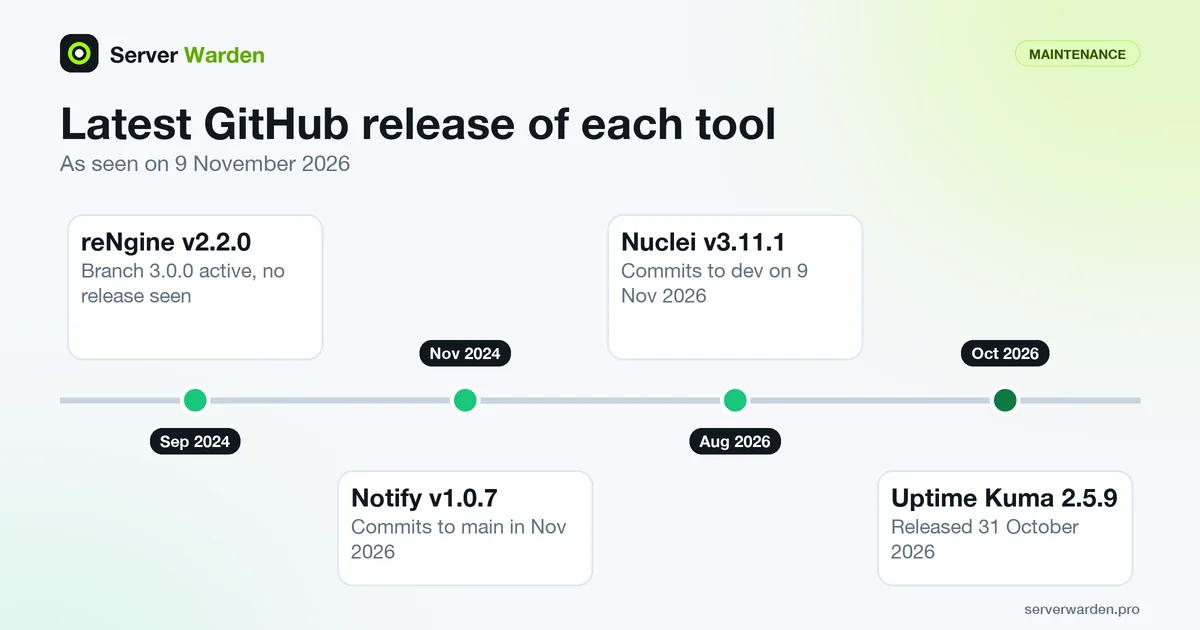
- Nuclei: latest release v3.11.1 on 8 August 2026, with commits to its dev branch on 9 November 2026. The nuclei-templates repository released v10.5.1 on 23 October 2026. The README warns to expect breaking changes, so read the changelog before updating.
- Notify: latest release v1.0.7 on 1 November 2024. The main branch had commits as late as 4 November 2026, but we saw no later release, so the Docker image we ran (1.0.7) does not contain them.
- reNgine: latest release v2.2.0 on 7 September 2024, and the last commit on the master branch is from 16 November 2025. A separate
release/3.0.0branch is 1,410 commits ahead of master and had commits on 8 November 2026; its README calls 3.0 a complete rewrite that does not import a 2.x database. We found no v3.0.0 release or tag on GitHub, so we treat 3.0 as branch code, not a finished release. - Uptime Kuma: latest release 2.5.9 on 31 October 2026, after 2.5.8 on 26 October and 2.5.7 on 23 October, and commits on 8 November 2026. Its README says there are many pull requests and the maintainer cannot test them all.
Recent activity is not a security audit. Pin a version, read release notes before upgrading and keep dashboards off the public internet.
Want a second pair of eyes on your server?
A free, read-only check shows what the internet can see on your server and what to fix first.
Get your free server check Talk to a security engineerWhat we ran and what we saw
On 9 November 2026 we ran the Docker images on a Mac with Docker 29.0.1, against a local Caddy container that served a fake .env file containing only obvious dummy values. First, versions:
docker run --rm projectdiscovery/nuclei:latest -version
docker run --rm projectdiscovery/notify:latest -version
Nuclei printed Nuclei Engine Version: v3.11.1 and Notify printed Current Version: 1.0.7. docker images showed 1.22GB for the Nuclei image and 71MB for Notify. Then we downloaded templates into a volume and scanned the local container (you would point -u at your own domain; our run left out -rl and -ni):
docker volume create nuclei-templates
docker run --rm -v nuclei-templates:/root/nuclei-templates projectdiscovery/nuclei:latest -update-templates
docker run --rm -v nuclei-templates:/root/nuclei-templates projectdiscovery/nuclei:latest -u https://example.com -tags exposure -severity medium,high,critical -rl 10 -ni -disable-update-check
The template download reported nuclei-templates v10.5.1 with 14,434 templates. The exposure run loaded 824 templates, found the fake .env through two of them (generic-env and codeigniter-env) and finished in about 2 minutes. The -ni flag disables the Interactsh server: without it, our run printed Using Interactsh Server: oast.fun, so a default run also contacts a third-party out-of-band server. We piped one finding into Notify with a custom webhook provider and a local receiver, and the message arrived. Real Telegram delivery was not tested.
For Uptime Kuma we ran the README command with the port kept on loopback:
docker run -d --restart=always -p 127.0.0.1:3001:3001 -v uptime-kuma:/app/data --name uptime-kuma louislam/uptime-kuma:2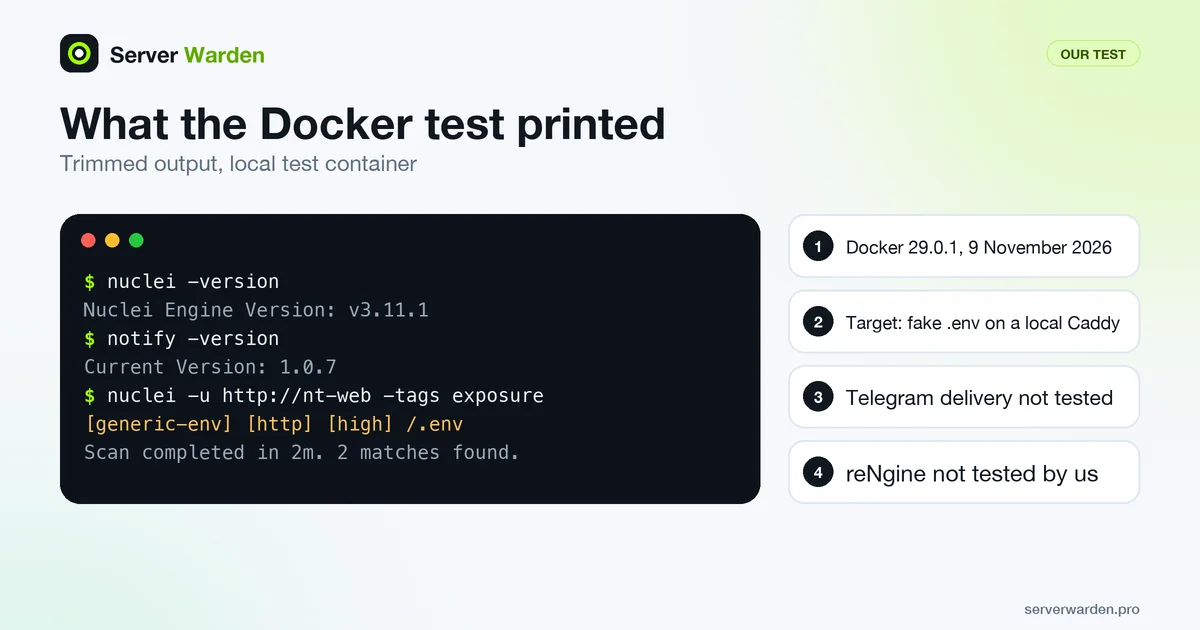
The image showed 2.56GB in docker images, the mapped port answered with a redirect, and the version 2 container began with a database setup step. We did not set up monitors or Telegram. We did not install reNgine: its master compose file starts 7 services (database, Redis, a Celery worker and scheduler, web, nginx and an Ollama container) and the install is longer than a quick test, so it is not tested by us.
The stack for 2 or 3 domains on one VPS
This is our recommendation for a solo owner or small agency, built from the facts above. Each piece has its own guide.
- Uptime Kuma for up and certificate checks. Add one HTTP(s) monitor per domain, turn on its certificate expiry notification and attach a Telegram notification to the monitor (the expiry code skips monitors that have no notification attached). Keep the port on 127.0.0.1 and reach the dashboard through an SSH tunnel or an authenticated reverse proxy. Setup: Uptime Kuma on Docker. Certificate lifetimes are getting shorter, so early warnings matter: see Let's Encrypt 45-day certificates.
- Nuclei from cron for exposure checks. Run a low-rate scan with the
exposuretag weekly and send findings to Telegram with Notify. It repeats the manual check from exposed .env and .git files. Setup: scheduled Nuclei scans. - An outside port scan, compared with last time. Run it from another machine, so you see what the internet sees, and alert on differences. Setup: external port scan with nmap and cron.
- Keep the origin private. If Cloudflare sits in front, check that your real server address cannot be reached around it: Cloudflare origin IP leak and lock down.
Optional extras: scan your own JavaScript bundles for leaked keys (guide) and keep projects apart (isolate projects on one VPS). If Uptime Kuma runs on the VPS it watches, you get no alert when the whole server is down, so use a second small machine if you can. Publish Docker ports on 127.0.0.1 only, because Docker can bypass firewall rules (Docker host security).
When reNgine is worth its weight
reNgine earns its cost when the question is "what do I even own?" It makes sense if:
- You have dozens of subdomains, old staging hosts or client sites, and want new and removed ones tracked between scans (a 2.2.0 README feature).
- You want one database with a web interface, roles for several people and scheduled scans with Slack, Discord or Telegram alerts.
- You can give it a separate machine with the 4 GB of memory the 3.0 branch README names as the minimum.
- You accept community support: the README says there is no guaranteed response time.
It is the wrong tool for 2 or 3 domains whose hostnames you already know. If you try it, use a separate virtual machine, never the production VPS. The master docker-compose.yml we read lists ports 443, 8082 and 11434 without a 127.0.0.1 prefix, so firewall them. It is a reconnaissance tool: point it only at your own targets.
What none of these cover, and what to do next
All three look at your server from outside. None of them sees inside it:
- Host-level activity: logins, new users, changed packages and processes. See a small SIEM with Wazuh and journald.
- Log analysis: failed logins, web errors and odd requests. See server monitoring and log analysis.
- File integrity: noticing that a file on disk changed. The Wazuh guide above includes file integrity checks.
- Your application logic: template scanners find known weak spots, not business bugs.
- Your baseline: scanners do not fix anything. Start from the VPS security checklist.
What to do next: Uptime Kuma first, the weekly Nuclei run second, the port scan third. Ask for help if a scan shows something you cannot explain.
How we checked this. On 9 November 2026 we read the READMEs, docs, release pages and recent commits of the three projects, the Nuclei expired-ssl template and the Uptime Kuma certificate code, and ran Nuclei v3.11.1, Notify 1.0.7 and the Uptime Kuma 2 image in Docker 29.0.1 against local containers. Real Telegram delivery and reNgine were not tested by us.
Sources:
Frequently asked questions
Which is better for a small website: Nuclei, reNgine or Uptime Kuma?
They do different jobs. Uptime Kuma watches uptime and certificate expiry, Nuclei checks for exposed files and known weak spots when run, and reNgine maps subdomains and ports at larger scale. For 2 or 3 domains, start with Uptime Kuma and a scheduled Nuclei run.
Can Uptime Kuma replace a vulnerability scanner?
No. Its README lists availability monitors such as HTTP, TCP, ping and DNS, plus certificate information and notifications. It does not look for exposed files, known vulnerabilities or new open ports.
Does Nuclei send Telegram alerts by itself?
No. Nuclei writes results to the terminal or a file. Notify, a separate tool from the same project, lists Telegram as a provider and forwards that output, but we did not test real Telegram delivery.
How much RAM does reNgine need?
The 2.2.0 README states no minimum, only concurrency values for 4, 8 and 16 GB of RAM. The README of the unreleased 3.0 branch gives 4 GB of memory and 10 GB of disk as the minimum, and 8 GB and 25 GB for regular scanning.
Is reNgine still maintained?
Its latest GitHub release is v2.2.0 from 7 September 2024, and master was last updated on 16 November 2025. A release/3.0.0 branch had commits on 8 November 2026, but we found no 3.0.0 release or tag on GitHub.
Will Uptime Kuma warn me before my SSL certificate expires?
Yes. Turn on the certificate expiry notification for the monitor and attach a notification channel. The source defaults to alerts at 7, 14 and 21 days left, changeable in Settings. The Nuclei expired-ssl template matches only certificates that have already expired.
Is it safe to run Nuclei against my own site behind Cloudflare?
Scan only assets you own, and expect a large scan to be noticed or rate limited by your provider or CDN. Lower the speed with -rl, add -ni to skip the Interactsh server, and read your provider terms.
Not sure where your server stands?
Get a free, read-only security check, or talk to a security engineer about managed protection.
Get your free server check Talk to a security engineer