Published 2026-11-09 · Updated 2026-11-09
Isolate Several Projects on One VPS and Test the Walls
Short answer: give every project on the VPS its own Linux user, its own PHP-FPM pool or service account, its own database login and its own Docker network, set project folders to mode 750 and secret files to 600, never share the Docker socket, then prove it with a script that acts as each project and tries to read the others. Whatever the script can still reach, a hacked project could reach too.
Two terms first. Isolation means a failure in one project stays inside that project. Blast radius is everything an attacker can reach after breaking one thing. This guide is part of the self-hosted external security monitoring series: outside scans show what the world sees, and the test here shows what a compromised project would see. Commands target Ubuntu 24.04 and Debian. Only scan what you own: run every test below only on your own servers and projects.
In this article
What a hacked project can reach on a shared VPS Layer 1: one Linux user per project and 750 folders Layer 2: a PHP-FPM pool and socket per project Layer 3: sandbox each app process with systemd Layer 4: one database login and one set of secrets per project Layer 5: one Docker network per project The test: log in as each project and try to break out Run the test every night and get an alert Common mistakes, why they happen and how to fix them When separate VPSs are the right answer What to do next, how we checked this, and sources Frequently asked questionsQuick win (25 minutes)
- Run
sudo -u WEB_USER_OF_A cat /srv/projb/.env, with the account project A runs as and your own path. You wantPermission denied. See the test section. - Run
ls -ld /srv/*/ /srv/*/.env. If the last three characters of a mode (the "others" part) are not---, every account on the server can at least look at that item. - Run
ps -eo user=,comm= | sort -u. If all your web apps show the same user, usuallywww-data, your projects share one account and have no wall between them. - Run
getent group docker. Only trusted admins belong there, never a project account. - Run
sudo -u postgres psql -c "\l"and read "Access privileges". An entry starting with=on a project database means it is open to every role (an empty name means PUBLIC).
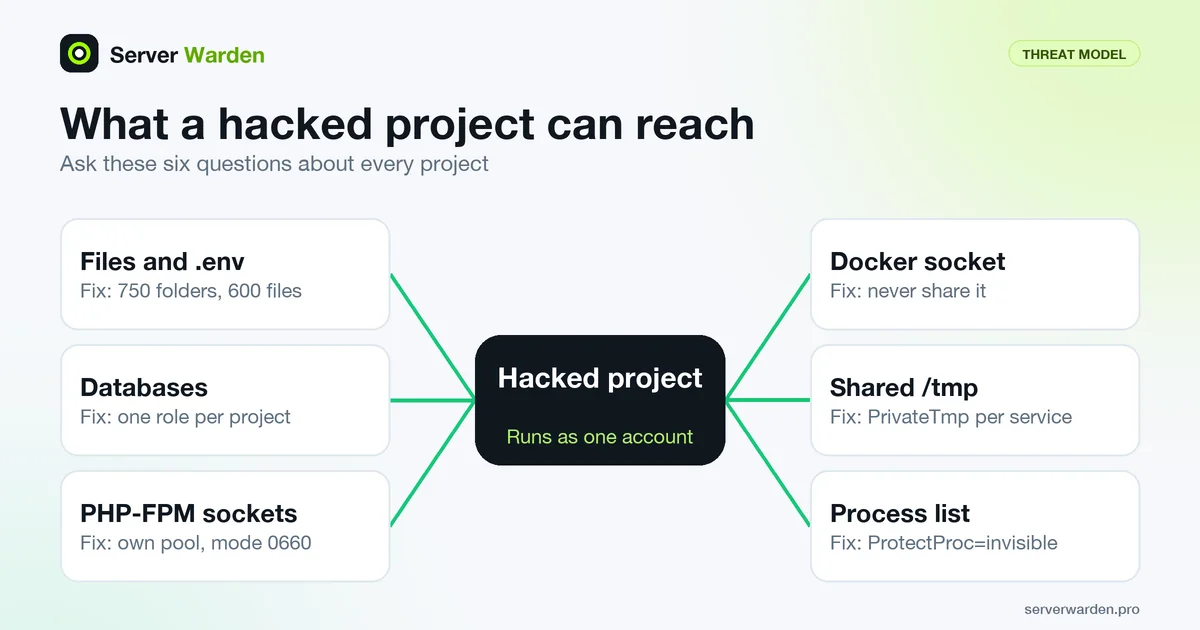
What a hacked project can reach on a shared VPS
Say one project has a bug that lets a stranger run commands (remote code execution), plant a script through a file upload, or steal a key. The attacker now has the rights of the account that project runs as. Ask what that account can touch next, in six places:
- Files: other projects' code,
.envfiles, uploads and backups, if folder permissions allow it. - Databases: any login the database accepts from localhost, including one written in a neighbour's config.
- Sockets and ports: a PHP-FPM socket or a loopback port. The PHP manual warns that an exposed FastCGI endpoint allows arbitrary code execution.
- The Docker socket: the Docker documentation says the docker group grants root-level privileges (Docker socket).
- Shared temp files and the process list: files left in
/tmpand other users' command lines. The proc(5) manual says thehidepidoption protects files such as/proc/PID/cmdlinefrom other users. - Shared accounts: if two projects run as the same user, often
www-data, there is no wall at all.
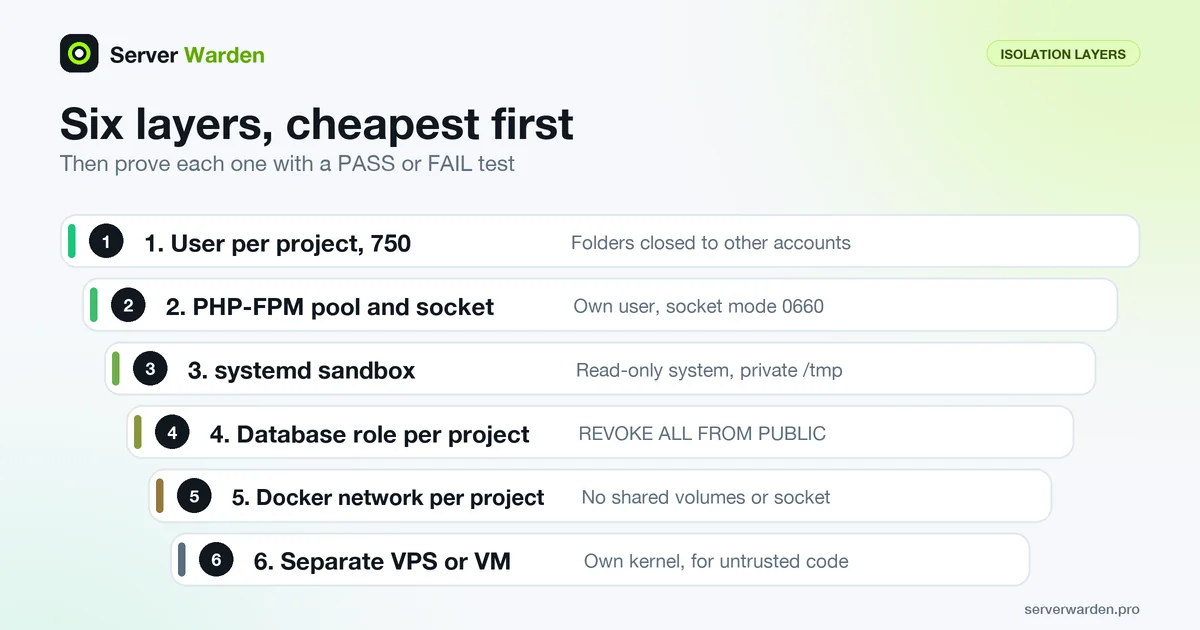
The cure is least privilege per project: only the files, sockets and logins it needs. Below are five layers, cheapest first, then the test (for people on the server, see sudo and least privilege).
Layer 1: one Linux user per project and 750 folders
Linux decides file access by user and group. If every site is owned by www-data, any code running as www-data reads every site. This is the classic mistake: the default PHP-FPM pool on Ubuntu runs as www-data, and so does nginx. In our lab a "hacked" site A read site B's .env with one file_get_contents call.
Two facts matter. New files are not private by default: umask(2) calls 022 the typical default (we saw 644 files and 755 folders on Ubuntu 24.04). And the folder is the wall: path_resolution(7) says a process without search (x) permission on a folder gets "Permission denied": a 644 file became unreadable in our test once its folder was 750.
Give each project a system user that cannot log in, and let nginx in through a group. Run as root, adjusting names and paths:
for p in proja projb; do
  useradd --system --user-group --no-create-home --home-dir /srv/$p --shell /usr/sbin/nologin $p
  chown -R $p:www-data /srv/$p
  find /srv/$p -type d -exec chmod 750 {} +
  find /srv/$p -type f -exec chmod 640 {} +
  chmod 2750 /srv/$p/uploads
  chown $p:$p /srv/$p/.env && chmod 600 /srv/$p/.env
done
useradd --system makes a service account without a home folder (useradd(8)); we set --shell because Ubuntu gave a system user /bin/sh. The project user owns its folder, www-data (nginx) is the group, 750 keeps everyone else out, and .env is private. The 2 in 2750 is the setgid bit: new files in uploads inherit the group (we confirmed it). Never put a project user in the sudo or docker group.
Loopback ports are different: any local user can connect to 127.0.0.1:3001. For app to nginx traffic use a Unix socket, whose file mode controls who may connect. The nginx proxy module accepts proxy_pass http://unix:/path/to/app.sock;, and Node.js net.Server.listen(path) starts a Unix socket server.
Layer 2: a PHP-FPM pool and socket per project
PHP-FPM is the PHP process manager behind nginx; a pool is a group of PHP workers with its own settings. The FPM configuration page lets each pool set user, group and its own listen socket, while listen.owner, listen.group and listen.mode decide who may connect. Retire the default www pool and add one per project (paths for PHP 8.3 on Ubuntu 24.04):
sudo mv /etc/php/8.3/fpm/pool.d/www.conf /etc/php/8.3/fpm/pool.d/www.conf.disabled
sudo nano /etc/php/8.3/fpm/pool.d/proja.conf
[proja]
user = proja
group = proja
listen = /run/php/proja.sock
listen.owner = www-data
listen.group = www-data
listen.mode = 0660
pm = ondemand
pm.max_children = 5Repeat for projb. Each pool runs as its own user, and only www-data (nginx) and root can open its socket. Each nginx site gets its own server block, picked by server_name (how nginx chooses a server), pointing at its own socket:
server {
    listen 80;
    server_name proja.example.com;
    root /srv/proja/public;
    index index.php index.html;
    location ~ \.php$ {
        include snippets/fastcgi-php.conf;
        fastcgi_pass unix:/run/php/proja.sock;
    }
}
sudo php-fpm8.3 -t && sudo nginx -t
sudo systemctl restart php8.3-fpm && sudo systemctl reload nginxphp-fpm8.3 -t on our two-pool config printed configuration file /etc/php/8.3/fpm/php-fpm.conf test is successful, and the sockets showed as srw-rw---- www-data www-data. We then planted a stand-in for a bug in site A, a PHP file that tries to read /srv/projb/.env, and fetched it through nginx:
curl -s -H "Host: proja.example.com" http://127.0.0.1/leak.php
# before (one www-data pool):  DB_USER=app  DB_PASS=EXAMPLE_NOT_A_REAL_PASSWORD ...
# after  (one pool per user):  blocked
Two honest limits. The PHP manual says pools are not a security mechanism because they do not provide full separation (all pools share one OPcache). And open_basedir, which the manual describes as limiting the files PHP can access, covers PHP file functions only: in our test file_get_contents was blocked while shell_exec("cat ...") read the same file. Build the wall on separate users, and keep nginx patched (nginx security best practices).
Layer 3: sandbox each app process with systemd
Node, Python and other apps usually run as systemd services, and a unit can fence a process in. Create /etc/systemd/system/projb-app.service with your own start command:
[Unit]
Description=projb app

[Service]
User=projb
Group=projb
ExecStart=/usr/bin/node /srv/projb/current/server.js
Restart=on-failure
NoNewPrivileges=true
ProtectSystem=strict
ReadWritePaths=/srv/projb/uploads
ProtectHome=true
PrivateTmp=true
PrivateDevices=true
ProtectProc=invisible
ProtectKernelTunables=true
ProtectKernelModules=true
ProtectControlGroups=true
RestrictSUIDSGID=true
LockPersonality=true
RestrictAddressFamilies=AF_UNIX AF_INET AF_INET6
CapabilityBoundingSet=
UMask=0027

[Install]
WantedBy=multi-user.target
Per systemd.exec(5): User= sets the account (default root); NoNewPrivileges= stops setuid tricks; ProtectSystem=strict makes the file system read-only except /dev, /proc and /sys, and ReadWritePaths= reopens only what the app writes; ProtectHome=true hides /home and /root; PrivateTmp=true gives its own /tmp; ProtectProc=invisible hides other users' processes; UMask=0027 keeps new files closed to others; an empty CapabilityBoundingSet= drops all capabilities. The rest lock kernel settings, modules, setuid files and odd socket types.
We ran a probe service with the same lines under real systemd 255 in an Ubuntu 24.04 container. Without them it saw /home, the host /tmp and processes of four users. With them ls /home gave "Permission denied", /tmp was empty, only its own user showed in the process list, and writing to /etc failed with "Read-only file system".
systemd-analyze verify warns about a misspelled directive (we tried ProtectHom=true) yet exits 0, so read its output. systemd-analyze security --offline=true UNIT_FILE scored a bare unit 9.0 and this one 4.1 (lower is better). If the app fails with "Read-only file system", add that path to ReadWritePaths=; to undo, delete the lines and run sudo systemctl daemon-reload. More: deploying an app on a VPS securely.
Layer 4: one database login and one set of secrets per project
A database is a shared service and needs its own walls. Give every project its own database and a role (login) that owns it, never the admin account. The PostgreSQL docs say a new role is NOSUPERUSER unless you ask otherwise. Use a different long random password for each, for example from openssl rand -hex 24:
sudo -u postgres psql <<'SQL'
CREATE ROLE proja_app LOGIN PASSWORD 'EXAMPLE_NOT_A_REAL_PASSWORD_A';
CREATE ROLE projb_app LOGIN PASSWORD 'EXAMPLE_NOT_A_REAL_PASSWORD_B';
CREATE DATABASE proja OWNER proja_app;
CREATE DATABASE projb OWNER projb_app;
REVOKE ALL ON DATABASE proja FROM PUBLIC;
REVOKE ALL ON DATABASE projb FROM PUBLIC;
SQL
The REVOKE lines matter. Per the PostgreSQL privileges chapter, every new database grants CONNECT and TEMPORARY to PUBLIC, meaning every role. We saw it: with separate roles but no revoke, proja_app connected to database projb. After the revoke it failed with FATAL: permission denied for database "projb" and User does not have CONNECT privilege, while projb_app still opened its own database. Check with \l. For an existing database, ALTER DATABASE projb OWNER TO projb_app; plus the revoke does the same. We did not test MySQL. See also exposed databases.
Secrets follow the same rule (secrets management). Each project gets its own .env outside the web root, mode 600, owned by its user, with its own database password, API keys and session secret. If projects share a key, one leak opens all of them; if one leaks anyway, see what to do if an API key leaks.
Layer 5: one Docker network per project
Containers add their own walls and their own traps. The Docker bridge docs say containers started without --network join the default bridge, where unrelated stacks can talk to each other, while a user-defined bridge lets only attached containers communicate. We confirmed both: a container on the default bridge reached another by IP address, and containers on proja-net could not reach one on projb-net.
docker network create proja-net
docker run -d --name proja-web --network proja-net YOUR_IMAGE- One user-defined network per project; attach a container to a second network only on purpose.
- No shared volumes. The Docker security page says Docker can share a host folder with a container without limiting its access rights.
- No
--network host: the host driver docs say the container then is not isolated from the host network stack. - Never mount the Docker socket into an app container or add a project user to the docker group.
More in Docker host security and Docker Compose on a VPS.

The test: log in as each project and try to break out
Settings are claims; a test is proof. The script below acts as each project's runtime user and tries what a hacked project would: read the neighbour's folder and .env, write into its uploads, list its processes and /tmp files, use its sockets, open its database with your own credentials, follow a symlink into it, plus host-wide checks for sudo and the Docker socket. It prints PASS when access is blocked and FAIL when it works, and exits 1 on any FAIL. Run it as root, on your own server only.
It confirms first that each target exists and prints ERROR if not, because a PASS against a missing target proves nothing. We hit this ourselves: a stand-in app that never started made checks pass for the wrong reason.
The one-liner for "can project A's web user read project B's .env" is:
sudo -u WEB_USER_OF_A cat /srv/projb/.env >/dev/null 2>&1 && echo "FAIL: can read" || echo "PASS: blocked"On a shared www-data account it printed FAIL; after the fix, run as proja, PASS. sudo -u runs a command as another user (sudo(8)); runuser -u USER -- COMMAND (runuser(1)) also works for accounts with a nologin shell. Save the script as /usr/local/sbin/isolation-test.sh and describe your projects in /etc/isolation-test.conf (columns: name, runtime user, folder, database, PHP-FPM socket, app address in socat syntax; each folder needs a .env with DB_USER and DB_PASS):
PROJECTS='
proja  proja  /srv/proja  proja  /run/php/proja.sock  UNIX-CONNECT:/run/proja/app.sock
projb  projb  /srv/projb  projb  /run/php/projb.sock  UNIX-CONNECT:/run/projb/app.sock
'
#!/bin/bash
# isolation-test.sh: run as root. PASS = access blocked, FAIL = access works. Exit 1 on any FAIL.
# Needs sudo, psql, socat, pgrep. /etc/isolation-test.conf sets PROJECTS, one project per line:
# name runtime-user dir db-name fpm-socket app-address (socat syntax)
. /etc/isolation-test.conf
FAILS=0
check() { local t=$1; shift # PASS when the command fails, meaning access is blocked
if "$@" >/dev/null 2>&1; then echo "FAIL $t"; FAILS=$((FAILS+1)); else echo "PASS $t"; fi; }
up() { local t=$1; shift # control: the target must exist, or a PASS proves nothing
"$@" >/dev/null 2>&1 || { echo "ERROR $t is not reachable even for root"; FAILS=$((FAILS+1)); }; }
as() { local u=$1; shift; sudo -n -u "$u" "$@"; }
val() { grep -m1 "^$2=" "$1/.env" | cut -d= -f2-; }
pg() { PGPASSWORD=$(val "$1" DB_PASS) psql -h 127.0.0.1 -U "$(val "$1" DB_USER)" -d "$2" -c 'select 1'; }
CONN="timeout 3 socat -u /dev/null" # connect, send nothing, hang up
while read -r a ua adir _; do
[ -z "$a" ] && continue
while read -r b ub bdir bdb bfpm bapp; do
{ [ -z "$b" ] || [ "$a" = "$b" ]; } && continue
echo "== $a (runs as $ua) tries to reach $b =="
up "PHP-FPM socket of $b" $CONN "UNIX-CONNECT:$bfpm"
up "app of $b" $CONN "$bapp"
up "processes of $ub" pgrep -u "$ub"
up "database $bdb" pg "$bdir" "$bdb"
check "$ua cannot read $bdir/.env" as "$ua" cat "$bdir/.env"
check "$ua cannot list $bdir" as "$ua" ls "$bdir"
check "$ua cannot write to $bdir/uploads" as "$ua" sh -c 'touch "$1/.p" && rm "$1/.p"' _ "$bdir/uploads"
check "$ua cannot see processes of $ub" as "$ua" sh -c 'ps -u "$1" -o pid= | grep -q .' _ "$ub"
check "$ua cannot read $ub files in /tmp" as "$ua" sh -c 'find /tmp -user "$1" -type f -readable | grep -q .' _ "$ub"
check "$ua cannot use the PHP-FPM socket of $b" as "$ua" $CONN "UNIX-CONNECT:$bfpm"
check "$ua cannot connect to the app of $b" as "$ua" $CONN "$bapp"
check "$a credentials cannot open database $bdb" pg "$adir" "$bdb"
check "no symlink from $adir into $bdir" sh -c 'find "$1" -type l -lname "$2/*" | grep -q .' _ "$adir" "$bdir"
done <<<"$PROJECTS"
done <<<"$PROJECTS"
echo "== host-wide =="
while read -r a ua _; do
[ -z "$a" ] && continue
check "$ua has no passwordless sudo" as "$ua" sudo -n true
check "$ua cannot write the Docker socket" as "$ua" test -w /var/run/docker.sock
done <<<"$PROJECTS"
check "no world-writable path under /srv" sh -c 'find /srv ! -type l -perm -0002 | grep -q .'
echo "RESULT: $FAILS check(s) failed"; [ "$FAILS" -eq 0 ]Before. In an ubuntu:24.04 container we built the classic layout: two sites, one shared PHP-FPM pool, everything owned by www-data with 755 folders and a 644 .env, one shared database role, stand-in apps on loopback ports, www-data in the docker group, a leftover file in /tmp and a symlink from A into B. Real output, trimmed (the B to A block is similar):
== proja (runs as www-data) tries to reach projb ==
FAIL  www-data cannot read /srv/projb/.env
FAIL  www-data cannot list /srv/projb
FAIL  www-data cannot use the PHP-FPM socket of projb
FAIL  proja credentials cannot open database projb
FAIL  no symlink from /srv/proja into /srv/projb
...
FAIL  www-data cannot write the Docker socket
RESULT: 19 check(s) failed
Fix. We applied layers 1, 2 and 4, moved the apps to Unix sockets, removed www-data from the docker group and moved the leftover file into a 700 folder. We hid other users' processes with sudo mount -o remount,hidepid=2 /proc (proc(5): mode 2 hides other users' /proc/PID folders). It affects every tool that reads other users' processes, so try it in a second session and undo it with sudo mount -o remount,hidepid=0 /proc; per service, ProtectProc=invisible is gentler. The Docker socket in our lab was a socat stand-in, so that check tests permissions only.
After. Same script, same server:
== proja (runs as proja) tries to reach projb ==
PASS  proja cannot read /srv/projb/.env
PASS  proja cannot list /srv/projb
PASS  proja cannot use the PHP-FPM socket of projb
PASS  proja credentials cannot open database projb
PASS  no symlink from /srv/proja into /srv/projb
...
RESULT: 0 check(s) failed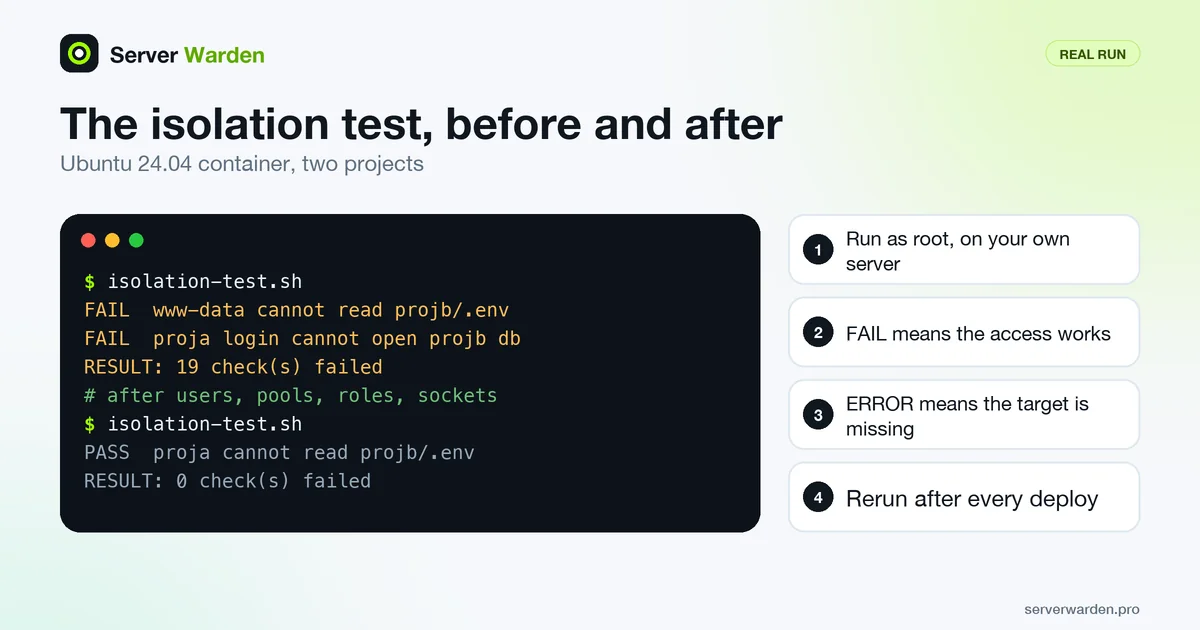
A test that cannot fail is worthless, so we broke the layout again: 755 on one project folder, 644 on its .env, GRANT CONNECT ... TO PUBLIC on its database and a project user in the docker group. The script printed four FAIL lines, one for each mistake.
Container networks are not visible from inside the lab container, so this second script runs on the Docker host. It tries every address the neighbour's container has, after checking that the target answers on its own network:
#!/bin/bash
# docker-net-test.sh: can a container on one project's network reach the other project's container?
# Assumes containers proja-web and projb-web (port 8080) on networks proja-net and projb-net.
reach() { docker run --rm --network "$1" python:3-slim python3 -c \
  'import socket,sys; socket.create_connection((sys.argv[1], 8080), timeout=3)' "$2" >/dev/null 2>&1; }
for pair in proja:projb projb:proja; do a=${pair%:*}; b=${pair#*:}
  own=$(docker inspect -f "{{(index .NetworkSettings.Networks \"$b-net\").IPAddress}}" "$b-web")
  reach "$b-net" "$own" || echo "ERROR $b-web does not answer on its own network"   # control
  hit=""   # try every address projb-web has, on every network it is attached to
  for ip in $(docker inspect -f '{{range .NetworkSettings.Networks}}{{.IPAddress}} {{end}}' "$b-web"); do
    reach "$a-net" "$ip" && hit="$hit $ip"
  done
  [ -n "$hit" ] && echo "FAIL  $a-net reaches $b-web at$hit" || echo "PASS  $a-net cannot reach $b-web"
done
PASS proja-net cannot reach projb-web
PASS projb-net cannot reach proja-web
# after: docker network connect proja-net projb-web (a shared network)
FAIL proja-net reaches projb-web at 172.19.0.3This is a smoke test for your own layout, not a penetration test, and it cannot prove the shared kernel is safe (see the section on separate VPSs).
Want a second pair of eyes on your server?
A free, read-only check shows what is exposed on your server and what to fix first.
Get your free server check Talk to a security engineerRun the test every night and get an alert
Layouts drift: a deploy creates a 644 file, or someone runs chmod -R 777 to fix an upload error. Run the test nightly and after every deploy. A systemd timer and a small wrapper alert only on failure, piping the failing lines into a notifier you build from scheduled scans with Telegram alerts (not repeated here):
sudo tee /usr/local/sbin/isolation-watch.sh >/dev/null <<'EOF'
#!/bin/bash
out=$(/usr/local/sbin/isolation-test.sh 2>&1) && exit 0
printf "%s\n" "$out" | grep -E "^(FAIL|ERROR)" | head -15 \
  | /usr/local/sbin/notify-telegram.sh "Isolation test FAILED on $(hostname)"
exit 1
EOF
sudo chmod 755 /usr/local/sbin/isolation-watch.sh
# /etc/systemd/system/isolation-test.service
[Service]
Type=oneshot
ExecStart=/usr/local/sbin/isolation-watch.sh
# /etc/systemd/system/isolation-test.timer
[Timer]
OnCalendar=*-*-* 04:23:00
Persistent=true
RandomizedDelaySec=300
[Install]
WantedBy=timers.targetsudo systemctl daemon-reload && sudo systemctl enable --now isolation-test.timerWe verified the unit files with systemd-analyze verify and ran the service with a failing stub test and a stub notifier: the service ended failed (also listed by systemctl --failed) and the notifier got the title and the FAIL line. We did not test real Telegram delivery.
External scans, such as a scheduled nmap scan of your own VPS, a Nuclei, reNgine or Uptime Kuma setup and locking the origin behind Cloudflare, tell you what the world sees; this test tells you what a compromised project sees. You need both.
Common mistakes, why they happen and how to fix them
| Symptom | Why it happens | Fix |
|---|---|---|
| One deploy user owns every project | One stolen key or token opens all projects. | One deploy user or deploy key per project. |
.env mode 644, or inside the web root | The default umask is 022, so new files are world-readable (exposed .env files). | chmod 600, project user as owner, folder 750, file outside the web root. |
| Shared uploads folder | One project can plant files that another serves. | One uploads folder per project, mode 2750. |
| Same database user for all projects | One password in every .env opens every database. | One role per database and REVOKE ALL ON DATABASE ... FROM PUBLIC. |
| Cron jobs running as root | If a project user can edit a script that root runs, that user can run commands as root. | Run jobs as the project user; keep root scripts root-owned and not writable by others. |
| Symlinks across projects | Root-run tools such as backups follow a link into another project. | Remove the link; copy the files or share a read-only folder owned by root. |
| Apps on loopback TCP ports | Any local user can connect. | Unix socket with mode 660 in a restricted folder. |
| Project user in the docker group | The group grants root-level privileges. | Remove it; see Docker socket. |
When separate VPSs are the right answer
All the layers above share one kernel and one nginx. The Docker documentation says containers share the same kernel, unlike a virtual machine with its own, and its security page warns that default capabilities and mounts can give incomplete isolation, alone or together with kernel vulnerabilities. Unix users share the kernel too, and the PHP manual says pools are not a security mechanism. So a kernel bug can break these walls, and patching is part of the wall (patch management).
Use a separate VPS or virtual machine when:
- projects belong to different customers, or one runs code you do not control;
- one project holds payment, health or other regulated data;
- one compromise would end the business, and a second small server costs less than that risk;
- nobody can keep the layers above correct.
The same test still helps: run it on each server and the checks stay valid.
What to do next, how we checked this, and sources
- Run the script on your own server today and fix FAIL lines using the table above.
- Add the nightly timer and alert, and rerun the test after every deploy.
- Write down what you would do if one project is breached: detecting and responding to a breach.
- If projects hold customer data and nobody owns server security, ask for help early: a free read-only check shows what the internet sees on your server.
How we checked this. On 9 November 2026 we ran every command and both scripts in ubuntu:24.04 containers (Ubuntu 24.04.5 LTS, nginx 1.24.0, PHP 8.3.6, PostgreSQL 16.15) on Docker 29.0.1. The systemd checks ran in a second container with systemd 255 as init, and the Docker network checks used python:3-slim containers. We did not test real Telegram delivery, MySQL, rootless Docker or other distributions. Option meanings come from the manuals below.
Sources: systemd.exec(5), PHP-FPM configuration, PHP core ini (open_basedir), umask(2), path_resolution(7), proc(5), useradd(8), PostgreSQL privileges, Docker bridge networks, Docker host networking, Docker security, nginx request processing.
Frequently asked questions
How do I isolate multiple websites on one VPS?
Give each site its own Linux user, PHP-FPM pool or systemd service, database role and Docker network, set folders to 750 and secret files to 600, then run a test that acts as each project and tries to read the others.
Can one hacked website read the other sites on the same server?
Yes, if they run as the same user or the folders are world-readable. In our lab a bug in site A read site B's .env while both ran as www-data; with one user and one PHP-FPM pool per site the same attempt was blocked.
Is it safe to use www-data for all my sites?
No. Anything running as www-data can read every site that www-data owns, so one flaw exposes all of them. Use one user per project and let nginx in through a group on 750 folders.
How do I check that one Linux user cannot read another user's files?
Run a command as that user, for example sudo -u proja cat /srv/projb/.env. You want "Permission denied". The script in this guide repeats the idea for files, processes, sockets and databases and prints PASS or FAIL.
Is open_basedir enough to separate PHP sites?
No. The PHP manual describes open_basedir as limiting the files PHP can access, and in our test file_get_contents was blocked while shell_exec still read the file. The FPM manual also says pools are not a security mechanism, so use separate users.
Are Docker containers enough to isolate projects on one VPS?
They help with one network per project, no shared volumes and no Docker socket. But Docker documents that containers share the host kernel, so for different customers or regulated data use separate VPSs or virtual machines.
Why does PostgreSQL say "permission denied for database" and is that good?
It means the role lacks the CONNECT privilege, which is what you want for a neighbour project. PostgreSQL grants CONNECT to PUBLIC by default, so run REVOKE ALL ON DATABASE name FROM PUBLIC and keep access for the owning role only.
Not sure where your server stands?
Get a free, read-only security check, or talk to a security engineer about managed protection.
Get your free server check Talk to a security engineer