Published 2026-11-09 · Updated 2026-11-09
Nuclei Scans on a Schedule With Telegram Alerts
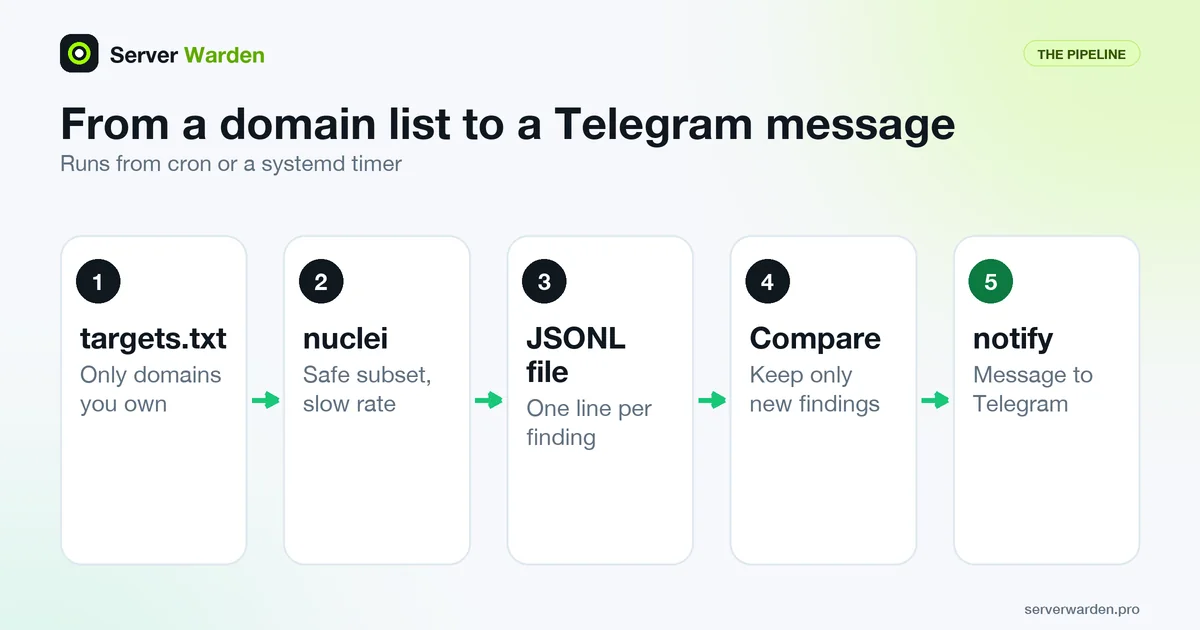
Short answer: install Nuclei and notify under an unprivileged user, scan only your own domains from a targets file with a slow, safe subset of templates and JSONL output, compare the result with the findings you already know, and pipe only the new ones into notify with a Telegram bot configured. Run that script nightly from cron or a systemd timer and keep the bot token in a file with 600 permissions.
Only scan what you own. Everything here is for domains and servers that belong to you or that you have written permission to test. Nuclei is an open-source scanner that checks a site against a library of small YAML templates, and notify is a small ProjectDiscovery tool that forwards text to Telegram and other chat services. This guide is part of the self-hosted external security monitoring cluster, and every command was run in a lab, as described in the last section.
In this article
Only scan what you own, and what Nuclei can find Install Nuclei and notify as an unprivileged user Run a safe, slow subset of templates Scan your domains and add a custom template Send findings to Telegram with notify Alert only on new findings Schedule it with cron or a systemd timer Scanning behind Cloudflare and on a small VPS What to run daily, weekly and after every deploy Frequently asked questionsQuick win (25 minutes)
- Check your own site by hand:
curl -sI https://example.com/.envandcurl -sI https://example.com/.git/configmust not return200. Replace example.com with your domain. - Install Nuclei as in step 1 and run it once against one of your domains with
-rl 5so it stays gentle. - Create the Telegram bot and send one test message with notify (step 4) before you build anything else.
- Run
stat -c "%a %n" ~/.config/notify/provider-config.yamland check that it prints600. - After you enable the timer, run
systemctl list-timers nuclei-watch.timerand confirm a next run time is shown.
Only scan what you own, and what Nuclei can find
Scanners send many unusual requests, and providers and CDNs have their own rules about security testing. Read your hosting provider's acceptable use or penetration testing policy before the first scan.
Nuclei is described in its README as a fast, customizable vulnerability scanner driven by YAML templates. A template says which request to send and what a vulnerable answer looks like. For a site owner it is good at finding:
- Exposed files such as
.env,.git/configanddocker-compose.yml(the fix is in the exposed .env and .git files guide). - Admin panels and default pages that should not be public.
- Misconfigurations such as missing security headers.
- Known CVEs in software it can recognise from a request.
It does not find flaws in your own business logic (can user A read user B's invoice), problems behind a login unless you set up authenticated scanning yourself, or zero-day bugs that have no template yet. A clean report means that no checked pattern matched, not that the site is safe. In the template release we used (v10.5.1), nuclei -tl listed 13,687 templates that run by default, 1,506 of them tagged exposure, 1,003 misconfig and 4,581 cve. This job watches the web part of your attack surface.
Install Nuclei and notify as an unprivileged user
The install page lists Go, Homebrew, a Docker image, a source build and release binaries. We use the release binaries and a dedicated user with no sudo rights, following least privilege. The commands below are for Ubuntu or Debian on x86_64; on ARM replace amd64 with arm64 (we ran the arm64 files). The checksum line must print OK twice.
sudo adduser --disabled-password --gecos "" scanner
sudo apt install -y curl unzip jq ca-certificates
cd "$(mktemp -d)"
VER=3.11.1; NV=1.0.7
curl -fsSLO https://github.com/projectdiscovery/nuclei/releases/download/v$VER/nuclei_${VER}_linux_amd64.zip
curl -fsSLO https://github.com/projectdiscovery/nuclei/releases/download/v$VER/nuclei_${VER}_checksums.txt
curl -fsSLO https://github.com/projectdiscovery/notify/releases/download/v$NV/notify_${NV}_linux_amd64.zip
curl -fsSLO https://github.com/projectdiscovery/notify/releases/download/v$NV/notify_${NV}_checksums.txt
sha256sum --check --ignore-missing nuclei_${VER}_checksums.txt notify_${NV}_checksums.txt
unzip nuclei_${VER}_linux_amd64.zip nuclei
unzip notify_${NV}_linux_amd64.zip notify
sudo install -m 0755 nuclei notify /usr/local/bin/
Then switch to the new user and download the template library. Per the README, -ut updates nuclei-templates and -duc disables the automatic update check:
sudo -u scanner -i
nuclei -ut
nuclei -tv
We saw it install nuclei-templates v10.5.1 into /home/scanner/nuclei-templates. The ProjectDiscovery docs say Nuclei checks for new template releases on every run and downloads them, unless you pass -duc. The engine itself updates only when you run nuclei -up, and the README warns to expect breaking changes between releases and to read the changelog first. So pin the version and update on purpose.
The Docker alternative is docker pull projectdiscovery/nuclei:latest plus volumes for your target list and results, as in the docs example docker run --rm -v ./:/app/ projectdiscovery/nuclei -l /app/urls.txt -jsonl /app/results.jsonl. We pulled it and ran -ut into mounted folders. Its default user is root (we checked), so we prefer the binary; see also Docker host security. The README warns that running Nuclei as a service may pose security risks, so never expose it on a port.
Run a safe, slow subset of templates
The docs say all templates against one target make several thousand requests, and that templates which can cause a denial of service are tagged and excluded by default. The default exclusion list (.nuclei-ignore in the template folder) names the tags dos, local, fuzz, bruteforce and txt-service, and the docs say not to edit that file. We add our own limits on top:
-t DIRECTORYpicks template folders:http/exposures,http/misconfigurationand our own, 1,169 templates after filtering in our lab.-tagsfilters by tag instead.-severity low,medium,high,criticaldrops the noisyinfolevel.-etags dos,fuzz,bruteforce,intrusiveexcludes risky tags explicitly.intrusiveexists in the library (634 templates); we found no official definition, so we exclude it as a precaution.-rl 10 -c 5 -bs 5: requests per second, templates in parallel, hosts per template. The defaults shown bynuclei -hare 150, 25 and 25. The docs say-rlwins over the other two. On a small VPS keep these low.-timeout 10 -retries 1keeps slow hosts from stalling the run.-nidisables Interactsh callbacks. By default Nuclei contacts public servers such as oast.pro for out-of-band checks, which sends traffic to third parties; an exposure scan does not need that.-ducskips the update check during the scan, because the script updates templates in a separate step.
Nuclei also skips a host after too many errors (-mhe, default 30). In our lab, scans with -tags cve stopped early and printed "found unresponsive permanently" although the host was up. With -no-mhe (-nmhe) the same scan ran to the end in 7 min 43 s and matched nothing, as expected on a plain nginx page. Use that flag only for hosts you know are up, and always read the end of a log, not only the findings.
Scan your domains and add a custom template
Put your own hostnames in ~/nuclei-watch/targets.txt, one per line, for example https://example.com and https://app.example.com. The -l flag reads that file and -jsonl writes one JSON object per finding. Here is the full command, which the script in step 5 reuses:
nuclei -l ~/nuclei-watch/targets.txt \
  -t ~/nuclei-templates/http/exposures \
  -t ~/nuclei-templates/http/misconfiguration \
  -t ~/nuclei-watch/custom-templates \
  -severity low,medium,high,critical \
  -etags dos,fuzz,bruteforce,intrusive \
  -rl 10 -c 5 -bs 5 -timeout 10 -retries 1 \
  -ni -duc -silent -nc -omit-raw -jsonl -o results.jsonl
One trap: by default the JSON output includes the full request and response. In our lab the saved file contained the fake database password from the .env it found, and a real scan would copy your real secrets into a log. Add -omit-raw (the fake password was then absent) and keep results in files only the scanner user can read. See secrets management.
The lab. nginx 1.24.0 on Ubuntu 24.04 in a container served a home page, a fake .env (made-up values such as sk_test_EXAMPLE_NOT_A_REAL_KEY) and a fake .git/config. Nuclei ran in a second container on the same private Docker network, and nothing else was scanned.
Two custom templates cover things you may care about. The first reports a served .env file: HTTP 200, lines that look like NAME=value, and no HTML in the body. Save it as ~/nuclei-watch/custom-templates/exposed-dotenv.yaml:
id: my-exposed-dotenv

info:
  name: Exposed .env file
  author: me
  severity: high
  description: A .env file is served over HTTP.
  tags: custom,exposure,config

http:
  - method: GET
    path:
      - "{{BaseURL}}/.env"

    matchers-condition: and
    matchers:
      - type: status
        status:
          - 200

      - type: regex
        part: body
        regex:
          - '(?m)^[A-Z][A-Z0-9_]{2,}='

      - type: word
        part: body
        words:
          - "<html"
          - "<!doctype"
        case-insensitive: true
        negative: true
A second template, missing-nosniff.yaml, reports a home page without an X-Content-Type-Options header: the same layout with a type: word matcher on part: header and negative: true, meaning the word must be absent. Check the syntax with nuclei -validate -t ~/nuclei-watch/custom-templates/; we saw "All templates validated successfully". A scan of the lab with the official http/exposures/configs folder plus these two took 48 seconds at -rl 10:
Trimmed output from the lab run:
[codeigniter-env] [http] [high] http://lab-web/.env
[laravel-env] [http] [high] http://lab-web/.env
[my-exposed-dotenv] [http] [high] http://lab-web/.env
[docker-compose-config] [http] [medium] http://lab-web/docker-compose.yml
[git-config] [http] [medium] http://lab-web/.git/config
[my-missing-nosniff] [http] [low] http://lab-web/
[INF] Scan completed in 47.9s. 6 matches found.
The official templates matched our fake files, and so did our custom ones.
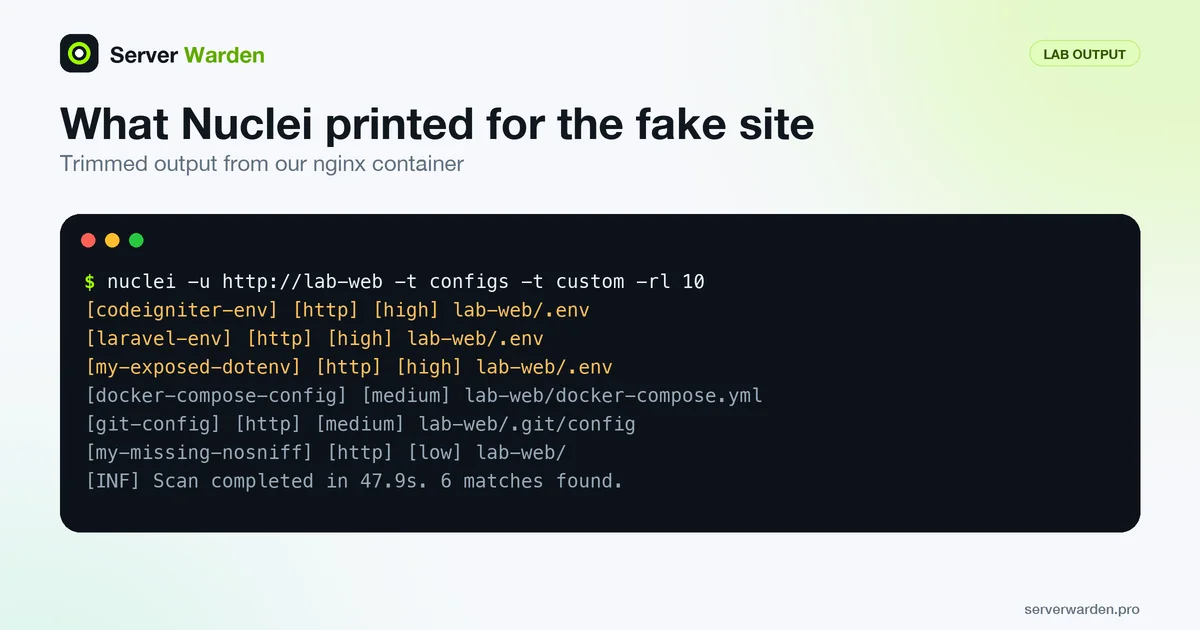
Two official templates name Laravel and CodeIgniter for the same file because both look for .env content, so expect some duplicates.
Want a second pair of eyes on your server?
We run a free read-only check of your server from the outside and send you a short report.
Get your free server check Talk to a security engineerSend findings to Telegram with notify
notify reads text from a pipe or a file and sends it to the providers listed in its config. We installed it in step 1; the README lists go install and our test used the release zip.

Create the bot. Per Telegram's bot documentation, send /newbot to BotFather, choose a name and get a token. Anyone who has the token can control the bot, and /token in BotFather issues a new one. Send your bot any message, then call the getUpdates method (https://api.telegram.org/bot plus your token plus /getUpdates) and read the chat id from the chat object in the reply.
Configure notify. The default provider file is ~/.config/notify/provider-config.yaml. The README names the Telegram fields id, telegram_api_key (the bot token) and telegram_chat_id. Leave telegram_parsemode unset: in the source, empty means plain text, so underscores in template names do not break formatting.
telegram:
  - id: "telegram"
    telegram_api_key: "123456789:EXAMPLE_NOT_A_REAL_TOKEN"
    telegram_chat_id: "123456789"
chmod 700 ~/.config/notify
chmod 600 ~/.config/notify/provider-config.yaml
echo "notify test from my scanner" | notify -bulk -id telegramWhat we tested and what we did not. We cannot send a real Telegram message from the lab, so real delivery to a phone is untested. Instead, the same pipeline ran against a local fake webhook through notify's custom provider with the id telegram, and the webhook received every message:
custom:
  - id: "telegram"
    custom_webhook_url: "http://127.0.0.1:8080/hook"
    custom_method: POST
    custom_format: '{"text":{{dataJsonString}} }'
    custom_headers:
      Content-Type: application/json
We also used the Telegram provider with the fake token above against the real Telegram API. It answered HTTP 401 and notify printed failed to send telegram notification for id: telegram : Unauthorized, so the config format is accepted and a wrong token gives a clear error.
Useful flags from the README: -bulk sends the input as one message instead of one per line (three lines gave three requests without it, one with it), -id picks a provider, -data FILE reads a file, -char-limit defaults to 4000 (the Telegram API allows 1 to 4096 characters) and -rate-limit to 1 request per second. Two surprises in version 1.0.7: notify exits with code 0 even when delivery fails, and -silent hides the error text. The script below therefore checks the output itself.
Alert only on new findings
If the same ten findings arrive every night you will mute the chat. Neither the notify README nor notify -h mentions a dedupe feature, so we compare against a list ourselves. Each finding becomes one line (severity template-id url). The script keeps the lines missing from known.txt (using comm -13), alerts on them, and only then copies the current list over known.txt. A fixed finding drops out of the list, and if it returns you are alerted again. The trade-off: if a site is down during a run, the next run re-alerts everything still open.
Save it as ~/nuclei-watch/run-scan.sh and run chmod +x on it. It sets PATH itself, because in our test cron's PATH was only /usr/bin:/bin, without /usr/local/bin. It uses flock so that two runs never overlap, refreshes templates, and sends a Monday heartbeat so that silence means "nothing new".
#!/usr/bin/env bash
# Scan my own sites with nuclei and alert in Telegram only about NEW findings.
set -euo pipefail
umask 077                                  # new files readable by this user only
export PATH="/usr/local/bin:/usr/bin:/bin" # cron starts with a short PATH
export LC_ALL=C                            # same sort order for sort and comm

BASE="$HOME/nuclei-watch"
RUN="$BASE/runs/$(date -u +%Y%m%dT%H%M%SZ).jsonl"
mkdir -p "$BASE/runs"

# notify exits 0 even when delivery fails, so look for its error text ourselves.
send() {
  local out
  out=$(notify -bulk -id telegram -duc -nc 2>&1) || true
  if printf '%s\n' "$out" | grep -q 'failed to send'; then
    printf '%s\n' "$out" >&2
    return 1
  fi
}

# Only one scan at a time: skip quietly if the previous run is still going.
exec 9>"$BASE/.lock"
flock -n 9 || { echo "previous scan still running, skipping"; exit 0; }

# Refresh the template repository; keep going with the old one if this fails.
nuclei -ut -duc -silent || echo "template update failed, using the old templates"

# The scan itself: a safe subset, slow on purpose, no third-party callbacks (-ni).
nuclei -l "$BASE/targets.txt" \
  -t "$HOME/nuclei-templates/http/exposures" \
  -t "$HOME/nuclei-templates/http/misconfiguration" \
  -t "$BASE/custom-templates" \
  -severity low,medium,high,critical \
  -etags dos,fuzz,bruteforce,intrusive \
  -rl 10 -c 5 -bs 5 -timeout 10 -retries 1 \
  -ni -duc -silent -nc -omit-raw -jsonl -o "$RUN" > /dev/null
touch "$RUN"                               # nuclei writes no file when nothing matched

# One sorted line per finding: "severity template-id url".
jq -r '[.info.severity, .["template-id"], .["matched-at"]] | join(" ")' "$RUN" \
  | sort -u > "$BASE/current.txt"
touch "$BASE/known.txt"
comm -13 "$BASE/known.txt" "$BASE/current.txt" > "$BASE/new.txt"

if [ -s "$BASE/new.txt" ]; then
  { echo "Nuclei: $(wc -l < "$BASE/new.txt") new finding(s), $(date -u +%F)"
    cat "$BASE/new.txt"; } | send
fi
cp "$BASE/current.txt" "$BASE/known.txt"   # only reached if the alert was sent

# Monday heartbeat, so silence means "nothing new", not "the job died".
if [ "$(date +%u)" = 1 ]; then
  echo "Nuclei weekly check ran: $(wc -l < "$BASE/current.txt") open finding(s)." \
    | send
fi

find "$BASE/runs" -name '*.jsonl' -mtime +30 -delete
With the webhook standing in for Telegram, we ran the script six times against the lab, using a copy with the rate limits raised so that each run took about a minute. Results:
- Run 1, started from cron: five findings known to nobody, one message listing all five.
- Run 2, nothing changed: no alert (only the Monday heartbeat, since 9 November 2026 is a Monday).
- Run 3, after we added a fake
docker-compose.yml: one alert with exactly that finding. - Run 4, file removed: no alert, and the list shrank back to five.
- Run 5, file back and the webhook stopped: the script printed the error, exited with code 1 and left
known.txtuntouched. - Run 6, webhook started again: the same finding was alerted.
Schedule it with cron or a systemd timer
Use one of the two. Cron is the shortest: run crontab -e as the scanner user. The crontab manual says an empty MAILTO stops mail and that an unescaped percent sign in a command is special, so avoid percent signs. Use absolute paths:
MAILTO=""
30 3 * * * /home/scanner/nuclei-watch/run-scan.sh >> /home/scanner/nuclei-watch/cron.log 2>&1
In the lab, the Ubuntu cron daemon ran jobs with HOME set to the user's home and PATH=/usr/bin:/bin, and it started run 1 of the script test above; its log stayed empty.
A systemd timer gives you journal logs and catch-up after downtime. Create /etc/systemd/system/nuclei-watch.service and nuclei-watch.timer. The timer manual says a timer starts the service of the same name, Persistent=true runs a missed job after downtime and RandomizedDelaySec adds a random delay. The exec manual describes the sandbox lines: NoNewPrivileges, PrivateTmp, ProtectSystem=strict (file system read-only) with ReadWritePaths as the exception.
[Unit]
Description=Nuclei scan of my own sites with Telegram alerts
After=network-online.target
Wants=network-online.target

[Service]
Type=oneshot
User=scanner
ExecStart=/home/scanner/nuclei-watch/run-scan.sh
Nice=10
TimeoutStartSec=2h
NoNewPrivileges=true
PrivateTmp=true
ProtectSystem=strict
ReadWritePaths=/home/scanner
[Unit]
Description=Run the nuclei scan every night
[Timer]
OnCalendar=*-*-* 03:30:00
RandomizedDelaySec=15min
Persistent=true
[Install]
WantedBy=timers.targetsudo systemctl daemon-reload
sudo systemctl enable --now nuclei-watch.timer
systemctl list-timers nuclei-watch.timer
sudo systemctl start nuclei-watch.service
journalctl -u nuclei-watch.service -eThe last two lines run the job now and read its log (more in server log monitoring). We ran systemd-analyze verify on both files (systemd 255, Ubuntu 24.04): it printed nothing and exited 0, while a deliberately broken file was flagged. systemd-analyze calendar "*-*-* 03:30:00" showed the next run. A real timer was not fired, because the lab container does not run systemd as init.
Keep the token private. It lives in provider-config.yaml: keep the file at mode 600 and the folder at 700 (step 4), never commit it to Git and never paste it into a chat. If it leaks, replace it with /token in BotFather. See what to do after a leaked key.
Before you leave it running, go through this list:
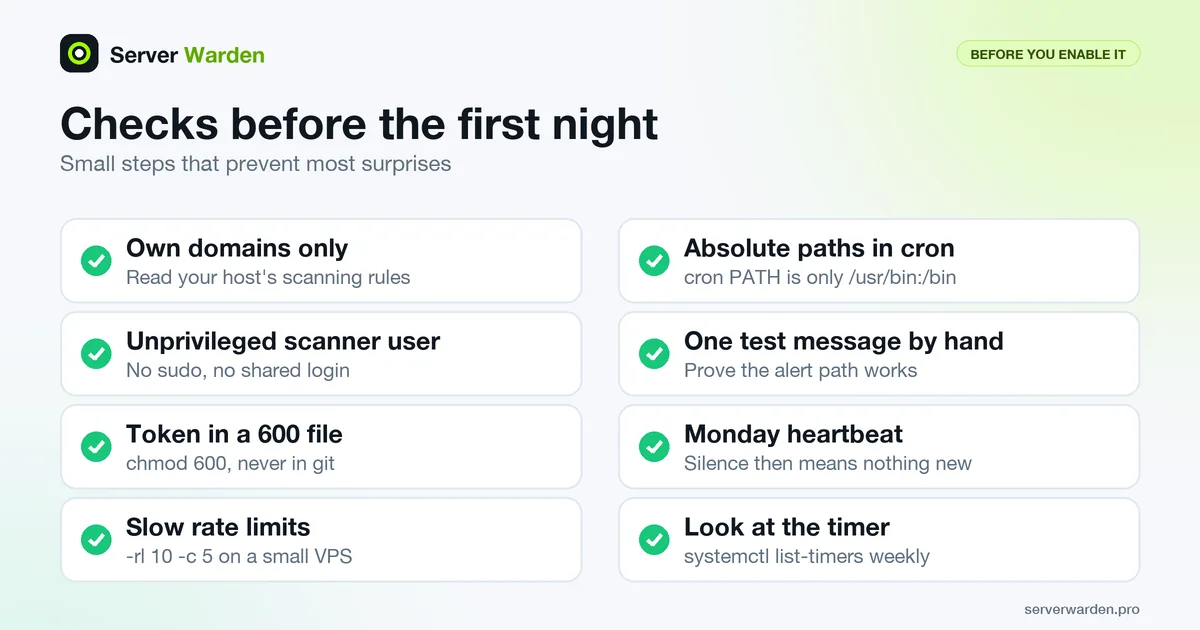
- The targets file contains only your own domains.
- The scanner user has no sudo rights (see sudo and least privilege).
- One test message reached the chat.
- You know where the log is.
Scanning behind Cloudflare and on a small VPS
If Cloudflare proxies your domain, scanning the public hostname shows what visitors see, including Cloudflare's own rules. That is the right view for this job, but two things can interfere. The Bot Fight Mode docs say it challenges traffic that matches known bot patterns, and that skip actions in WAF custom rules do not apply to it, while Super Bot Fight Mode supports skip rules and an IP Access rule that matches the request comes first. The rate limiting rules docs say a rule applies its action (for example block) once a request rate is exceeded. A scanner can trigger either, and then you read challenge pages instead of your site.
- Keep
-rllow, and compare one manualcurl -sI https://example.com/from the scanner machine with what a browser gets. - If you must allow the scanner, use its fixed IP address in a Cloudflare rule that the docs describe, and remember that this lowers protection for that address.
- A scan through Cloudflare does not test your origin server. Whether it answers when someone skips Cloudflare is a separate check, covered in the origin lock-down guide (see also origin server IP and WAF).
On a small VPS, give the job low priority (Nice=10 in the unit, or nice -n 10 in cron) and keep the rate limits low. Ideally run it from another machine, so that it sees what the internet sees; the nginx security guide covers the server side. We did not test Cloudflare, so this section comes from its documentation.
What to run daily, weekly and after every deploy
| When | What to run | Why |
|---|---|---|
| After every deploy | nuclei -u URL -t http/exposures/configs -t ~/nuclei-watch/custom-templates -rl 10 -ni | Catches a leaked .env or .git the same day. Took 48 s in our lab. |
| Every night | The script above | Exposures and misconfigurations, new findings only. Took 6 min 19 s for one target at -rl 10. |
| Every week | Add -tags cve -severity high,critical and read the log | Known CVEs for software it recognises. 7 min 43 s with -no-mhe in our lab, so run it at night. |
| When something changes | Edit targets.txt | New subdomain, new project, retired site. |
Other checks complement this one: an external port scan of your own VPS, scanning JavaScript bundles for leaked keys, and uptime and certificate monitoring with Uptime Kuma. To compare the tools, read Nuclei vs reNgine vs Uptime Kuma, and for the wider routine the VPS security checklist.
What to do next. When a finding arrives, fix it, then wait for the next scan to stop reporting it. For a leaked file follow the exposed files guide above and rotate any secret that was visible. If you are unsure what a finding means, or you suspect someone already used it, ask for help early.
How we checked this. On 9 November 2026 we ran every command in containers: Ubuntu 24.04.5 for the scanner (nuclei 3.11.1, nuclei-templates v10.5.1, notify 1.0.7, jq 1.7, cron and systemd 255 tooling) and Ubuntu 24.04 with nginx 1.24.0 as the target, on a private Docker network. The binaries were the arm64 release builds. We did not test real Telegram delivery, a timer that really fires, or anything with Cloudflare.
Sources: Nuclei README, ProjectDiscovery docs source, nuclei-templates .nuclei-ignore, notify README, Telegram Bot API, Telegram bot features, systemd.timer, crontab(5), Cloudflare Bot Fight Mode, Cloudflare rate limiting rules.
Frequently asked questions
Is it legal to run Nuclei on my own website?
Scanning domains and servers that you own is the normal use, but check your hosting provider and CDN rules first, because some require notice or forbid certain tests. Never scan systems you do not own or have written permission to test. This is not legal advice.
How do I get a Telegram bot token and chat id for notify?
Send /newbot to BotFather in Telegram to get a token, then send your bot a message and read the chat id from the getUpdates method of the Bot API. Put both into provider-config.yaml as telegram_api_key and telegram_chat_id, and keep the file at mode 600.
Why does notify say "failed to send telegram notification ... Unauthorized"?
Telegram rejected the bot token, which is what happened in our test with a fake token. Re-copy the token from BotFather, check that the telegram_api_key line has no extra spaces, and remember that notify 1.0.7 still exits with code 0 after this error.
How do I stop Nuclei from sending the same alert every night?
Write one sorted line per finding to a file, compare it with the list from the last run using comm -13, and send only the lines that are new. The script in this guide does exactly that and replaces the known list only after the alert was sent.
Will Nuclei slow down or crash my small VPS?
It can if you use the defaults of 150 requests per second and 25 parallel templates. Use -rl 10 -c 5 -bs 5, run it at night with Nice=10, and prefer a second machine as the scanner.
Why are my Nuclei results empty or strange behind Cloudflare?
Cloudflare may be challenging or rate limiting the scanner, so Nuclei sees challenge pages instead of your site. Lower -rl, check a manual curl from the scanner machine, and if needed allow the scanner IP with a rule from the Cloudflare docs.
How often should I run Nuclei and update its templates?
Run the safe subset nightly, a short run after every deploy and a CVE run weekly. Nuclei downloads new template releases on each run unless you pass -duc, while engine updates need nuclei -up and a look at the changelog first.
Not sure where your server stands?
Get a free, read-only security check, or talk to a security engineer about managed protection.
Get your free server check Talk to a security engineer