Nuclei
Nuclei is an open-source vulnerability scanner from ProjectDiscovery, released under the MIT license. It reads YAML templates that describe a request and the response that proves a problem, sends them to the targets you give it and prints each match with a severity. It is used to check your own sites and servers for known exposures and misconfigurations.
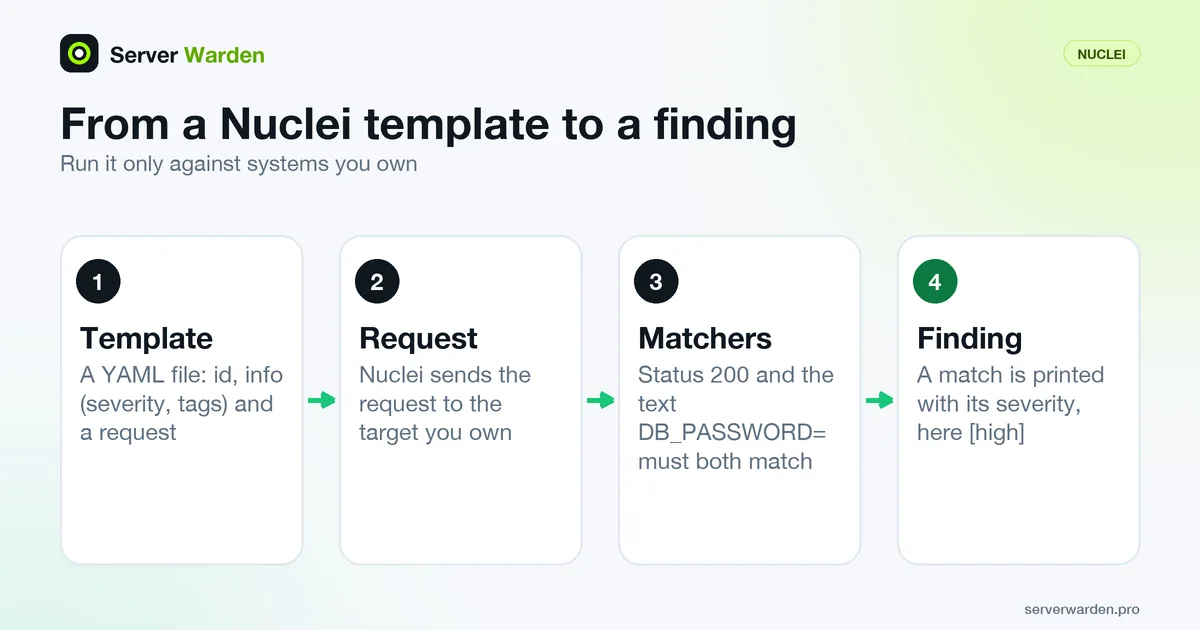
How a Nuclei template works
The Nuclei README describes a template engine: every check is a YAML file that says what to send and what a vulnerable answer looks like. Protocols include HTTP, DNS, TCP, SSL, WHOIS, JavaScript and code, and the flag help also lists file, headless, websocket and workflow. A minimal template for an exposed .env file, which we ran for this entry, looks like this:
id: env-file-check

info:
  name: Exposed .env file check
  author: serverwarden
  severity: high
  tags: exposure,config

http:
  - method: GET
    path:
      - "{{BaseURL}}/.env"
    matchers-condition: and
    matchers:
      - type: status
        status:
          - 200
      - type: word
        part: body
        words:
          - "DB_PASSWORD="
The id names the check, the info block carries a name, an author, a severity and tags, and the http block requests a path. The matchers decide whether the answer counts. Here both a 200 status and the text DB_PASSWORD= must be present, which cuts false alarms. The real-world version of this problem is covered in exposed .env and .git files.
Severity, tags and the community template set
The built-in help lists the severity values info, low, medium, high, critical and unknown. You narrow a run with -severity (-s), -tags and -etags (exclude tags), and -tl lists the templates a filter would pick without running them. The running documentation says that several filters work together with AND, so every one must match.
nuclei -u https://example.com -s high,critical -tags exposure -rl 10Most people do not write every template. The nuclei-templates repository is a community-curated, MIT-licensed collection, and -ut updates your local copy. The same documentation notes that Nuclei checks for new template releases on each run, which -duc turns off, that some templates are excluded by default, and that fuzzing, headless and code templates need their own flags (-dast, -headless, -code).
Pick tags for what you actually run, for example the nginx or WordPress checks, so the output stays short.
What we ran, and safe settings for a small server
We ran Nuclei v3.11.1 from the official projectdiscovery/nuclei Docker image against a throwaway container that served a fake .env file, on a private Docker network. Nothing outside our own machine was contacted.
docker run --rm --network nucnet -v "$PWD:/t:ro" projectdiscovery/nuclei:latest -u http://nuc-target:8080 -t /t/env-file-check.yaml -duc -ncIt printed [env-file-check] [http] [high] http://nuc-target:8080/.env and "1 matches found". The -validate flag reported that the template validated, and adding -s critical loaded no templates, so the run stopped with "no templates provided for scan", which shows that the filter reads the info block.
The default request rate is 150 per second (-rl), which is a lot for a small VPS, so lower it. Add -jsonl or -silent for output a script can read, as in the scheduled scans with Telegram alerts guide.
What Nuclei does not do
A template only checks what its author wrote down. Nuclei therefore finds known exposures and misconfigurations, not a zero-day exploit that has no template yet, and a clean run is not proof that a server is safe. A match still needs a person to read it, and an unpatched package stays unpatched until you do the work described under patch management.
Treat it as a command-line tool. The README says Nuclei is primarily built as a standalone CLI, that running it as a service may pose security risks, and that the project is in active development, so expect breaking changes between releases.
Many templates send real requests, so scan only systems you own or are authorized to test, keep the rate low and run it outside busy hours. It looks at one URL or host at a time. To discover which hosts exist at all, start from your attack surface, and see Nuclei vs reNgine vs Uptime Kuma for how it differs from reNgine and Uptime Kuma.
Related terms: Attack surface, reNgine, Uptime Kuma, Patch management, Zero-day exploit.
Frequently asked questions
Is Nuclei free?
Yes. The Nuclei engine and the community nuclei-templates repository are both published under the MIT license. ProjectDiscovery also offers a hosted cloud edition, which is optional.
What are Nuclei templates?
They are YAML files that define a request to send and the matchers that decide whether the response shows a problem. Each has an id, an info block with severity and tags, and a protocol block such as http.
Which severity levels does Nuclei use?
info, low, medium, high, critical and unknown. You filter with -severity or -s, for example -s high,critical, and exclude with -es.
Can I run Nuclei against any website?
No. Run it only against systems you own or have written permission to test, because templates send real requests. Lower the rate with -rl so a small server is not overloaded.
Does Nuclei replace patching or a firewall?
No. It reports known issues that a template describes. You still have to fix them, keep packages updated and close ports you do not need.
Want to see where your own server stands?
Run the free, read-only server check, or open the Security Lab and watch the detect, contain, recover, verify loop in action.
Get your free server checkOpen the Security Lab