Uptime Kuma
Uptime Kuma is a self-hosted, MIT-licensed monitoring tool with a web interface. It checks at set intervals whether your websites and services answer, over HTTP(s), TCP, ping, DNS and other monitor types, and sends an alert to Telegram, email or another channel when they do not. It can also publish status pages.
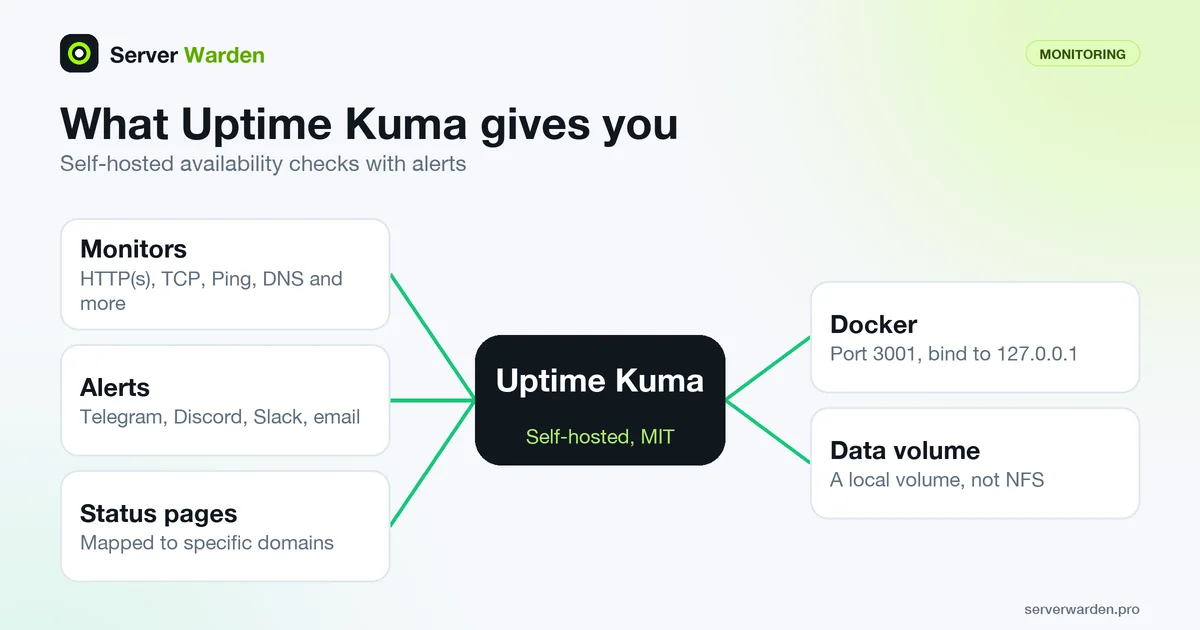
What Uptime Kuma checks
The Uptime Kuma README lists these monitor types: HTTP(s), TCP, HTTP(s) Keyword, HTTP(s) JSON Query, WebSocket, Ping, DNS Record, Push, Steam Game Server and Docker Containers. Each monitor is a check that runs on a schedule, and the README mentions intervals of 20 seconds. It also lists certificate information and 2FA support for the login.
For a small business site that means one HTTP(s) monitor on the home page, one on the login or checkout page, a TCP monitor on a port that must stay up, such as your mail server, and a DNS monitor for the records that matter. The keyword and JSON query types look at the content of the response, which helps when a page still returns 200 but shows an error text.
A monitor reports what an outside visitor would see: up or down, and how fast. It does not look inside the server. For logs and host-level signals, see server monitoring and log analysis.
Alerts and status pages
An alert is the reason to run the tool. The README names Telegram, Discord, Gotify, Slack, Pushover and email (SMTP), plus more than 90 other notification services. Pick a channel you actually read on your phone and send a test message when you set it up.
The README also lists multiple status pages that can be mapped to specific domains. A status page is a public or shared page that shows whether your services are up, which is useful for customers or a client of an agency, but it is a public view of your infrastructure, so do not put internal host names on it.
What you gain is a shorter time between an outage and your noticing it. An outage can be a crash, an expired certificate, a full disk, a bad deploy or a DDoS attack, and the monitor will not tell you which. It only tells you that something stopped answering, so you still need logs to find the cause. See Uptime Kuma on a VPS with Docker, SSL and Telegram for a full setup.
Running it with Docker
The README gives this command, and the web interface uses port 3001:
docker run -d --restart=always -p 3001:3001 -v uptime-kuma:/app/data --name uptime-kuma louislam/uptime-kuma:2The README also says that to limit access to localhost you bind the port as 127.0.0.1:3001:3001. On a server that is the better choice. The Docker documentation says ports are published to all host addresses by default, which it calls insecure by default, and that publishing to 127.0.0.1 limits access to the Docker host. Put the interface behind a reverse proxy with HTTPS and a login instead of exposing 3001 to the internet.
We ran louislam/uptime-kuma:2 with that command on a local Docker, with the port bound to 127.0.0.1. The container reported healthy, its package.json showed version 2.5.9 under the MIT license, and the first request was redirected to /setup-database, where the logs showed it waiting for user action. We went no further.
Without Docker the README requires Node.js 20.4 or later, and it says NFS file systems are not supported, so keep the data on a local volume.
What it does not do
Uptime Kuma measures availability. It does not detect an intrusion, scan for vulnerabilities, read your logs or block anything. A hacked site that still returns 200 looks healthy to a plain HTTP check, so use a keyword monitor for content you control, and use tools such as Nuclei for known exposures. Nuclei vs reNgine vs Uptime Kuma shows where each fits.
Run it away from what it watches. If the monitor lives on the same server as your site, one failure takes both down and no alert is sent. A cheap second VPS or a different provider is a better home, with its own updates and firewall, as covered in Docker host security.
The interface is itself a login page on the internet, so keep it patched, use a strong password and the 2FA the README lists, and do not publish the port without the proxy. Alerts also depend on the channel working: if Telegram is blocked or the token is revoked, silence looks like good news.
Related terms: Reverse proxy, SIEM, VPS, DDoS attack, Nuclei.
Frequently asked questions
Is Uptime Kuma free?
Yes. It is open source under the MIT license and you host it yourself, so you pay only for the server it runs on.
What can Uptime Kuma monitor?
The README lists HTTP(s), TCP, HTTP(s) Keyword, HTTP(s) JSON Query, WebSocket, Ping, DNS Record, Push, Steam Game Server and Docker Containers monitors.
How do I get alerts from Uptime Kuma?
Add a notification channel in the interface and attach it to your monitors. The README names Telegram, Discord, Gotify, Slack, Pushover and email (SMTP), plus more than 90 other services.
How do I keep the Uptime Kuma interface private?
Publish the container port only on localhost with 127.0.0.1:3001:3001 and reach it through a reverse proxy with HTTPS and a login. Turn on the 2FA that the README lists.
Does Uptime Kuma detect hacking?
No. It checks whether services answer, not whether someone broke in. Use logs, a scanner and updates for security, and keep the monitor on a separate host.
Want to see where your own server stands?
Run the free, read-only server check, or open the Security Lab and watch the detect, contain, recover, verify loop in action.
Get your free server checkOpen the Security Lab