reNgine
reNgine is an open-source web application reconnaissance suite released under the GNU GPL v3. Through one web interface it runs and chains tools for subdomain discovery, port identification, endpoint collection, screenshots and vulnerability scanning with Nuclei, stores the results in a database and compares scans over time. Use it on domains you own.
What reNgine bundles
The reNgine README describes a suite that wraps several command-line tools behind one interface and database. Its feature list covers subdomain discovery, IP and open port identification, endpoint discovery, directory and file fuzzing, screenshot gathering, WHOIS identification and WAF detection. For vulnerability scanning it names Nuclei, the Dalfox XSS scanner, CRLFuzzer and a misconfigured S3 bucket scanner. The README also mentions Subfinder, Naabu and amass in its configuration notes.
In other words, reNgine does not invent new checks. It is an orchestrator: it runs the tools, keeps their output in one place, and lets you filter and query it, with roles (Sys Admin, Penetration Tester, Auditor), PDF reports and a screenshot gallery.
That is useful when you have several domains and many subdomains and want one inventory. It helps with subdomain enumeration and with finding open ports as a first step toward a smaller attack surface, and it can pass hosts to Nuclei. For a single small site it is more than you need.
Scan engines, scheduling and change detection
The README says scans are driven by highly configurable YAML-based scan engines. The pre-configured engines are Full Scan, Passive Scan, Screenshot Gathering and OSINT, so you can start with a narrower engine and move to a full scan once you are comfortable with the load.
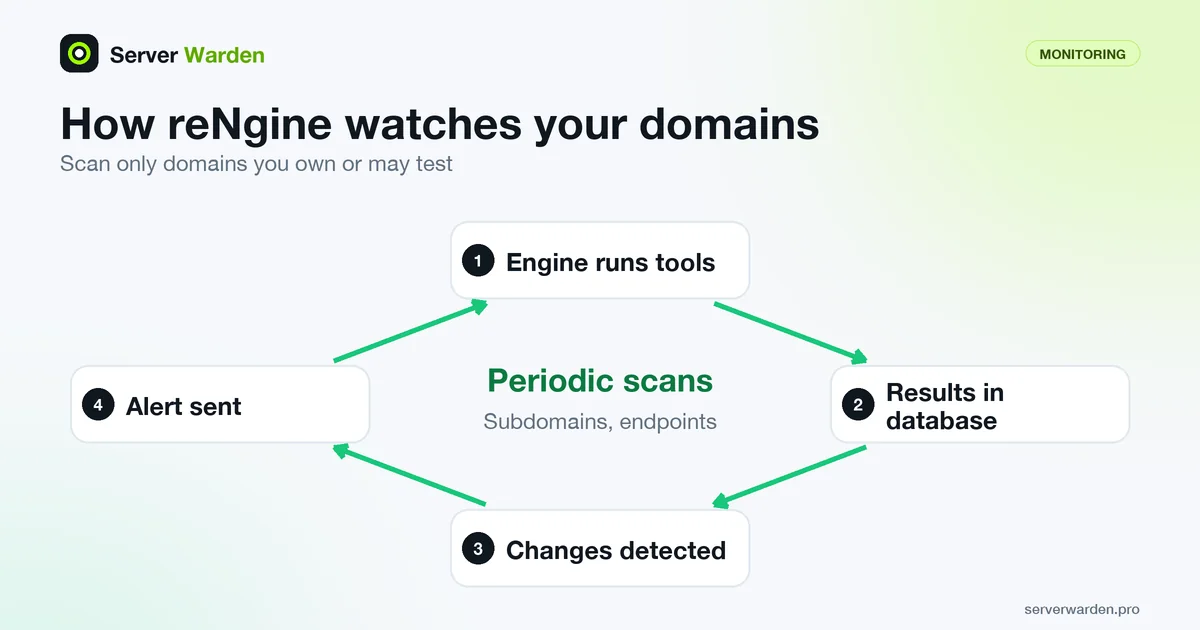
The part that suits monitoring is scheduling. The README lists clocked and periodic scans, recon data change detection, which reports new and removed subdomains and endpoints, and alerts on Slack, Discord and Telegram. A new subdomain you did not create, or an endpoint that appeared after a deploy, is exactly the kind of change you want to hear about early.
The README also lists GPT-based features that write vulnerability descriptions and generate an attack surface summary, and says that version 2.1.0 added support for local models. Treat generated text as a draft that a person checks, as with any scanner output.
Which tool to start with, and how reNgine differs from a single-purpose scanner, is compared in Nuclei vs reNgine vs Uptime Kuma.
Setup and requirements as the README states them
We did not install reNgine for this entry, so the details here come from its README, which showed version 2.2.0 when we read it. On Ubuntu or a VPS it asks you to clone the repository, edit the .env file and change POSTGRES_PASSWORD, set the concurrency, then run the installer:
sudo ./install.shThe README gives example values for MAX_CONCURRENCY by memory: 10 for 4 GB of RAM, 30 for 8 GB and 50 for 16 GB, and says real capacity also depends on bandwidth and CPU count. It reaches the interface at https://127.0.0.1 or the server address after the install, and the install and update scripts need root or sudo. A non-interactive install is available with -n.
The README does not publish a full requirements list, so plan for a machine with RAM to spare. Because many tools run in parallel, put it on its own host, not on the server that runs your production site. See isolating projects on one VPS for testing it safely.
Limits and cautions
reNgine is a recon suite for security professionals and bug bounty hunters, as its README puts it, and it is broader than most small sites need. Its output is long and noisy, because discovery tools list everything they find, so expect to spend time deciding what matters. Pair it with port scanning checks you understand, not a result you take on trust.
The README contains no statement about authorization or legal use, so the rule is yours to keep: scan only domains and networks you own or have written permission to test. Aggressive modes such as fuzzing generate heavy traffic.
It stores findings in a database and exposes a login, so protect the interface with a firewall or VPN rather than leaving it on the open internet, and change the default database password as the README instructs. The project is described by its maintainer as a passion project, and support runs through a community Discord with no guaranteed response time, so check that your installed version is current before you rely on it.
Related terms: Attack surface, Nuclei, Subdomain enumeration, Port scanning, Uptime Kuma.
Frequently asked questions
What is reNgine used for?
It maps and checks the domains you own: subdomain discovery, open ports, endpoints, screenshots and vulnerability scans, all stored in one database with a web interface and scheduled re-scans.
Does reNgine include Nuclei?
Yes. The README lists Nuclei among its vulnerability scanners, alongside Dalfox, CRLFuzzer and a misconfigured S3 bucket scanner.
What license does reNgine use?
The README states that it is distributed under the GNU GPL v3 license.
How much RAM does reNgine need?
The README does not give a minimum. Its example concurrency settings are 10 for 4 GB, 30 for 8 GB and 50 for 16 GB of RAM, and it adds that CPU and bandwidth also matter.
Can I scan any domain with reNgine?
No. Scan only domains and networks you own or have written permission to test. The tool does not check authorization for you, and fuzzing generates heavy traffic.
Want to see where your own server stands?
Run the free, read-only server check, or open the Security Lab and watch the detect, contain, recover, verify loop in action.
Get your free server checkOpen the Security Lab