Subdomain enumeration
Subdomain enumeration is the process of building a list of the hostnames that exist under a domain, such as app.example.com or staging.example.com. For a domain you own it is an inventory task: you collect names from your DNS zone, certificate logs and old records to find forgotten hosts, dangling records and services you never meant to expose.
Start with the records you own
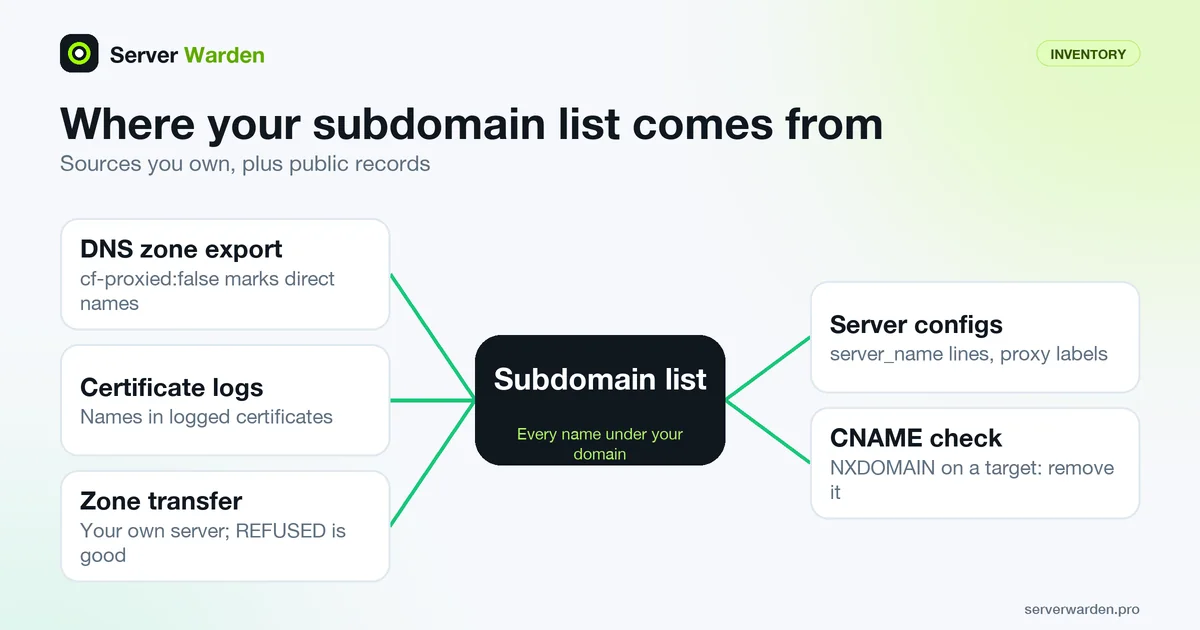
The most reliable list is the one you already hold. Your DNS provider can export the whole zone: Cloudflare offers an export in the dashboard under DNS Records, Import and Export, and through an API endpoint, as the Cloudflare import and export page explains. Exported records are marked cf-proxied:true or cf-proxied:false, which also shows which names point straight at your server.
The OWASP Web Security Testing Guide makes the same point from the tester's side. Its subdomain takeover test (WSTG-CONF-10) says that when the DNS zone file is available, DNS enumeration is not necessary. Guessing names from a wordlist only finds names somebody guessed, while the zone file lists what exists.
Add the places your server names live: server_name lines in nginx, reverse proxy labels and old deploy notes. Each unexpected name is one more entry in your attack surface.
Passive sources: certificate logs
Public certificate authorities record the certificates they issue in Certificate Transparency logs, and each entry lists the names the certificate covers. Searching those logs for your domain therefore turns up hostnames that once had a certificate, including ones you forgot. It is passive: you read public records and send nothing to the host.
The open source Cert Spotter monitor reads a watch list, one DNS name per line, stored in $HOME/.certspotter/watchlist. Its README says a leading dot, as in .example.com, covers the domain and every name under it, while a name without the dot matches only itself. It can alert by email or run a script. We have not run it, because it contacts public log servers, so treat this as documented behaviour rather than something we tested.
The limit is coverage. Only names that appeared in a publicly logged certificate show up here. A host that runs plain HTTP, or one that sits behind a certificate you never logged, will not, so a log search complements the zone file and never replaces it.
Zone transfer on your own name server
A zone transfer (AXFR) is the DNS mechanism a secondary server uses to copy a whole zone from the primary. RFC 5936 says an administrator may restrict AXFR and that an implementation should offer a way to restrict it to specific clients. OWASP's WSTG-INFO-04 page notes that transfers are now largely not honoured, which is the correct outcome for a public server.
We ran BIND 9.18 in an Ubuntu 24.04 container with a sample zone for example.com and allow-transfer set to 127.0.0.1. From that address the transfer returned the zone's name server and address records, including hosts nobody linked to:
host -l example.com 127.0.0.1It listed app, mail, staging and the name server. Then we set allow-transfer to none and the same command printed REFUSED. Use this only to audit your own server, and confirm that a request from an address outside allow-transfer is refused. If it is not, your whole zone is readable by anyone, which is a finding to fix.
Using the list: dangling records
The point of the list is to act on it. A record that points to a resource that no longer exists is dangling, and the OWASP test describes how an attacker who claims that resource gets control of your subdomain. Its remediation is to remove the vulnerable record from the zone, with continuous monitoring and periodic checks.
Check each CNAME target. We used a zone with old-app pointing at a name that did not exist:
dig +short CNAME old-app.example.com
dig +noall +comments A gone.example.com | grep status
The first command printed gone.example.com. and the second reported NXDOMAIN, one of the answers OWASP lists as worth investigating, along with SERVFAIL and REFUSED. Delete the record, or restore the service.
A list is a snapshot, so schedule it again. For the hosts that remain, see port scanning and the external port scan guide. Run all of this only on domains you own or have written permission to test.
Related terms: Attack surface, Certificate Transparency, Port scanning, Origin server IP, nginx.
Frequently asked questions
Is subdomain enumeration safe to run?
Reading your own zone file and public certificate logs touches no one else. Run any active guessing or probing only against domains you own or have written permission to test.
What is the easiest way to list my subdomains?
Export the DNS zone from your provider, then compare it with the names found in certificate logs. The zone shows what exists, and the logs show names that once had a certificate.
Why does a zone transfer return REFUSED?
Servers restrict AXFR on purpose, and RFC 5936 says implementations should be able to limit it to specific clients. Allow it only to your own secondary servers.
What is a dangling DNS record?
It is a record, often a CNAME, that points to a resource that no longer exists or is no longer yours. OWASP says the fix is to remove the record from the zone.
How often should I repeat the inventory?
Regularly, because new records appear whenever someone deploys something. OWASP recommends continuous monitoring and periodic checks for dangling records.
Want to see where your own server stands?
Run the free, read-only server check, or open the Security Lab and watch the detect, contain, recover, verify loop in action.
Get your free server checkOpen the Security Lab