Port scanning
Port scanning is the practice of sending probes to a host to find out which network ports answer, and so which services are reachable. Run from outside against your own server, it shows what the internet can see after your firewall has done its work. Nmap, the standard tool, reports each port as open, closed, filtered or one of three less certain states.
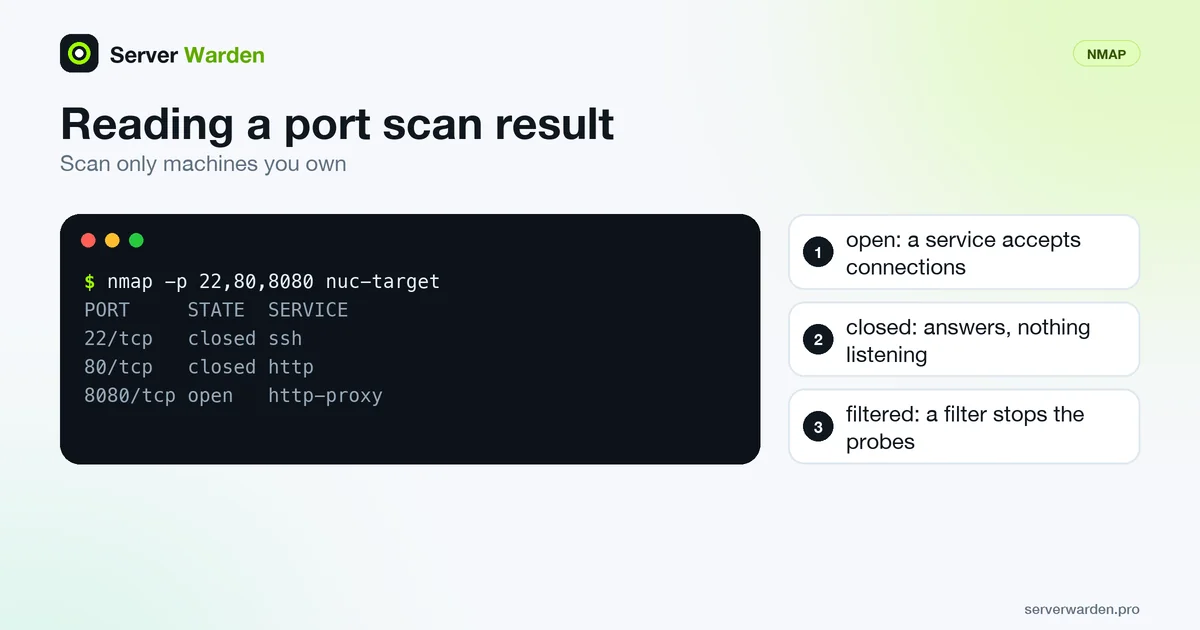
The six port states
The Nmap documentation defines six states, and reading them correctly is most of the skill:
- open: a service is listening and accepts connections or datagrams.
- closed: the port is reachable and answers, but nothing is listening.
- filtered: packet filtering, such as a firewall rule, stops the probes, so Nmap cannot tell whether the port is open. Filters often drop probes silently, which makes the scan slower.
- unfiltered: the port is reachable but Nmap cannot tell whether it is open or closed. Only the ACK scan gives this.
- open|filtered: Nmap cannot tell which, because open ports do not reply to that scan type. UDP, FIN, NULL, Xmas and IP protocol scans give this.
- closed|filtered: Nmap cannot tell which. Only the IP ID idle scan gives this.
For your own server, the states you want from outside are closed or filtered on everything except the services you chose to publish.
Scan types and how long they take
According to the scan techniques page, the default for a privileged user is the SYN scan (-sS). Nmap sends a SYN packet and reads the reply without completing the handshake, which is why it is called half-open. A SYN/ACK means open, a reset means closed, and no answer after retries means filtered. An unprivileged user gets the TCP connect scan (-sT), because raw packets cannot be sent.
UDP scanning (-sU) is slower. The documentation explains that many hosts rate-limit the ICMP port unreachable replies, and that Linux allows about one per second, so a full scan of all 65,536 UDP ports could take more than 18 hours. A UDP port with no reply is shown as open|filtered.
The built-in help lists -p to choose ports (for example -p1-65535), -F for fewer ports than the default, --top-ports for the most common ones and -sV to probe open ports for service and version information.
What we ran
We ran Nmap 7.93 from a Debian 12 container against a second container that serves files with Python on port 8080, both on a private Docker network. Nothing outside our own machine was scanned.
nmap -p 22,80,8080 nuc-target
PORT     STATE  SERVICE
22/tcp   closed ssh
80/tcp   closed http
8080/tcp open   http-proxy
A plain nmap nuc-target printed "Not shown: 999 closed tcp ports (reset)" and listed only 8080, which accounts for 1,000 ports scanned by default. It finished in about 0.1 seconds on the local network. Adding -sV on that single port took about 92 seconds and reported the banner "SimpleHTTP Python/3.15.2", while still printing "1 service unrecognized despite returning data".
Two lessons follow. The SERVICE column is a label for the port number unless -sV checked it, and version detection can be far slower than a plain scan. To repeat this against your own server on a schedule, see scanning your own VPS with Nmap and cron.
Permission, impact and limits
The Nmap legal issues page says the legality of scanning has no simple answer, that unauthorized scans can break a provider's acceptable use policy and that written authorization from the network owner is strongly recommended. Scanning your own servers rarely draws complaints. Scan only machines you own or are allowed to test, and prefer the SYN scan with slower timing, since the same page notes that Nmap tries to tread lightly but crashes of fragile devices do happen.
A scan shows reachability, not safety. An open port may be exactly what you want, and a closed one does not mean the server is patched. Filtered is ambiguous by nature: something dropped the probe, and it could be a firewall or a host that is down.
Scan from another network, not from the server itself, because a local scan does not show what a default-deny policy blocks for outsiders. Compare the result with your intended attack surface and with the rules in the Linux firewall guide.
Related terms: Attack surface, Firewall, Default-deny policy, UFW, nftables.
Frequently asked questions
What is port scanning?
It is sending probes to a host to see which ports answer. The result shows which services can be reached and whether a firewall is filtering the rest.
What do open, closed and filtered mean in Nmap?
Open means a service accepts connections. Closed means the port answers but nothing listens. Filtered means a firewall or other filter stops the probes so Nmap cannot tell.
Is it legal to scan my own server?
Scanning machines you own or administer rarely draws complaints. Scanning others without permission may break their provider rules or local law, so get written authorization first.
Why is a UDP scan so slow?
Many hosts rate-limit ICMP port unreachable replies, and Nmap documents that Linux sends about one per second. A full scan of all UDP ports can take many hours.
Does a port scan find vulnerabilities?
No. It shows which ports are reachable and, with -sV, what answers. Use a vulnerability scanner and patching to judge whether the service itself is safe.
Want to see where your own server stands?
Run the free, read-only server check, or open the Security Lab and watch the detect, contain, recover, verify loop in action.
Get your free server checkOpen the Security Lab