Patch management
Patch management is the ongoing process of tracking, testing and applying software updates that fix known security vulnerabilities, rather than updating only when something breaks.
Why 'update when something breaks' is not a strategy
Waiting for a visible failure to trigger updates means every known, already-patched vulnerability sits unaddressed for however long that takes, which is exactly the window that n-day exploits are built to take advantage of.
What a working process actually looks like
A basic process tracks which packages have available updates, distinguishes routine updates from critical security fixes that need faster turnaround, and tests changes before they reach production wherever practical, rather than applying everything blindly the moment it is released.
For a working process you can adopt today, see our server patch management guide.
Four situations a patch process has to cover
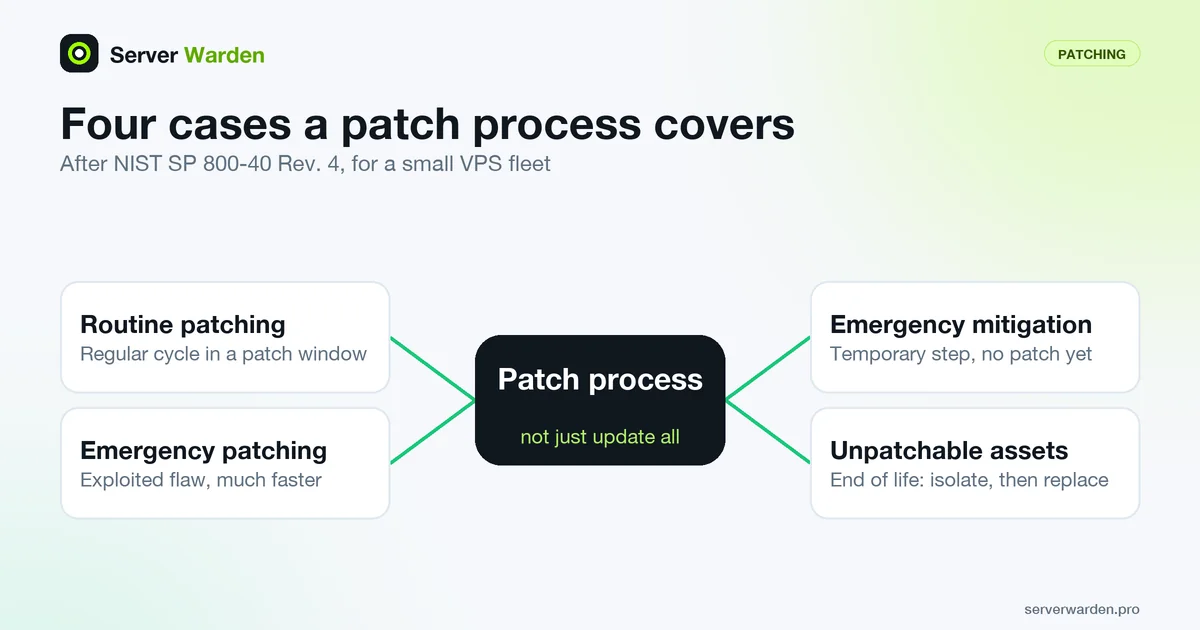
NIST's SP 800-40 Rev. 4 suggests planning for four different responses instead of one generic "update everything" habit. Translated to a small Linux VPS fleet:
- Routine patching: the regular cycle for ordinary updates, handled in a scheduled patch window.
- Emergency patching: a severe or actively exploited flaw, such as an entry on the CISA KEV catalog in software you run, installed on a much faster schedule.
- Emergency mitigation: a temporary protective step, such as disabling a feature or blocking a port, while no safe patch exists yet.
- Unpatchable assets: systems that no longer receive vendor fixes, for example an end-of-life operating system. NIST points to isolation and other compensating measures for these, plus a plan to replace them.
The document also warns that putting off routine patching makes emergencies harder, because earlier updates that new patches depend on have to be installed first. A backlog is a risk in itself, not just an untidy list.
Checking what is pending, including restarts
Installing a package update replaces files on disk, but a service that is already running keeps using the old library until it restarts. The dnf needs-restarting documentation makes the same point: processes often need a restart before a security update takes effect. A complete check therefore covers both the packages and the processes:
# Debian / Ubuntu
apt list --upgradable
sudo needrestart -r l
test -f /var/run/reboot-required && echo "reboot required"

# RHEL family
sudo dnf updateinfo list --security
sudo dnf needs-restarting -r
According to the needrestart project, the -r l mode only lists affected services and restarts nothing, and -k checks for an obsolete kernel. On RHEL-family systems dnf needs-restarting -r exits with code 1 when a reboot is required, which makes it easy to use in a script. Run these after every update cycle, then follow the rest of the routine in the server patch management guide. A useful definition of "done" is simple: nothing pending, nothing flagged for restart, and no reboot required. A server that reports no pending packages but still runs an outdated library is not actually patched.
Related terms: Kernel live patching, N-day exploit, CVSS, CISA KEV catalog.
In the news: CISA's September 2026 KEV catalog additions included a flaw exploited to deploy reverse shells and crypto miners, a real example of why patch speed matters.
Frequently asked questions
How often should patches be applied?
Critical security patches should be applied as soon as practically possible; routine, non-security updates can follow a slower, scheduled cadence such as a weekly or monthly patch window.
Is automated patching enough on its own?
For most routine updates, yes, through something like unattended-upgrades. Critical fixes sometimes still warrant a faster, manually confirmed rollout rather than waiting for the next automated cycle.
What is the risk of patching too aggressively without testing?
An update can occasionally break a dependency or configuration; testing critical services after major updates, especially kernel or database upgrades, reduces the chance of an update itself causing an outage.
What should I do about software that no longer receives patches?
NIST SP 800-40 Rev. 4 calls these unpatchable assets and recommends isolating them or applying other mitigations while planning for replacement. In practice that means moving to a supported release, or at minimum restricting network access to the system as tightly as you can.
How can I install only security updates on a RHEL-family server?
Run dnf upgrade --security, which includes only packages that fix a security issue according to the DNF documentation. Running dnf updateinfo list --security first shows which advisories are waiting.
Want to see where your own server stands?
Run the free, read-only server check, or open the Security Lab and watch the detect, contain, recover, verify loop in action.
Get your free server checkOpen the Security Lab