WAF (Web Application Firewall)
A WAF (web application firewall) is a layer that inspects HTTP requests for attack patterns like SQL injection before they reach the application itself, complementing rather than replacing server hardening.
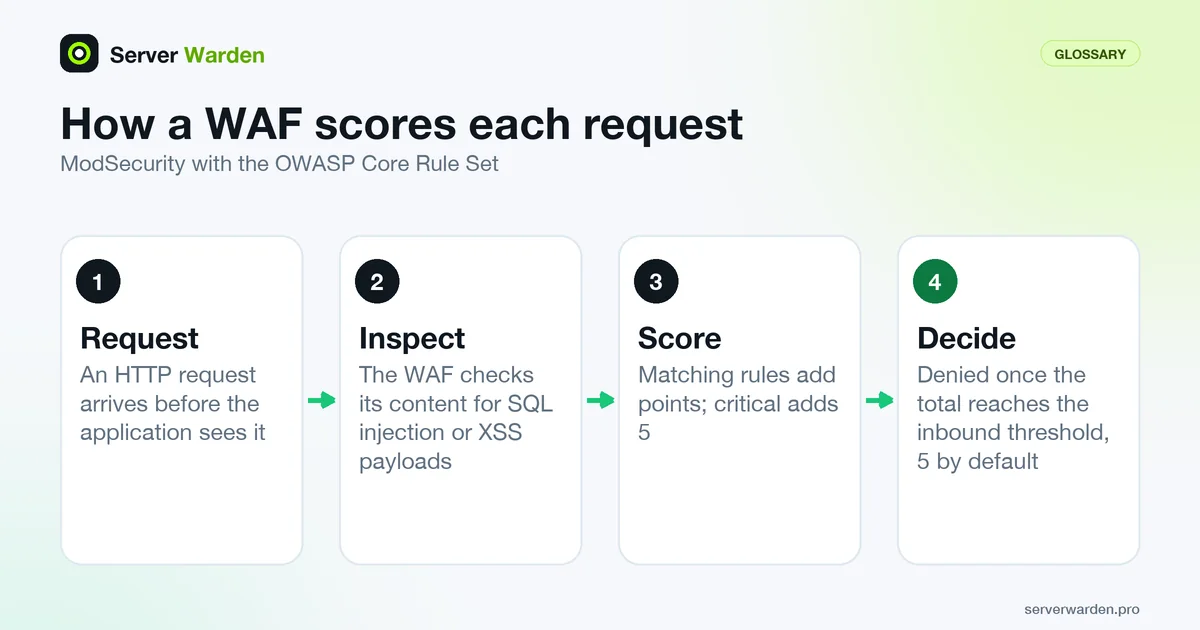
What a WAF actually looks at
WAF stands for web application firewall.
A WAF inspects the content of HTTP requests, not just whether a connection should be allowed, checking for known attack patterns such as SQL injection attempts or cross-site scripting payloads before those requests ever reach the application.
Why it is a complement, not a substitute
A WAF catches many known attack patterns, but a genuinely vulnerable application can still be exploited through a request that does not match any known bad pattern. Fixing the underlying vulnerability still matters even with a WAF in place.
Our nginx security guide covers WAF options alongside rate limiting for web servers.
Running a WAF on the server itself: ModSecurity and the OWASP CRS
The most common self-hosted combination is ModSecurity with the OWASP Core Rule Set (CRS), a set of generic attack detection rules aimed at threats such as SQL injection, cross-site scripting and local file inclusion. For nginx you need ModSecurity v3 (libmodsecurity) plus the separate ModSecurity-nginx connector, which is built as a static or dynamic module (a dynamic build needs source matching your running nginx version). Once built, two directives switch it on:
server {
    modsecurity on;
    modsecurity_rules_file /etc/nginx/modsec/main.conf;
}
The path is an example. In that rules file, begin with SecRuleEngine DetectionOnly. Per the ModSecurity reference manual, the default is Off, and DetectionOnly processes rules but never executes disruptive actions such as block or deny. Run it for a while, read the alerts, and only then switch to On. This is the safe path for a live site, because a rule that misfires in DetectionOnly costs you a log line, not a customer. Building modules against the exact nginx version is also why a WAF adds work to every nginx upgrade. Compare this with a cloud WAF in front of the server, which needs no module but sends your traffic through a third party.
Anomaly scoring, paranoia levels and false positives
CRS does not block on a single rule match. In anomaly scoring mode, each matching rule adds points by severity (by default critical 5, error 4, warning 3, notice 2), and the request is denied only when the total reaches the inbound threshold, which is 5 by default according to the CRS documentation. One critical match is therefore enough to block.
Strictness is set separately by the paranoia level, from 1 to 4. Level 1 is described as baseline protection with few false positives, level 2 suits sites handling real user data and needs tuning, and levels 3 and 4 come with many false positives and are for high-value targets. Move up one level at a time.
When a legitimate request is flagged, read the rule ID and matched data in the error log, and add the narrowest exclusion that works instead of editing the CRS files, since updates overwrite them. A configure-time exclusion placed after the CRS include looks like this:
SecRuleRemoveById 920230Rule 920230 is the documentation's own example, so use the ID from your log. Remember that a WAF complements nginx hardening and patching, it does not replace them.
Related terms: nginx, Application-layer attack, Rate limiting, Firewall, Reverse proxy, SQL injection.
Frequently asked questions
Does a WAF replace the need to patch the application itself?
No. It reduces exposure while a fix is being developed or applied, but it is not a substitute for actually fixing the underlying vulnerability.
Is a WAF the same as a regular firewall?
No. A regular firewall controls network-level access based on IP and port; a WAF inspects the actual content of HTTP requests for application-level attack patterns.
Can a WAF block legitimate traffic by mistake?
Yes, particularly with overly strict rule sets; WAF rules typically need some tuning against real traffic to avoid false positives on legitimate requests.
Should I run a WAF in blocking mode from day one?
It is safer not to. Start in detection-only mode, review what the rules would have blocked on real traffic, add exclusions for legitimate requests, and only then turn blocking on.
What is the OWASP Core Rule Set?
It is a set of generic attack detection rules for ModSecurity and compatible WAFs, covering threats such as SQL injection, cross-site scripting and local file inclusion. It is free, maintained as an OWASP project, and tuned through paranoia levels and rule exclusions.
Want to see where your own server stands?
Run the free, read-only server check, or open the Security Lab and watch the detect, contain, recover, verify loop in action.
Get your free server checkOpen the Security Lab