Published 2026-11-09 · Updated 2026-11-09
Scan Your JavaScript Bundles for Leaked API Keys
Short answer: to check whether your deployed website's JavaScript contains secret API keys, run a secret scanner such as gitleaks or TruffleHog on the built folder (dist/ or .next/) before every deploy, and on the script files your live pages download once a week. Anything inside a front-end bundle is public, so a secret key found there must be rotated, not hidden. Also check that you are not publishing source maps.
A JavaScript bundle is the minified file a build tool such as Vite or webpack makes from your source code. Browsers download it, so anyone can read it. This guide is part of the self-hosted security monitoring cluster and extends the vibe coding security checklist. Only scan what you own. Every command here targets your own build folder or your own site; we ran them against a local test container.
In this article
Why bundlers put secrets in front-end code Public by design versus secret Build a test front-end and scan it before you deploy Scan the JavaScript your live site serves Source maps: check them and stop shipping them Automate it: a deploy gate and a weekly scan False positives and what to do on a real hit What scanners miss and what verification sends out What to do next, how we checked this and sources Frequently asked questionsQuick win (15 minutes)
- List variable names that go to the browser but look secret (values are not printed):
grep -oE '^(NEXT_PUBLIC|VITE)_[A-Z0-9_]*(SECRET|PRIVATE|TOKEN|PASSWORD)[A-Z0-9_]*' .env* - Run
gitleaks dir dist --no-banner --redactand read theRuleIDof each finding. - Ask your own site for a source map:
curl -s -o /dev/null -w "%{http_code}\n" https://example.com/assets/YOUR_FILE.js.map. A 200 with JSON means it is public (details). - Make your deploy script stop when a scan exits non-zero (example).
Why bundlers put secrets in front-end code
Browser code needs configuration such as an analytics ID or an API address. Front-end build tools deliver it by copying environment variables into the bundle at build time, and both popular frameworks document the rule:
- Next.js. The environment variables guide says variables without the
NEXT_PUBLIC_prefix are available only in Node.js, while a prefixed variable is "inlined" at build time into the JavaScript sent to the browser and frozen there. - Vite. The env and mode guide says
VITE_variables are exposed in client-side source code after bundling and should not contain sensitive information such as API keys.
So the prefix is a decision to publish the value. A typical way it goes wrong (our description, not from the docs): a variable shows undefined in the browser, someone adds the prefix to fix it, and a secret key now sits in a file every visitor downloads. Minifying does not hide it. It is the same family of mistake as an exposed .env file, one step later. The rule from secrets management: secrets stay in server-side environment variables and the browser calls your own backend. If an AI assistant writes your front end, set the AI coding assistant security rules first, and know what a leaked key costs.
Public by design versus secret
Not every key in a bundle is a leak, because some vendors issue keys meant for browsers. This table repeats only what each vendor's own documentation says:
| Key | In the browser? | What the vendor docs say |
|---|---|---|
Stripe publishable key (pk_) | Yes | The Stripe keys page lists it as safe to expose and usable in front-end code. Secret (sk_) and restricted (rk_) keys are listed as not safe. |
Supabase publishable key (legacy anon) | Yes | The Supabase docs call it safe to expose online, source code included, with Row Level Security deciding what it can reach. The secret key (legacy service_role) is backend only and bypasses every policy. |
| Firebase web API key | Yes, with rules | The Firebase docs say keys restricted to Firebase services need not be treated as secrets, but data must be protected with Security Rules. A Gemini Developer API key must never be in your code. |
| AWS access key ID and secret access key | No | The IAM docs say not to put access keys or credential information in your application files. |
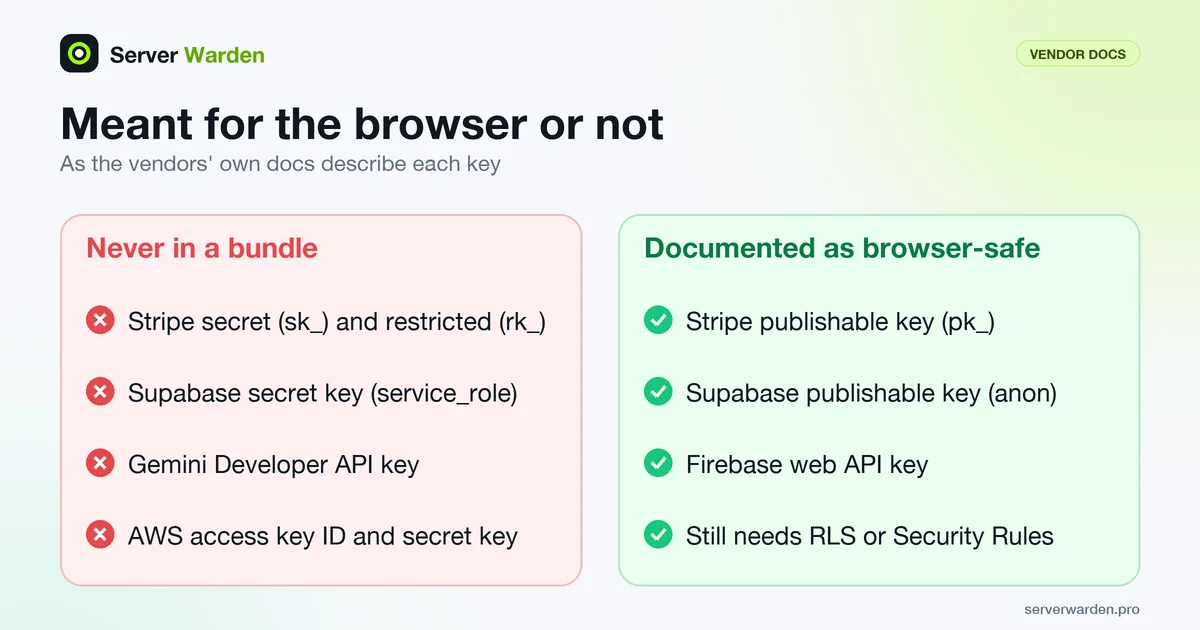
A "public" key is safe only because something else limits it, so check the rules behind it: Supabase Row Level Security and Firebase Security Rules. A scanner cannot tell which kind it found, so you decide from the vendor docs. If a key type is not documented as public, treat it as secret and give server-side keys only the permissions they need (least privilege).
Build a test front-end and scan it before you deploy
Before scanning your real project, prove the scanner works on a bundle you control. We built a Vite demo in an Ubuntu 24.04 container (Node 22.23.4, Vite 8.3.7) with a deliberate mistake: secret values stored in VITE_ variables. The .env file holds obviously fake values:
VITE_STRIPE_PUBLISHABLE_KEY=pk_test_EXAMPLEFAKEPUBLISHABLE0000
VITE_STRIPE_SECRET_KEY=sk_live_FAKEDEMOKEYNOTREAL1a2B3c4D5e6F7g8H
VITE_INTERNAL_API_TOKEN=3f9a1c7e5b2d4086a1f3c9e7d5b30c11
The code reads them with import.meta.env and sends the secret ones in an Authorization header. (Our first attempt only checked whether they were set, and the minifier dropped them, so a value nothing uses never reaches the bundle.) Build, then list files containing the fake Stripe key; -l prints file names only, never the secret:
npm install vite
npx vite build
grep -rlE "(sk|rk)_live_[A-Za-z0-9]+" dist
dist/assets/index-B9n7qF_d.js
The fake secret is now plain text in a file every browser downloads. Use clearly fake keys like these; never paste a real key into a test.
Scan the folder your build tool writes, because that is what you are about to publish. We tested Vite's dist/. Next.js writes to .next by default (distDir docs), which also holds server-side files, so a hit there is not automatically public. We did not run a Next.js build.
gitleaks. The gitleaks README lists a dir command for scanning directories and files without git history, plus Docker images and Homebrew for installing. Our Docker registry pulls were blocked, so we ran the official Linux release binary (8.30.1) in the Ubuntu container; the Docker images are untested by us.
gitleaks dir dist --no-banner --redact -v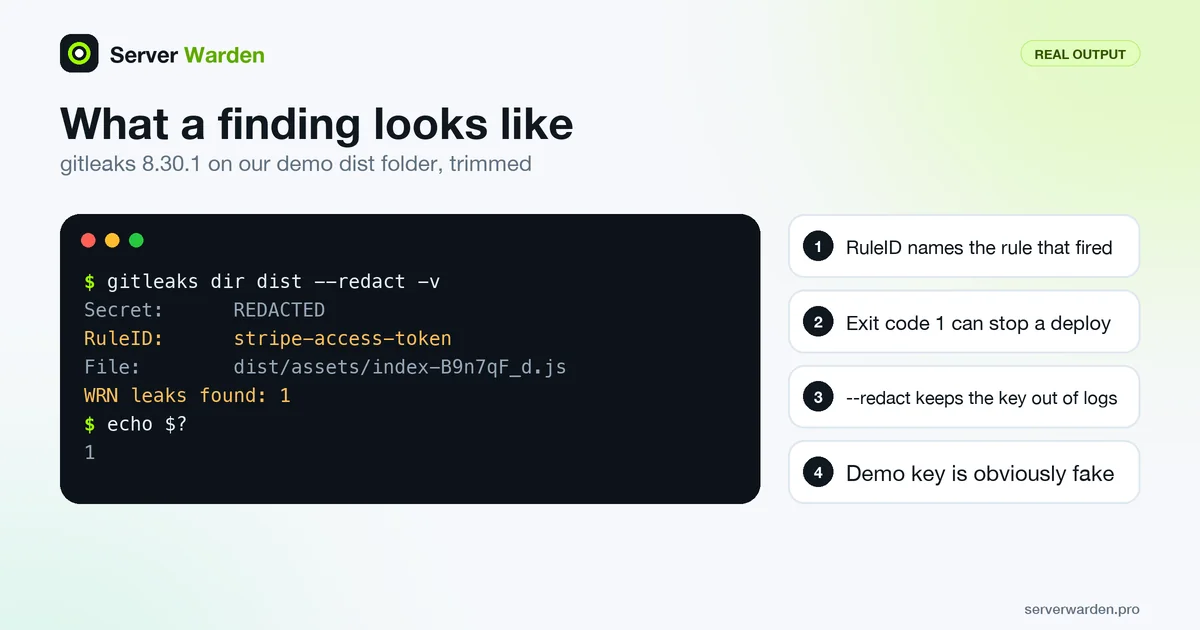
Finding:     REDACTED
Secret:      REDACTED
RuleID:      stripe-access-token
Entropy:     4.868508
File:        dist/assets/index-B9n7qF_d.js
Line:        1

WRN leaks found: 1
-v prints each finding, --redact hides the secret in logs, and RuleID names the rule that fired. Per the README the exit code on a leak is 1 by default (change it with --exit-code).
TruffleHog. The TruffleHog README documents trufflehog filesystem. We used release 3.99.8:
trufflehog filesystem dist --no-update --no-verification --failFound unverified result
Detector Type: Stripe
Raw result: sk_live_FAKEDEMOKEYNOTREAL1a2B3c4D5e6F7g8H
File: dist/assets/index-B9n7qF_d.js--no-update skips the update check, --no-verification keeps the scan local (see the verification warning), and --fail makes the exit code 183 when results exist; per the README, 0 means clean and 1 means an error. TruffleHog printed the raw secret, so treat CI logs as sensitive. Exit codes are tool-specific, so test both outcomes yourself: after we removed the secret and rebuilt, gitleaks printed no leaks found and both tools exited 0.
One surprise: the AWS documentation example key ID (AKIAIOSFODNN7EXAMPLE) was not reported by gitleaks, whose AWS rule allowlists values ending in EXAMPLE, and TruffleHog skipped a Stripe-shaped key containing that word. Test scanners with a fake that avoids it.
Scan the JavaScript your live site serves
The build scan checks what you meant to ship. A live scan checks what the server delivers, which catches a wrong build uploaded by hand or an old file left behind. Save this as scan-live.sh and use it only on your own site:
#!/bin/sh
# Download the scripts a page references and scan them. Only for your own site.
set -eu
SITE="${1:?usage: scan-live.sh https://your-site.example}"
WORK="$(mktemp -d)"
trap 'rm -rf "$WORK"' EXIT

curl -fsS "$SITE/" -o "$WORK/index.html"
grep -oE '(src|href)="/[^"]+\.m?js"' "$WORK/index.html" | cut -d'"' -f2 | sort -u |
while read -r path; do
  curl -fsS "$SITE$path" -o "$WORK/$(basename "$path")"
  echo "downloaded $SITE$path"
done
gitleaks dir "$WORK" --no-banner --redact
It uses curl (-f fails on HTTP errors) to fetch the home page and each root-relative script, then scans the folder. We served the demo build from a local Caddy container and ran it from a second Ubuntu 24.04 container:
./scan-live.sh http://jsscan-site:8080
downloaded http://jsscan-site:8080/assets/index-B9n7qF_d.js
WRN leaks found: 1
Limits: it sees only scripts named in the home page HTML, so lazy-loaded chunks, other pages and scripts added by JavaScript are not covered. That is why the build scan stays the main check. For a wider view of what your domains expose, see the Nuclei, reNgine and Uptime Kuma comparison (we did not test Nuclei's token templates here); your attack surface is bigger than JavaScript.
Source maps: check them and stop shipping them
A source map is a file that connects minified code back to your original source. The Chrome DevTools docs explain that with one loaded, the browser runs the minified code but its Sources panel shows the code you wrote. For a reader that means original names, comments and structure. Our demo map held the whole original src/main.js, comments included, in its sourcesContent field.

Check your site. The last line of a bundle often points to its map, so request it from your own site:
curl -s https://example.com/assets/YOUR_FILE.js | tail -n 1
curl -s -o /dev/null -w "%{http_code}\n" https://example.com/assets/YOUR_FILE.js.map
curl -s https://example.com/assets/YOUR_FILE.js.map | head -c 12
In our container the build with maps returned //# sourceMappingURL=index-B9n7qF_d.js.map, status 200 and a body starting with {"version":3. If your server rewrites unknown URLs to index.html, a 200 proves nothing, so read the body: a real map is JSON.
Stop publishing them. The documented options:
- Vite.
build.sourcemapdefaults tofalse;truewrites a separate file and'hidden'writes it without the comment that points to it. Our default build produced no map and the URL returned 404. A'hidden'build still wrote the file and our server still answered 200, so a hidden map is safe only if you do not upload it. - Next.js.
productionBrowserSourceMapsis off for production unless you opt in; when on, maps sit next to the JavaScript and are served automatically.
For readable error reports, send maps only to your error-tracking tool, and repeat the curl checks after each deploy.
Want a second pair of eyes on what your site exposes?
A free, read-only check shows what the internet can see on your server and what to fix first.
Get your free server check Talk to a security engineerAutomate it: a deploy gate and a weekly scan
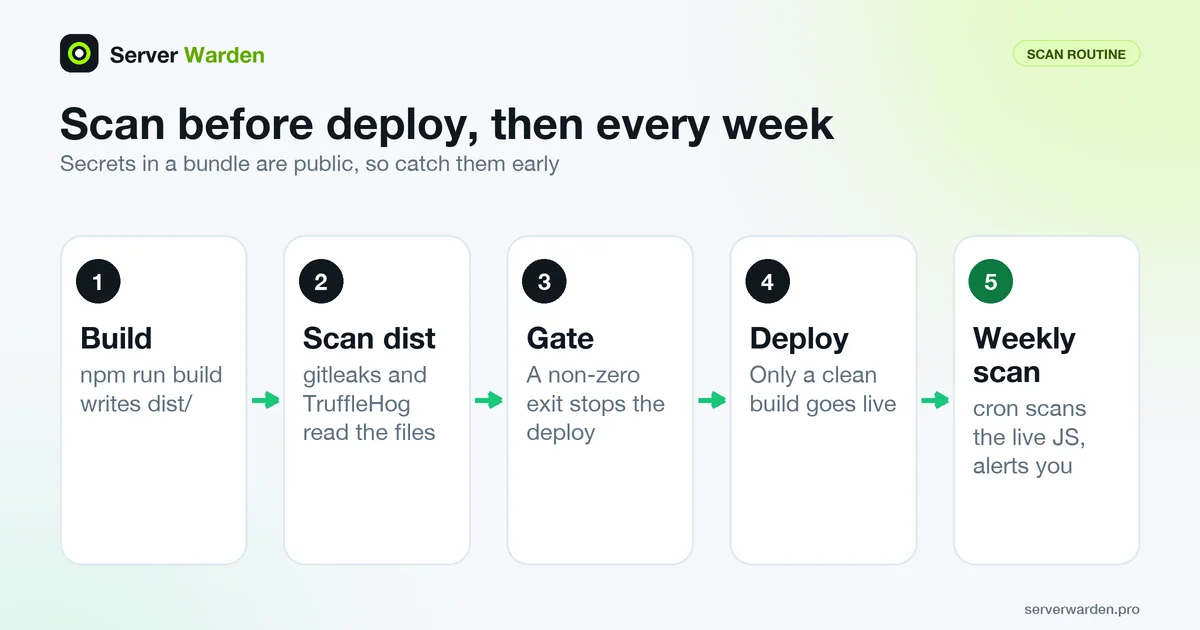
A deploy gate. Put the scans between build and upload. With set -e the shell stops at the first non-zero exit, so a finding blocks the deploy. We tested this in the demo project (its build script is vite build):
#!/bin/sh
set -eu
npm run build
gitleaks dir dist --no-banner --redact
trufflehog filesystem dist --no-update --no-verification --fail
echo "scans clean, deploying"
# ./deploy.sh goes here
With the planted secret it exited 1 after gitleaks and never reached the last line; with the secret removed it printed scans clean, deploying and exited 0. CI services work the same way: a step fails on a non-zero code. Run a failing case once before you trust the gate. Deployment itself is covered in deploying an app to a VPS securely.
A weekly live scan. Keep scan-live.sh and this wrapper in /opt/jsscan, owned by an unprivileged user (see isolating projects on one VPS), saved as weekly-scan.sh and made executable with chmod +x:
#!/bin/sh
SITE=https://example.com
if ! OUT=$(/opt/jsscan/scan-live.sh "$SITE" 2>&1); then
  printf '%s\n' "$OUT" | tail -n 20 | /opt/jsscan/notify-telegram.sh "JS secret scan failed: $SITE"
fi
notify-telegram.sh is a placeholder for any script that sends a Telegram message. Creating the bot and sending the message is explained in Nuclei scheduled scans with Telegram alerts, so we do not repeat it; Uptime Kuma with Telegram is another route. In crontab(5) the fields are minute, hour, day of month, month, day of week, so this runs on Mondays at 06:17:
17 6 * * 1 /opt/jsscan/weekly-scan.shWe ran the scripts by hand; cron and Telegram delivery were not tested.
False positives and what to do on a real hit
Reviewed false positives. Record the decision in a file instead of ignoring the scanner. In gitleaks, an [[allowlists]] block in .gitleaks.toml, with [extend] useDefault = true to keep the default rules, adds your exception:
[extend]
useDefault = true

[[allowlists]]
description = "Demo placeholder we have reviewed"
regexTarget = "secret"
regexes = ["^sk_live_FAKEDEMOKEYNOTREAL"]
Run gitleaks dir dist -c .gitleaks.toml. In our test the finding disappeared (exit 0), and without the file it returned 1. Keep exceptions narrow, and never allowlist a real secret.
The README also describes a baseline (--baseline-path with an earlier report) and a .gitleaksignore file of fingerprints, marked experimental. A catch for build output: the baseline worked on an unchanged build, but after a code change the file name hash changed, the finding no longer matched and the scan failed again. A fingerprint contains the file name, so expect the same from .gitleaksignore (untested). TruffleHog documents a trufflehog:ignore line comment, but minifiers drop comments, so use --exclude-detectors or --exclude-paths (both in --help).
A real hit. In this order:
- Rotate or revoke the key first. Stripe's docs say a compromised secret or restricted key should be rotated to block misuse; choosing "Now" as the expiry deletes the old key, while a later expiry keeps both working for up to 7 days. Pick immediate expiry for a leaked key.
- Check the provider's usage logs since the file went live. Stripe's keys page describes per-key request logs, and the AWS IAM docs recommend CloudTrail for access key usage. Unknown requests mean incident response.
- Move the call to your server, rebuild, delete the old bundle files from the server and CDN cache (hashed names leave them reachable) and re-run the live scan.
- Clean Git history last, see what to do when an API key leaks to GitHub, and check your server logs if the key touched your backend.
What scanners miss and what verification sends out
What they miss. A scanner matches patterns, so it is a safety net, not proof. In our tests:
- A key split into parts and joined in code (
["sk_li", "ve_...", "..."].join("")) was found by neither tool. - The 32-character hex token in the
Authorizationheader was found by neither: it has no vendor prefix, and the minified bundle lost the variable name that a generic "key" or "token" rule needs. - The same Stripe-shaped key base64-encoded inside
atob()was found by both. The gitleaks help for 8.30.1 shows decoding to depth 5 by default.
Obfuscated code can hide more, and a scanner cannot judge danger: it sees a string shaped like a key, not what it can do.
What verification sends out. The TruffleHog README says a verified result means it confirmed the credential by testing it against the service's API (for AWS, a call that checks whether the credential is active). So with verification on, the key you found is sent to the provider and the check appears in that key's logs. The gitleaks README we read describes no verification step. We confirmed both tools work offline: with Docker's --network none, gitleaks and TruffleHog with --no-verification still found the planted key. If you are unsure what verification does, use --no-verification and treat any hit as real. "Verified" is strong evidence a key is live; "unverified" does not prove it is dead, so rotate either way.
What to do next, how we checked this and sources
- Scan every project's build, not only the main one, each in its own folder (isolation test guide).
- Add the weekly scan beside your other external checks in the monitoring cluster.
- Ask for help if provider logs show suspicious use, or you cannot tell whether a key is public by design.
How we checked this. On 9 November 2026 we built a Vite 8.3.7 demo with Node 22.23.4 in an Ubuntu 24.04 container, planted fake keys, and ran gitleaks 8.30.1 and TruffleHog 3.99.8 (official Linux arm64 release binaries, checksums compared with the published lists) against dist/ and against a local Caddy container serving it. Docker image pulls for the scanners were blocked in our environment, so the Docker images, a Next.js build, cron and real Telegram delivery were not tested. We never ran a TruffleHog scan with verification on against a planted key.
Sources. gitleaks README, TruffleHog README, Next.js environment variables, Vite env and mode, Stripe API keys, Supabase API keys, Firebase API keys, AWS IAM access keys.
Frequently asked questions
How do I check if my website's JavaScript contains API keys?
Build your site, then run a secret scanner such as gitleaks (gitleaks dir dist) or TruffleHog (trufflehog filesystem dist) on the output folder. For a live site, download the scripts your page references and scan them, on your own site only.
Is it safe to put an API key in a NEXT_PUBLIC_ or VITE_ variable?
Only if the key is meant to be public. Next.js inlines NEXT_PUBLIC_ variables into the browser bundle at build time, and the Vite docs say VITE_ variables are exposed in client-side code and should not hold API keys.
Is a Stripe publishable key or a Firebase API key in my bundle a leak?
Not by itself. Stripe says publishable keys are safe in front-end code, and Firebase says keys restricted to Firebase services need not be treated as secrets. A Stripe secret key or a Gemini Developer API key in the bundle is a leak.
Do source maps expose my API keys?
Not by themselves, but a map can include your full original source with comments, so a hard-coded secret becomes easy to read. Request the .map file of a script to check, and turn maps off or keep them off the server.
Should I use gitleaks or TruffleHog to scan a build folder?
Both found the planted key in our test, but they ignore different things, so using both is reasonable. gitleaks runs fully local, while TruffleHog can verify findings online unless you pass --no-verification.
Does TruffleHog send my API keys to the provider?
When verification is on, yes: the README says it confirms a credential by testing it against the service's API. Use --no-verification for a local-only scan.
I found a secret key in my deployed JavaScript. What do I do first?
Rotate or revoke the key immediately, then check the provider's usage logs for requests you do not recognise. Then move the call to your server, rebuild, remove the old bundle files and re-scan the live site.
Not sure where your server stands?
Get a free, read-only security check, or talk to a security engineer about managed protection.
Get your free server check Talk to a security engineer