Published 2026-11-05 · Updated 2026-11-05
PHP2Shell: Patch PHP RCE CVE-2026-109618 on Your VPS
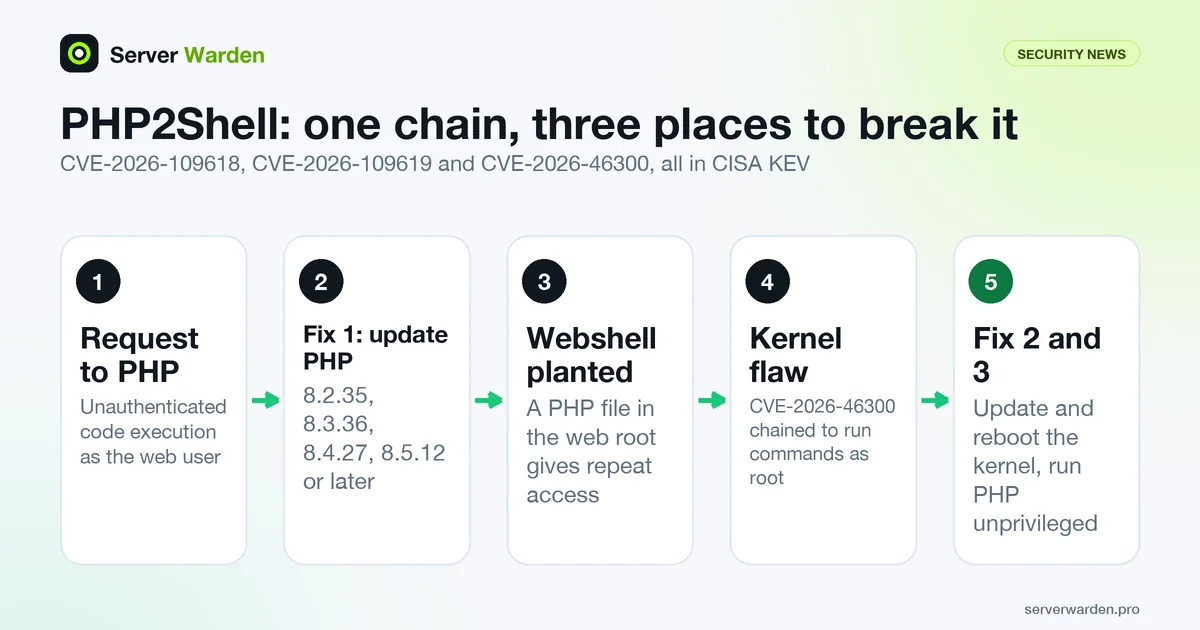
Short answer: on October 21, 2026 the PHP security team disclosed two critical remote code execution flaws in PHP itself, CVE-2026-109618 and CVE-2026-109619, nicknamed PHP2Shell. The fixed releases are PHP 8.2.35, 8.3.36, 8.4.27 and 8.5.12, all published the same day. CISA added both flaws to its Known Exploited Vulnerabilities catalog on October 26, and on October 28 added a Linux kernel flaw, CVE-2026-46300, that its entry says can be chained with them to plant a PHP webshell and run commands as root. If your VPS serves PHP, update PHP, update and reboot the kernel, then check for signs of compromise.
In this article
What was disclosed and which PHP versions are affected Who is exploiting it, according to CISA and Arctic Wolf The Linux kernel flaw CISA says can be chained with it How to check whether your server is fixed What to do, in order Read-only checks for signs of compromise Limiting the damage of the next PHP bug Frequently asked questionsQuick win (10 minutes)
- Check the PHP version your web server really runs:
php -vfor the command line, andphp-fpm8.3 -v(adjust the number) orapachectl -M | grep phpfor the web side. - Check whether your distribution already patched PHP:
zgrep -h -m2 -E "CVE-2026-1096(18|19)" /usr/share/doc/php*/changelog*.gz. A hit means the package carries the fix, even ifphp -vshows an older number. - Update and restart:
sudo apt update && sudo apt upgradeon Debian or Ubuntu, then restart PHP-FPM or Apache so the new code is loaded. - Compare the running kernel with the installed one:
uname -r, then reboot if a newer kernel is installed. - Search web logs for the self-identifying scanner reported by Arctic Wolf:
sudo grep -rl "php2shell-scan" /var/log/nginx /var/log/apache2 2>/dev/null.
What was disclosed and which PHP versions are affected
On October 21, 2026 the PHP security team announced two critical vulnerabilities in php-src, the core of PHP. Both announcements on the oss-security mailing list give the same affected range and the same severity, CVSS v4.0 9.2:
- CVE-2026-109618 (announcement, NVD): PHP uses
longjmp()to abort a request when it runs out of memory. An allocation failure can interrupt initialization while incomplete request state is already reachable, and request shutdown may then use that invalid state. The team says unauthenticated remote code execution was demonstrated over HTTP against Apachemod_php, before application code runs. Source analysis also points to PHP-FPM being susceptible, but a complete FPM exploit had not been demonstrated at the time. - CVE-2026-109619 (announcement, NVD): PHP keeps global state that temporarily points into request memory. If that state is not reset correctly, a later request handled by the same worker can use it after the memory was freed, a use-after-free. The team says unauthenticated remote code execution was demonstrated against both
mod_phpand PHP-FPM, and that exploitability depends on the state, the configuration and the application.
The affected versions stated by the PHP security team are PHP 8.2 before 8.2.35, 8.3 before 8.3.36, 8.4 before 8.4.27 and 8.5 before 8.5.12. The php.net release data shows 8.2.35, 8.3.36, 8.4.27 and 8.5.12 all dated October 21, 2026. A later message on the same list quotes a CrowdStrike post saying the underlying bug pattern first shipped in PHP 7.3.0 in December 2018, so older branches that no longer get fixes deserve attention too; we did not read that post ourselves.
On workarounds the PHP team is direct: for CVE-2026-109618 it says updating is the only complete mitigation, and for CVE-2026-109619 that there is no complete generic configuration workaround. Arctic Wolf names the affected setups as PHP-FPM, Apache with mod_php, php-cgi, FrankenPHP and LiteSpeed, and describes mod_php as the highest-risk one. A web application firewall does not replace the update, because the bug is in how PHP handles memory, not in your application code.
Who is exploiting it, according to CISA and Arctic Wolf
Two independent sources say this is being used, not just disclosed.
First, CISA. In the KEV JSON feed (catalog version 2026.11.04), both CVE-2026-109618 and CVE-2026-109619 have dateAdded 2026-10-26 and dueDate 2026-10-29. The KEV catalog only lists vulnerabilities with reliable evidence of exploitation in the wild, so the listing means exploitation was confirmed; see the glossary entry for KEV for what that threshold means.
Second, Arctic Wolf Labs, in a post dated October 22, reported widescale scanning and active exploitation attempts shortly after disclosure. Most of what it saw was probing: requests that switch on PHP's session upload-progress feature with an attacker-chosen session ID and upload roughly 63 KB of repetitive data, plus session-poisoning and local file inclusion attempts. One scanner announced itself with the user agent php2shell-scan/109618.
It also identified likely weaponized requests from the address 92.118.112[.]100 that ran id, printed a marker string, changed to /tmp and fetched a file with wget. The infrastructure behind it hosted binaries linked to the Potassium botnet, a Mirai-derived family. Arctic Wolf is careful on two points that we repeat: its telemetry did not show that those requests actually downloaded or ran the binaries, and request logs alone do not prove that a target was vulnerable or that code ran.
The practical reading: whether or not you saw an attack, automated scanning for this flaw was under way within a day of disclosure, so an unpatched PHP server exposed to the internet should be treated as at risk.
The Linux kernel flaw CISA says can be chained with it
On October 28 CISA added CVE-2026-46300, a Linux kernel flaw, to the same catalog with a due date of October 31. The catalog text says it can be chained with CVE-2026-109618 and CVE-2026-109619 to implant PHP webshells and run commands as root. That matters because PHP runs as a web user: on its own, a PHP flaw gives an attacker that user's rights, and a local kernel flaw is the step from there to full control of the machine.
The kernel bug itself is not new. The NVD record was published on May 23, 2026. It concerns the kernel's network buffer coalescing code, which loses a marker for shared memory fragments, so that in-place decryption of ESP packets can happen over page-cache-backed memory. In other words, it can modify cached file data that it should not.
The good news is that fixes have been in distribution kernels for months. The Debian security tracker lists the fix in Debian 12 (bookworm) from kernel 6.1.174-1 (DSA-6306-1), in Debian 13 (trixie) from 6.12.90-1 (DSA-6295-1) and in Debian 11 (bullseye) from 5.10.257-1 (DLA-4606-1). A server that installed regular updates and then rebooted is likely already covered. The catch is the reboot: a kernel package that is installed but not running does not protect you. For the habit that prevents this, see our patch management guide and the glossary entry on kernel live patching.
How to check whether your server is fixed
Start with what runs, not what is installed. A server can have several PHP versions side by side and a web server pointed at only one.
# which PHP the web side uses
ps -eo pid,user,args | grep -E "php-fpm|apache2|httpd" | grep -v grep | head

# the PHP command line version, and the installed packages
php -v | head -1
dpkg -l | grep -E "^ii +php[0-9.]+-(cli|common|fpm)"      # Debian and Ubuntu
rpm -qa | grep -E "^php-(cli|common|fpm)"                   # RHEL family
Do not rely on the version number alone. Distributions usually backport the fix and keep the upstream number. We checked this on current package builds: on Debian 12 the PHP 8.2 package is 8.2.35-1~deb12u1 and php -v shows 8.2.35, but on Ubuntu 24.04 the PHP 8.3 package 8.3.6-0ubuntu0.24.04.13 still reports PHP 8.3.6 while carrying a patch named CVE-2026-109618_109619.patch. So an Ubuntu server reading 8.3.6 can be fixed. The reliable check is the package changelog:
zgrep -h -m2 -E "CVE-2026-1096(18|19)" /usr/share/doc/php*/changelog*.gzOn Debian 12 this printed lines saying "Fix CVE-2026-109618 and CVE-2026-109619" for the 8.2.35 package, and on Ubuntu 24.04 it printed the patch name. No output means that package does not mention the fix: update it, or check your distribution's tracker, such as the Debian tracker entry. For versions you installed from upstream or a third-party repository, compare against the fixed releases from the first section.
If you run PHP in Docker, the host package manager is irrelevant: check the image tag and rebuild from a patched base image. The Docker Compose deploy guide covers pinning and rebuilding images.
Not sure which PHP your servers run?
A free, read-only server check lists exposed services and installed versions, so you can compare them with advisories like this one.
Get your free server check Talk to a security engineerWhat to do, in order
- Update PHP. On Debian or Ubuntu:
sudo apt update && sudo apt upgrade(or upgrade just the PHP packages). On the RHEL family:sudo dnf upgrade "php*". For a third-party repository, take the 8.2.35, 8.3.36, 8.4.27 or 8.5.12 build or later. - Restart what loads PHP. Package upgrades usually restart PHP-FPM, but confirm with
systemctl status php8.3-fpm(adjust the version) and check the start time is after the upgrade. Withmod_php, restart Apache:sudo systemctl restart apache2. - Update the kernel and reboot. Install pending updates, then compare
uname -rwith the newest installed kernel (ls /boot/vmlinuz-*). Reboot in a planned window if they differ. - Check for compromise using the read-only commands in the next section, starting from October 21, the disclosure date. Patching closes the door; it does not remove someone who already came in.
- Write down the fix. Record the PHP package version, the date and the kernel, so the next advisory takes minutes. Our patch management guide shows a routine that does this.
If you cannot update today, there is no vendor-documented configuration workaround to lean on. Limiting who can reach the server and putting it behind a CDN or reverse proxy reduces exposure but does not fix the flaw, so schedule the update, and treat the server as exposed until then.
Read-only checks for signs of compromise
None of these commands change anything. They are our suggestions for where an attacker using this chain would leave traces, based on the behavior Arctic Wolf and CISA describe. Finding nothing does not prove a server is clean, because a skilled attacker can hide files and clear logs.
# 1. PHP files created or changed since disclosure (webshells are PHP files)
sudo find /var/www -type f -name "*.php" -newermt 2026-10-21 -ls 2>/dev/null | head -50

# 2. files dropped in temp directories (the observed payload went to /tmp)
sudo find /tmp /var/tmp /dev/shm -type f -newermt 2026-10-21 -ls 2>/dev/null

# 3. the scanner user agent and the reported source address in web logs
sudo grep -rIl -e "php2shell-scan" -e "92\.118\.112\.100" /var/log 2>/dev/null

# 4. outbound connections and what owns them
sudo ss -tupn state established | head -40

# 5. new scheduled jobs and new accounts
sudo ls -la /etc/cron.d /var/spool/cron 2>/dev/null
sudo awk -F: '$3 == 0 {print $1}' /etc/passwd
Check 1 is the most useful: a PHP file in an upload directory, or a recently changed file in a place your deploys do not touch, is the classic webshell sign. If you use WordPress, also run wp core verify-checksums from the site directory; it compares core files with the official checksums. If anything looks wrong, stop and switch to our breach response guide: isolate the server first, preserve logs, and rotate secrets from a clean machine. Ongoing log review is covered in monitoring and log analysis.
Limiting the damage of the next PHP bug
This chain has two steps for a reason: PHP code execution alone is bounded by the account PHP runs as. You control how much that account can do.
- Run PHP as an unprivileged, per-site user. With PHP-FPM, give each site its own pool and user, with no sudo rights and no write access outside its own directories. Our guide to sudo and least privilege covers service accounts and narrow sudo rules.
- Keep the web root read-only for the PHP user except upload and cache directories, and do not execute PHP from upload directories. A webshell needs somewhere to be written.
- Patch on a schedule, not on news. Both PHP fixes shipped the same day as the disclosure. Automatic security updates, as in the glossary entry on unattended-upgrades, close that gap for most servers.
- Watch for file changes. File integrity monitoring on the web root turns a silent webshell into an alert.
- Know what you run. A server list with PHP versions per host is what makes a day like October 21 a ten-minute job. The VPS security checklist is a starting point.
This is also a data point for how fast the window is. In our October KEV roundup the catalog had no Linux kernel, GitLab or WordPress entries yet. By November 3 it had all three, plus PHP. See our WordPress follow-up: WordPress core CVE-2026-119977.
Frequently asked questions
What is PHP2Shell?
PHP2Shell is the nickname researchers use for two critical PHP vulnerabilities, CVE-2026-109618 and CVE-2026-109619, disclosed by the PHP security team on October 21, 2026. Both can allow unauthenticated remote code execution in PHP installations that process web requests.
Which PHP versions are fixed?
PHP 8.2.35, 8.3.36, 8.4.27 and 8.5.12, all released on October 21, 2026, or later releases in the same branch. Distributions often backport the fix without changing the upstream version number, so check the package changelog as shown above.
Is this vulnerability being exploited?
Yes. CISA added both CVEs to its Known Exploited Vulnerabilities catalog on October 26, 2026, and Arctic Wolf Labs reported widescale scanning and exploitation attempts shortly after disclosure.
Do I need to update the Linux kernel too?
CISA says CVE-2026-46300, a Linux kernel flaw added to the catalog on October 28, can be chained with the PHP flaws to plant a webshell and run commands as root. Debian lists kernel fixes from earlier in 2026, so a regularly updated and rebooted server is likely covered. Confirm with uname -r and your distribution tracker.
Why does php -v still show an old version after patching?
Debian and Ubuntu usually backport security fixes and keep the upstream version string. On Ubuntu 24.04 the PHP 8.3 package still reports 8.3.6 while carrying the patch. Check the package changelog with zgrep for the CVE numbers.
Is there a workaround if I cannot update right now?
The PHP security team says updating is the only complete mitigation for CVE-2026-109618 and that there is no complete generic configuration workaround for CVE-2026-109619. Reducing exposure helps, but schedule the update.
Does a WAF protect me from PHP2Shell?
Not reliably. The flaws are in how PHP manages memory while handling a request, not in your application code, and Arctic Wolf notes that exploitation can happen before application code runs. A WAF can add friction but is not a substitute for the update.
Not sure where your server stands?
Get a free, read-only security check, or talk to a security engineer about managed protection.
Get your free server check Talk to a security engineer