File integrity monitoring
File integrity monitoring is the continuous checking of whether files that should not change, such as system binaries or configuration files, have actually been modified.
What it actually catches that logs might miss
An attacker who successfully covers their tracks in log files can still leave behind modified system binaries or configuration files. File integrity monitoring compares the current state of protected files against a known-good baseline, catching changes regardless of whether the change itself was logged.
The trade-off in how it is used
Monitoring too many files, or files that are expected to change frequently as part of normal operation, produces a flood of noise that makes real alerts easy to miss. Effective setups focus on files that genuinely should not change without a deliberate, tracked action.
For how file changes fit into day-to-day monitoring, see our server monitoring and log analysis guide.
Building a baseline you can trust with AIDE
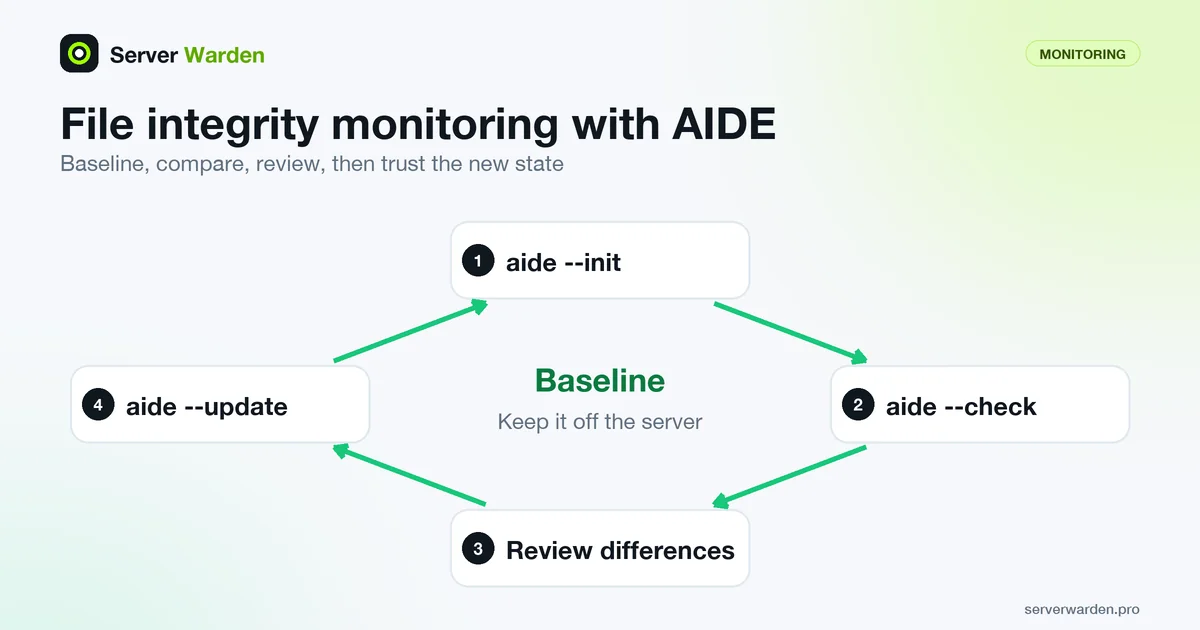
AIDE is one of the established open-source tools for this job. Its manual defines three modes you will use: aide --init builds the initial database of the files selected in the configuration, aide --check compares that database with the files on disk, and aide --update runs the same comparison but writes a new database. Your distribution may wrap these commands, so read its package notes for the exact database paths.
What you monitor is set by rules in aide.conf. A rule is a list of attributes joined with plus signs, such as p for permissions, u and g for owner and group, s for size and sha256 for a checksum, and a selection line pairs a path with a rule. A leading ! excludes a path:
Critical = p+u+g+s+sha256
/etc Critical
/usr/bin Critical
/usr/sbin Critical
!/var/log/.*
Build the baseline right after you finish hardening and before you deploy applications, so the first snapshot is a state you trust. Then follow the manual on storage: it advises moving the new database to a secure location such as read-only media and keeping the configuration file off the target machine. On a VPS that means copying both to another host, not leaving them next to the files they protect. Keep the scope small: logs, caches and uploads change constantly, and the monitoring guide explains why noise defeats the purpose.
What a clean report does and does not prove
File integrity checking is detection, not prevention. NIST SP 800-94 describes it as periodically computing checksums for critical files and comparing them to reference values, and states that it can only determine after the fact that a file has already changed, for example a system binary replaced by a Trojan horse or rootkit. The same guide warns that some products base monitoring on file names, so an attacker who renames files may blind them, and it separates this from agents that watch file access attempts and can stop suspicious ones.
Three habits keep the signal useful. Run the check on a schedule and send the result off the server, because a report that stays on a compromised machine can be edited. Run it immediately after every planned update, review the differences against what you actually changed, and only then run aide --update and store the new database. Treat an unexplained difference in /usr/bin or /etc/ssh as an incident: preserve the evidence and follow the breach response guide. The patch management guide explains how to schedule updates so that expected changes are easy to tell apart from unexpected ones.
Related terms: SIEM, Incident response, UID 0, RECOVERED vs VERIFIED, auditd, journalctl.
Frequently asked questions
What tools are commonly used for this on Linux?
AIDE and Tripwire are two long-established options, alongside broader monitoring platforms that include file integrity checks as one feature among several.
How often should a baseline be updated?
Whenever a legitimate, planned change is made to a monitored file, such as a deliberate configuration update, so the new state becomes the trusted baseline going forward.
Can file integrity monitoring detect a breach that already happened before it was set up?
No. It can only detect changes going forward from when the baseline was established, which is why setting it up early, before an incident, matters.
Does file integrity monitoring stop malware from being installed?
No. Checksum-based checking only tells you after the fact that a file changed, according to NIST SP 800-94. Stopping an attempt requires a different mechanism that watches file access in real time.
Where should the baseline database be stored?
Away from the server it describes. The AIDE manual advises moving the database to a secure location such as read-only media and keeping the configuration file off the target machine, so an intruder cannot rewrite the baseline.
Want to see where your own server stands?
Run the free, read-only server check, or open the Security Lab and watch the detect, contain, recover, verify loop in action.
Get your free server checkOpen the Security Lab