Published 2026-11-05 · Updated 2026-11-05
WordPress CVE-2026-119977: Update Core to 7.1.4 Now
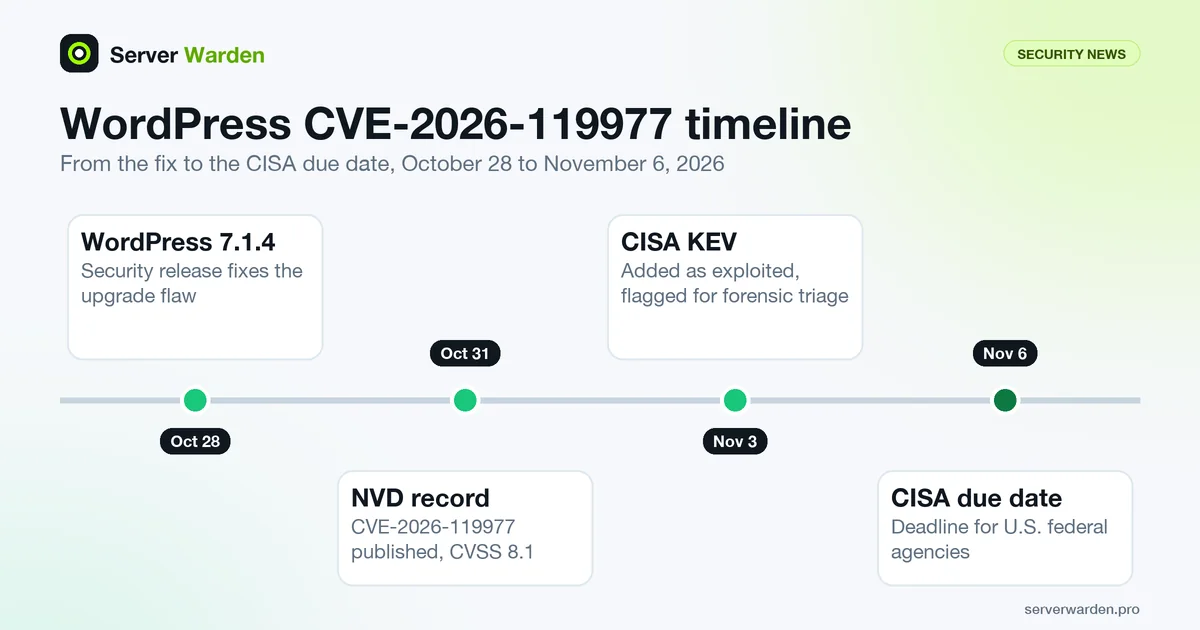
Short answer: CVE-2026-119977 is a remote code execution flaw in WordPress core, in versions 4.7 through 7.1.3. NVD says unauthenticated attackers can run code on the server during the upgrade window, because full-package core upgrades use predictable, web-accessible staging paths. WordPress fixed it in 7.1.4 on October 28, 2026. CISA added it to the Known Exploited Vulnerabilities catalog on November 3 with a due date of November 6, and flagged it for forensic triage. Update to 7.1.4 or later, then check the site for unexpected files and administrators.
In this article
What the flaw is and which versions it affects What CISA added on November 3, and what it says What the upgrade window means for your site How to check your version and update Read-only checks after the update Reducing the risk of the next WordPress bug Frequently asked questionsQuick win (10 minutes)
- Find your core version: Dashboard, then Updates, or from the site directory
wp core version. - Compare with the current release the official update API reports:
curl -s https://api.wordpress.org/core/version-check/1.7/ | grep -o '"version":"[^"]*"' | head -1. At the time of writing it returns 7.1.4. - Update core: Dashboard, Updates, Update Now, or
wp core update. Then runwp core versionagain to confirm. - Verify core files against the official checksums:
wp core verify-checksums. - List administrator accounts and look for any you do not recognize:
wp user list --role=administrator --fields=ID,user_login,user_registered.
What the flaw is and which versions it affects
The NVD record for CVE-2026-119977 (published October 31, 2026, last updated November 4 with status Analyzed) describes it in one sentence: WordPress core is vulnerable to remote code execution in versions 4.7 through 7.1.3, due to predictable, web-accessible staging paths used during full-package core upgrades, which makes it possible for unauthenticated attackers to execute code on the server during the upgrade window.
NVD scores it CVSS 3.1 base 8.1, with a network attack vector, no privileges and no user interaction required, but high attack complexity. The complexity rating fits the description: the attacker needs the upgrade window, not just a request to a live site.
The fix is in WordPress 7.1.4, released on October 28, 2026. The release post calls it a security release featuring fixes for multiple issues, lists "a weakness in the WordPress upgrade process which can lead to remote code execution during the upgrade window", and recommends updating immediately. It also fixed a series of stored cross-site scripting issues, a stored denial of service issue in the Interactivity API, a flaw that let unauthenticated users discover unpublished customizer changesets, and updated the bundled root certificates after the eMudhra revocation. So even for a site you consider low-risk, 7.1.4 is not an optional update.
The post adds that the security fixes were backported to all branches eligible for security fixes, currently back to 4.7, but that "the backports are in progress and will ship as they become ready", and that only the most recent version of WordPress is actively supported. If you run an older branch and have not been offered an update yet, plan to move to 7.1.4.
What CISA added on November 3, and what it says
In the CISA KEV JSON feed (catalog version 2026.11.04), CVE-2026-119977 is listed for "WordPress WordPress Core" as a time-of-check time-of-use (TOCTOU) race condition, with dateAdded 2026-11-03 and dueDate 2026-11-06. The KEV catalog includes only vulnerabilities for which CISA has reliable evidence of exploitation in the wild, so its presence means exploitation is confirmed; the glossary entry on KEV explains the threshold. The entry's weakness type is CWE-367, which is the race condition class.
The catalog entry carries two more fields worth reading as they are. Its knownRansomwareCampaignUse field is "Unknown", which means no recorded ransomware use, not a guarantee of safety. And it is flagged forensicTriage: Yes, with a required action that cites CISA's BOD 26-04 and its "Forensics Triage Requirements". CISA's own pages refuse automated requests, so we could not read that guidance; open it on cisa.gov if you need the exact requirements. What the flag tells an ordinary site owner, in our reading, is that CISA expects you to look for signs of compromise rather than only apply the update. That is why this post has a section on checks.
The short due date matters only for U.S. federal agencies, which are bound by the directive. For everyone else it is a signal about urgency: CISA is treating this as something to fix within days.
What the upgrade window means for your site
The record does not publish step-by-step exploit details, and we did not find any. What it does say is enough to reason about risk: the staging paths WordPress uses while it performs a full-package core upgrade are predictable and reachable over the web, and an attacker who reaches them during the upgrade can get code to run. Outside an upgrade, the described condition does not exist, which is what the high attack complexity reflects.
Three practical consequences follow from that, each our own reading rather than a statement from the sources:
- Automatic background updates go through the same process. A site that updates itself enters the window without anyone watching. For this flaw the fix is in the version you are moving to, so being on 7.1.4 already is what matters.
- The risky moment is the upgrade, so the safe state is already being on 7.1.4. If your site is still on 7.1.3 or older, every future upgrade that starts from that version runs the vulnerable process. Update promptly rather than waiting for a quiet moment.
- We do not know when exploitation began. The sources do not say. A site that went through a core upgrade on a vulnerable version at any point is in scope for the checks below.
Related reading: our write-up of the PHP flaws disclosed the same month, PHP2Shell, which also hit servers that run WordPress. A scanner in Arctic Wolf's report even checked whether wp-content/db.php existed on the target.
How to check your version and update
Take a backup first if you can (a snapshot of the server or a database and files copy), because core updates change files. Then:
# version and available update (WP-CLI, from the site directory)
wp core version
wp core check-update

# update core
wp core update
wp core version
Without WP-CLI, use the Dashboard: Updates, then Update Now. If your host manages updates, check the version shown under Dashboard, At a Glance, or in the footer of the admin area, and ask the host which version it applies.
To see what the official release API says is current, without logging in anywhere:
curl -s https://api.wordpress.org/core/version-check/1.7/ | grep -o '"version":"[^"]*"' | head -1On November 5, 2026 this returned 7.1.4. If your wp core version is lower, you are not on the fixed release. Do not install WordPress from an unofficial mirror or a "nulled" package to get there; use WordPress.org or the updater.
After updating, update plugins and themes too: the PHP and kernel advisories of the same weeks, covered in our PHP2Shell post, showed how an application bug and a platform bug chain together. A routine for all of it is in our patch management guide.
Not sure what your WordPress server is exposing?
A free, read-only server check lists exposed services and installed versions so you can compare them with advisories like this one.
Get your free server check Talk to a security engineerRead-only checks after the update
These commands change nothing. They look for the kinds of changes an attacker who got code running would leave. A clean result does not prove the site is clean, and we cannot tell you how long to look back, since the sources do not say when exploitation started.
# 1. core files against the official checksums (run in the site directory)
wp core verify-checksums

# 2. plugin files against wordpress.org checksums (plugins from wordpress.org only)
wp plugin verify-checksums --all

# 3. administrator accounts
wp user list --role=administrator --fields=ID,user_login,user_email,user_registered

# 4. PHP files where PHP should not be (uploads should hold media, not code)
find wp-content/uploads -type f -name "*.php" -ls

# 5. PHP files changed recently outside the usual plugin and theme updates
find . -type f -name "*.php" -newermt 2026-10-28 -ls | head -50
Check 1 reports files that differ from the official release or are not part of it. Check 4 is the classic webshell location: any .php file in the uploads directory deserves an explanation. Check 3 catches the most common persistence trick, a new administrator.
If something is wrong, do not just delete it and move on. Take the site offline, keep a copy of the files and the web server logs, restore from a clean backup taken before the suspect date, change all passwords and the keys and salts in wp-config.php, and follow our breach response guide. Because the flaw allows code execution on the server, the question is whether the server itself was touched, not only the site.
Reducing the risk of the next WordPress bug
- Turn on automatic updates for core and keep them on. A core security release reached this flaw's fix on October 28, and CISA's catalog entry followed on November 3. A site that updates itself within a day or two was ahead of that curve.
- Remove what you do not use. Unused plugins and themes are code that can be attacked. Delete them, do not just deactivate.
- Do not let PHP write everywhere. The web server user should be able to write to uploads and cache directories only, and PHP should not execute from uploads. Our guide on least privilege covers the account side.
- Watch for changed files. File integrity monitoring on the web root turns a silent webshell into an alert.
- Keep the admin area narrow. Two-factor authentication for administrators and an IP allow list for
wp-adminreduce what a stolen password can do. See nginx security best practices for rate limiting and access rules. - Know your exposure. The VPS security checklist covers the server layer under WordPress.
Frequently asked questions
What is CVE-2026-119977?
CVE-2026-119977 is a remote code execution vulnerability in WordPress core versions 4.7 through 7.1.3. According to NVD, predictable, web-accessible staging paths used during full-package core upgrades let unauthenticated attackers execute code on the server during the upgrade window.
Which WordPress version fixes it?
WordPress 7.1.4, released on October 28, 2026. The WordPress security team also states that the fixes were backported to branches eligible for security fixes, with the backports shipping as they become ready, so update to 7.1.4 if your branch has not been offered a fix.
Is CVE-2026-119977 being exploited?
CISA added it to its Known Exploited Vulnerabilities catalog on November 3, 2026 with a due date of November 6. The catalog lists only vulnerabilities with reliable evidence of exploitation in the wild, and flags this entry for forensic triage.
How do I check my WordPress version?
Open Dashboard, then Updates, or run wp core version from the site directory. Compare the result with the current release from the official update API, which reported 7.1.4 on November 5, 2026.
Do automatic updates protect me?
They help, because they bring the fix to a site without anyone acting. The flaw concerns the upgrade process itself, so the site is protected once it is running 7.1.4 or later. If your site still runs 7.1.3 or older, update it now instead of waiting for the next automatic cycle.
How do I check whether my site was compromised?
Run wp core verify-checksums, list administrator accounts, look for PHP files in the uploads directory and for recently changed PHP files. A clean result does not prove the site is clean, so if the site matters, also review web server logs and consider a restore from a backup that predates any suspicious change.
Does this affect WordPress sites on managed hosting?
It depends on whether the host has applied the update. Ask your host which core version your site runs. If it is below 7.1.4 or a patched backport from the WordPress security team, ask when the update will be applied.
Not sure where your server stands?
Get a free, read-only security check, or talk to a security engineer about managed protection.
Get your free server check Talk to a security engineer