CORS (cross-origin resource sharing)
CORS (cross-origin resource sharing) is an HTTP-header mechanism that lets a server say which other origins a browser may allow to load its resources. Without the right Access-Control headers, a browser stops a web page from reading a cross-origin response. It is a browser rule, not a firewall, so it does not replace authentication on your API.
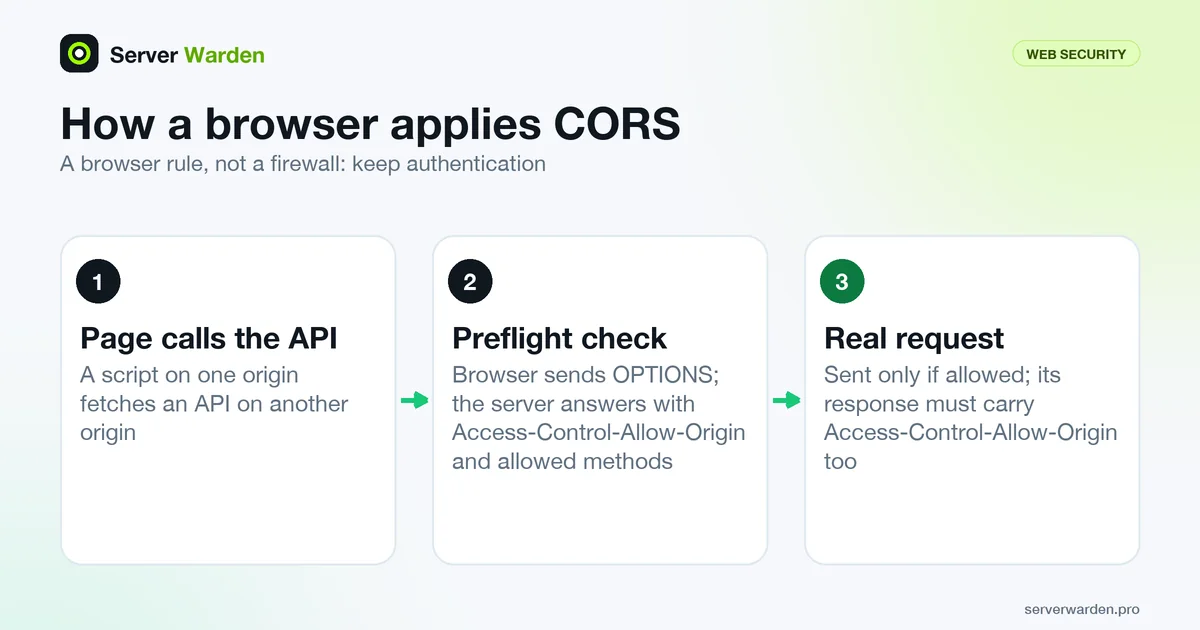
Origins, the same-origin policy and what CORS changes
An origin is the combination of scheme, host and port. A page on https://app.example.com and an API on https://api.example.com are different origins. By default, as the MDN CORS guide explains, scripts using fetch() follow the same-origin policy, and a cross-origin response is usable only if it includes the right CORS headers. CORS is how a server opts in.
Simple requests, such as a GET with safe headers, are sent directly, and the server must still answer with Access-Control-Allow-Origin. Other requests, for example one with a JSON body or an Authorization header, trigger a preflight: the browser first sends an OPTIONS request carrying Access-Control-Request-Method and Access-Control-Request-Headers, and sends the real request only if the answer allows it. A "CORS error" in the console usually means the response lacked the headers the browser needed.
A correct response
This preflight answer lets one specific frontend call the API:
HTTP/1.1 204 No Content
Access-Control-Allow-Origin: https://app.example.com
Access-Control-Allow-Methods: GET, POST, OPTIONS
Access-Control-Allow-Headers: Content-Type, Authorization
Access-Control-Max-Age: 86400
Vary: Origin
MDN notes that when the server names a single origin rather than *, it should also send Vary: Origin. Access-Control-Max-Age says how long the browser may cache the preflight result. The preflight answer only grants permission, so the real response that follows must carry Access-Control-Allow-Origin as well.
If your frontend sends cookies or other credentials, the rules are stricter. The server must reply with Access-Control-Allow-Credentials: true and name an explicit origin. MDN says the * wildcard must not be used for credentialed requests, and the browser blocks the response if it is. For public data fetched without credentials, Access-Control-Allow-Origin: * is fine.
Common mistakes
Developers often paste a wildcard to make the console error disappear. These are the patterns that weaken CORS:
- Reflecting any Origin. PortSwigger describes servers that copy the request's Origin header into the response with credentials enabled, which lets any website read sensitive responses.
- Trusting
null. Attackers can produce a null origin from a sandboxed iframe, so allowing it defeats the allow-list. - Loose matching. Prefix, suffix or regex checks can accept look-alike domains an attacker registers.
- Duplicate headers. MDN says to send exactly one
Access-Control-Allow-Origin; proxies, CDNs and app middleware can each add one. - Treating CORS as protection. It runs in the browser. A script or
curlis not stopped, and PortSwigger stresses that CORS is not a replacement for server-side protection and is not a defence against CSRF. Keep authentication on every endpoint.
Where to set it and how to test
Configure CORS in one place only: your app's middleware or the reverse proxy in front of it. In nginx it looks like this:
add_header Access-Control-Allow-Origin "https://app.example.com" always;
add_header Vary Origin always;
The nginx documentation says add_header directives are inherited from a higher level only if the current level defines none, and that always adds the header on every response code, including errors. A location with its own add_header therefore drops the inherited CORS headers.
Test from the command line by sending an Origin and reading the response headers:
curl -i -H "Origin: https://app.example.com" https://api.example.com/itemsCORS headers are separate from security headers, which protect the page itself. Allow only the origins you need, in the spirit of a default-deny policy, and include the check in your vibe coding security checklist.
Related terms: Reverse proxy, nginx, Security headers, Default-deny policy.
Frequently asked questions
What does CORS stand for and what does it do?
CORS stands for cross-origin resource sharing. It is an HTTP-header mechanism that lets a server declare which other origins a browser may allow to load its resources, relaxing the browser's same-origin policy.
Why do I get a CORS error?
Usually the response from the server lacks the Access-Control headers the browser needs, or they do not match the request. MDN says most CORS errors can only be fixed on the server, for example by returning the right allowed origin.
Is Access-Control-Allow-Origin: * safe?
It is acceptable for public data fetched without credentials. With cookies or other credentials the wildcard is not allowed and the browser blocks the response, so name the exact origin instead.
Does CORS protect my API from attackers?
No. CORS is enforced by browsers and does not stop curl, scripts or other servers. PortSwigger stresses it is not a replacement for server-side protection, so keep authentication and authorisation on your API.
Why does the browser send an OPTIONS request first?
That is the preflight. For requests that could affect user data, such as those with custom headers, the browser asks the server with OPTIONS whether the real request is allowed before sending it.
Want to see where your own server stands?
Run the free, read-only server check, or open the Security Lab and watch the detect, contain, recover, verify loop in action.
Get your free server checkOpen the Security Lab