UID 0
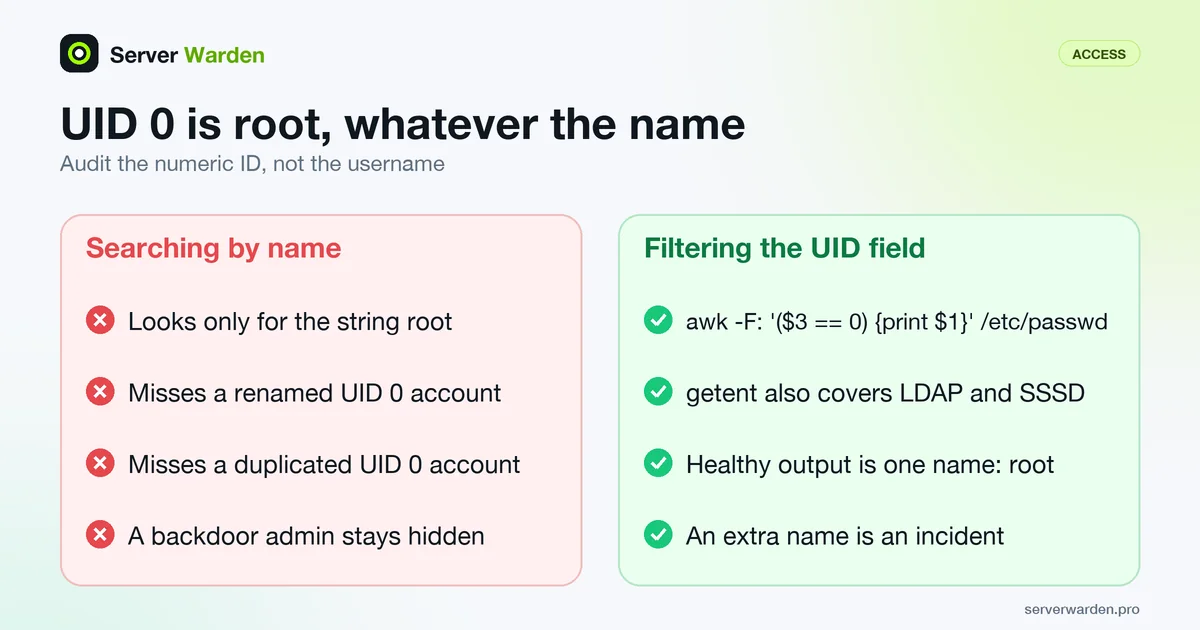
UID 0 is the user ID that Linux gives to root, so any account with UID 0 has exactly the same privileges as root, regardless of its username. Extra accounts with UID 0 are a common way attackers create a hidden backdoor admin account.
Why the username does not matter
Linux does not check for the literal string "root" to grant root privileges; it checks whether the account's user ID is 0. Anyone who creates a second account with UID 0, under any name, has created a second root account with identical power.
Why this matters during an audit
A file integrity or user audit that only searches for accounts literally named "root" will miss a renamed or duplicated UID 0 account entirely, which is exactly the kind of persistence mechanism an attacker with prior root access might leave behind.
If you suspect a rogue root-level account, our server breach incident response guide explains what to check and in what order.
To audit and reduce who holds root across a whole server, see the guide to users, sudo and least privilege.
How to list every UID 0 account
Linux stores the numeric user ID in the third colon-separated field of each /etc/passwd line, as the passwd(5) manual page describes. Filter on that field instead of searching for the name "root":
awk -F: '($3 == 0) {print $1}' /etc/passwd
getent passwd | awk -F: '($3 == 0) {print $1}'
The second command also covers accounts supplied by LDAP or SSSD, which never appear in the local file. A healthy server prints exactly one name, root. Run the check after every incident and on a schedule, since a one-off audit misses an account added next week.
What to do if a second one appears
Do not simply delete the line. An unexpected UID 0 account means someone with root access has already been here, so treat it as an incident: note when the entry was added with stat /etc/passwd, check that account's authorized_keys and shell history, review recent logins, and look for other persistence. The breach response guide gives the order. Afterwards, the least privilege audit shows how to keep root limited to the one account that needs it.
Related terms: Root login, authorized_keys, File integrity monitoring, Incident response, Least privilege, /etc/passwd, sudoers, sudo.
Frequently asked questions
How do I check for extra UID 0 accounts?
Inspect /etc/passwd directly and look at the third field of every line, which is the UID, rather than trusting account names alone.
Is it ever legitimate to have two UID 0 accounts?
In practice, no. Any second account sharing UID 0 should be treated as suspicious until proven otherwise.
Does removing sudo access remove root privileges from a UID 0 account?
No. Sudo is a separate, additional mechanism for granting root privileges temporarily; an account with UID 0 already has full privileges regardless of sudo configuration.
Can I see UID 0 accounts that are not in /etc/passwd?
Yes, if the system uses a directory service. Run getent passwd and filter the third field for 0, because that includes accounts from LDAP or SSSD as well as the local file.
Is the root account itself a risk?
It has to exist, but it should be the only UID 0 account, and direct root login over SSH should be disabled so administrators use named accounts with sudo.
Want to see where your own server stands?
Run the free, read-only server check, or open the Security Lab and watch the detect, contain, recover, verify loop in action.
Get your free server checkOpen the Security Lab