server_tokens
server_tokens is an nginx setting that, when left on, exposes the exact nginx version number in every response, giving attackers a head start on finding version-specific vulnerabilities.
Why this is an easy, low-risk fix
Turning server_tokens off removes version information from every response with a single configuration line and no functional impact on the site, making it one of the highest-value, lowest-effort changes available on an nginx server.
What it does not protect against
Hiding the version number reduces easy reconnaissance but does not fix any actual vulnerability. A server hiding its version while still running genuinely outdated, vulnerable software is only marginally safer than one that reveals it.
See our nginx security guide for this and other quick hardening settings.
Verifying the change actually took effect
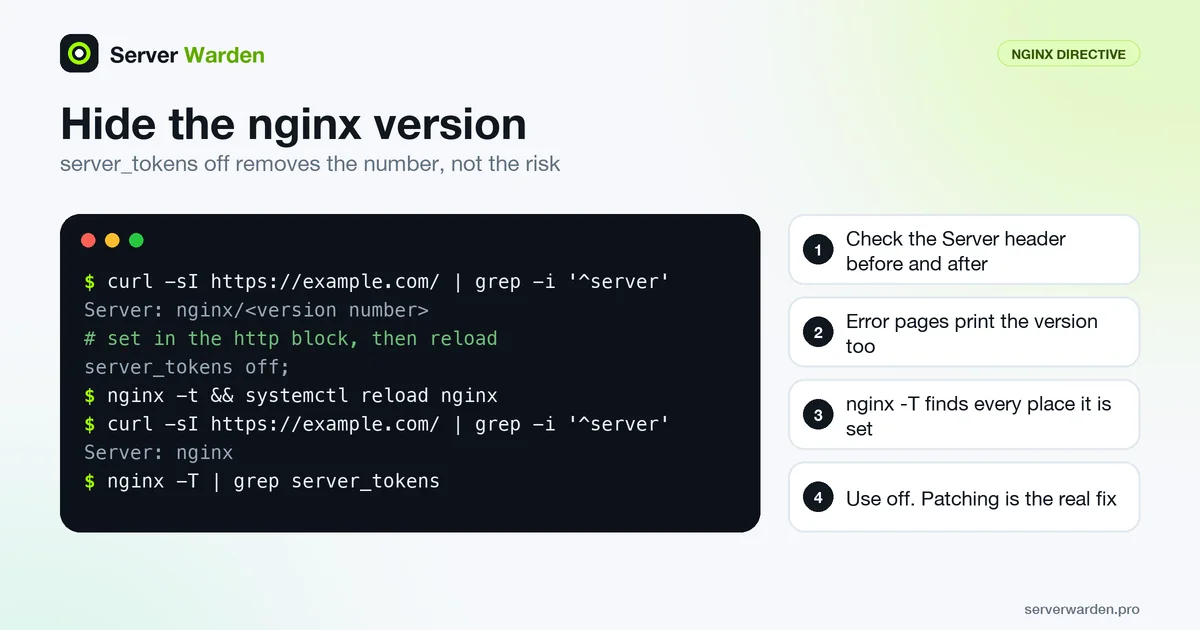
Setting the directive is not the same as seeing it work. Check the response header before and after, and look at an error page too, because the nginx documentation says on emits the version both in the "Server" header and on error pages:
curl -sI https://example.com/ | grep -i '^server'
curl -s https://example.com/no-such-page | tail -n 3
nginx -T | grep server_tokens
Before the change the first line shows nginx/ followed by a version number. Afterwards it should show only nginx, and the error page footer should carry no number. The last command lists every place the directive is set. That matters because it is allowed in http, server and location contexts, so a more specific block can quietly switch it back on. Apply the change with nginx -t && systemctl reload nginx.
The documented values are on (the default), off, build (version plus build name, since 1.11.10) and a custom string. Use off. Treat this as quick housekeeping, not as the fix. The nginx security guide shows where it sits among the other settings.
When the Server header still leaks
With server_tokens off, nginx still announces that it is nginx. Removing or rewriting the header completely is not possible with stock open-source nginx: the documentation says the custom string value, where an empty string disables the Server field, is part of the commercial subscription. The usual open-source workaround is the third-party headers-more module, which can clear built-in output headers, but it must be compiled or loaded as a dynamic module, which adds upgrade work. For most sites, the hidden version number is enough.
Check your applications too. When nginx proxies to a backend, the proxy module does not pass the backend's Date and Server headers by default, but others such as X-Powered-By are passed along, and they often name the language and version. Remove one with:
proxy_hide_header X-Powered-By;None of this stops a targeted attacker who tests behaviour instead of reading banners. The decisive step is patching, as the NGINX Rift case showed, where the fix was an upgrade. Read the patch management guide to make that routine.
Related terms: nginx, Security headers, TLS / SSL.
Frequently asked questions
Does hiding the nginx version make the server secure?
No, on its own it only removes one piece of reconnaissance information; keeping nginx itself updated is what actually closes known vulnerabilities.
How is server_tokens disabled?
By setting "server_tokens off;" in the nginx configuration, typically in the http block, and reloading nginx for the change to take effect.
Do other web servers have an equivalent setting?
Yes, most web servers have some form of version-suppression option, often under a similarly named directive, though the exact syntax differs by software.
How can I confirm that server_tokens off is working?
Run curl -sI against your site and check the Server line: it should read nginx without a version number. Also request a page that does not exist, since nginx prints the version on error pages too when the directive is on.
Can I remove the Server header completely in nginx?
Not with stock open-source nginx. The documentation lists a custom string value, where an empty string disables the Server field, as a commercial subscription feature, and the usual open-source alternative is the third-party headers-more module.
Want to see where your own server stands?
Run the free, read-only server check, or open the Security Lab and watch the detect, contain, recover, verify loop in action.
Get your free server checkOpen the Security Lab