Root login
Root login is logging in directly as the root, or administrator, account over SSH. Disabling direct root login and requiring a normal user plus sudo is one of the fastest ways to reduce the damage a single stolen credential can do.
Why direct root login is treated as a red flag
Root has no restrictions of any kind, so a single compromised session is equivalent to a full server takeover. Every automated brute-force script on the internet tries the username "root" first, since it is guaranteed to exist on almost every Linux server.
The usual alternative
Most hardened setups create a named administrative account, add it to the sudo group, and disable root login over SSH entirely. Anyone who needs root privileges still gets them through sudo, but only after authenticating as themselves first, leaving an audit trail of who ran what.
For the complete list of settings that lock down remote access, see our SSH hardening guide.
Disabling direct root login is one part of least privilege; the full audit of users and sudo rules is in users, sudo and least privilege.
What each PermitRootLogin value allows
The setting is not a simple on/off switch. The sshd_config manual accepts four values:
yes: root may log in with any enabled method, including a password.prohibit-password: password and keyboard-interactive login are disabled for root, but a public key still works. This is the default in the manual.forced-commands-only: root may log in only with a key that carries a forcedcommandoption, and all other methods are disabled for root.no: root cannot log in over SSH at all.
The practical lesson is that the default is not the same as no. With prohibit-password, any key left in root's authorized_keys is still a working way in, which is why unexplained keys there matter. Your distribution or provider image may also set a different value than the built-in default, so check what is really active:
sudo sshd -T | grep -i permitrootlogin
sudo cat /root/.ssh/authorized_keys
Use forced-commands-only only for a genuine automation need, such as a single backup job, and pair it with the key restrictions described in the authorized_keys entry.
Turn root login off without losing access
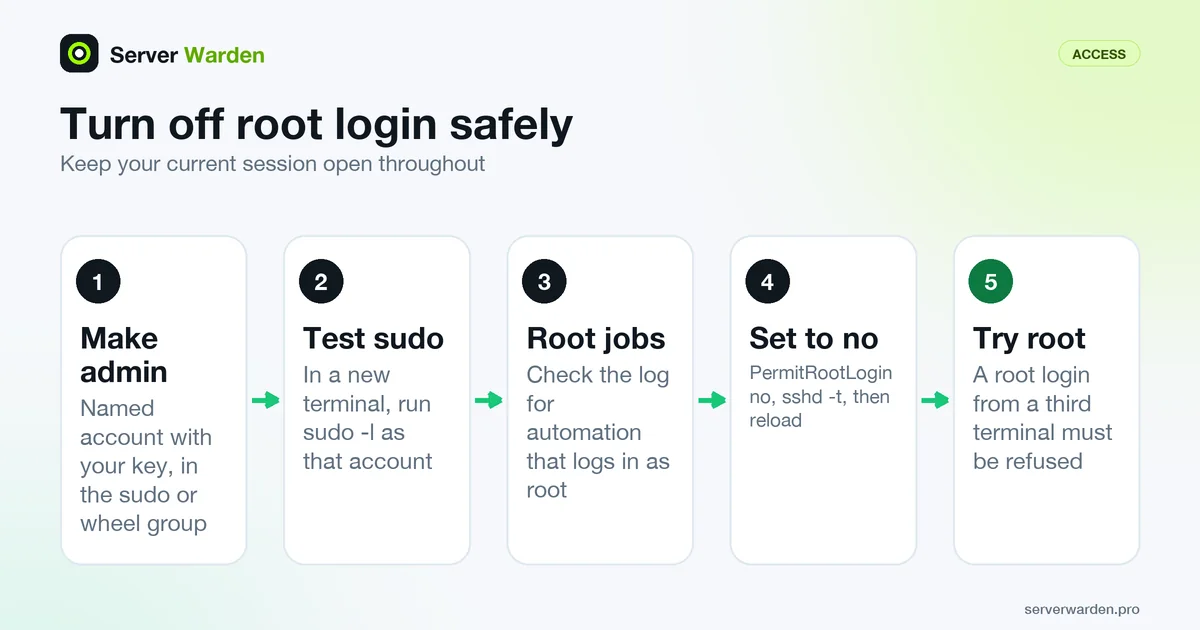
The risk is not the setting but the order of steps. Work through them with your current session still open:
- Create a named administrator account, add your public key to it, and give it sudo through the administrators group your distribution uses (commonly
sudoorwheel). - Open a new terminal, log in as that account and run
sudo -lto prove the privileges work. - Find out what still logs in as root, so no automation breaks:
sudo journalctl -u ssh | grep 'Accepted .* for root'. Move those jobs to restricted service accounts. - Set
PermitRootLogin no, runsudo sshd -t, reload sshd and confirm withsudo sshd -T | grep -i permitrootlogin. - From a third terminal, try
ssh root@your-server. It must be refused.
Keep your provider's web console or rescue mode available, since it is the way back if the administrator account turns out to be broken. Remember that the setting only blocks remote SSH logins as root: local use of sudo continues to work, and that is intended. The SSH hardening guide covers the surrounding settings, and the sudo and least privilege audit shows how to keep those sudo rules narrow.
Related terms: SSH, sshd_config, UID 0, Brute-force attack, Least privilege, PermitRootLogin, AllowUsers, sudo.
Frequently asked questions
Does disabling root login remove root access completely?
No. Root still exists and can be reached locally or through sudo from an authorized account; the only thing disabled is logging in directly as root from a remote SSH session.
Is it enough to just set a strong root password?
It reduces one risk but not the core problem, since a shared root login still gives no record of which person performed a given action. A named account with sudo is the safer default.
What Linux setting controls this?
The PermitRootLogin directive in sshd_config, usually set to "no" or "prohibit-password" on a hardened server.
Is PermitRootLogin prohibit-password the same as no?
No. It blocks password and keyboard-interactive login for root, but a public key in root's authorized_keys still works. Set no if nobody should log in as root remotely at all.
Will disabling root login break my backup or deploy jobs?
It can, if they connect as root. Search the SSH log for accepted logins for root first, then move each job to a dedicated account with a restricted key, or use forced-commands-only for a single fixed command.
Want to see where your own server stands?
Run the free, read-only server check, or open the Security Lab and watch the detect, contain, recover, verify loop in action.
Get your free server checkOpen the Security Lab