Read-only audit
A read-only audit is a security scan that only inspects a system's current state without changing any configuration, banning IPs, or deleting anything, used to establish a baseline before any other action is taken.
Why this matters as a first step
Running any tool that changes configuration, bans IPs, or deletes files on a server nobody has assessed yet risks breaking something that was actually working, before anyone even understands the server's current state. A read-only audit removes that risk entirely.
What it typically produces
A report describing current configuration, open ports, running services, and any obvious weaknesses found, without altering anything, giving the server owner a factual baseline to make informed decisions from.
Once you have a baseline, our VPS security checklist shows what to fix first.
What the free Server Warden check reads
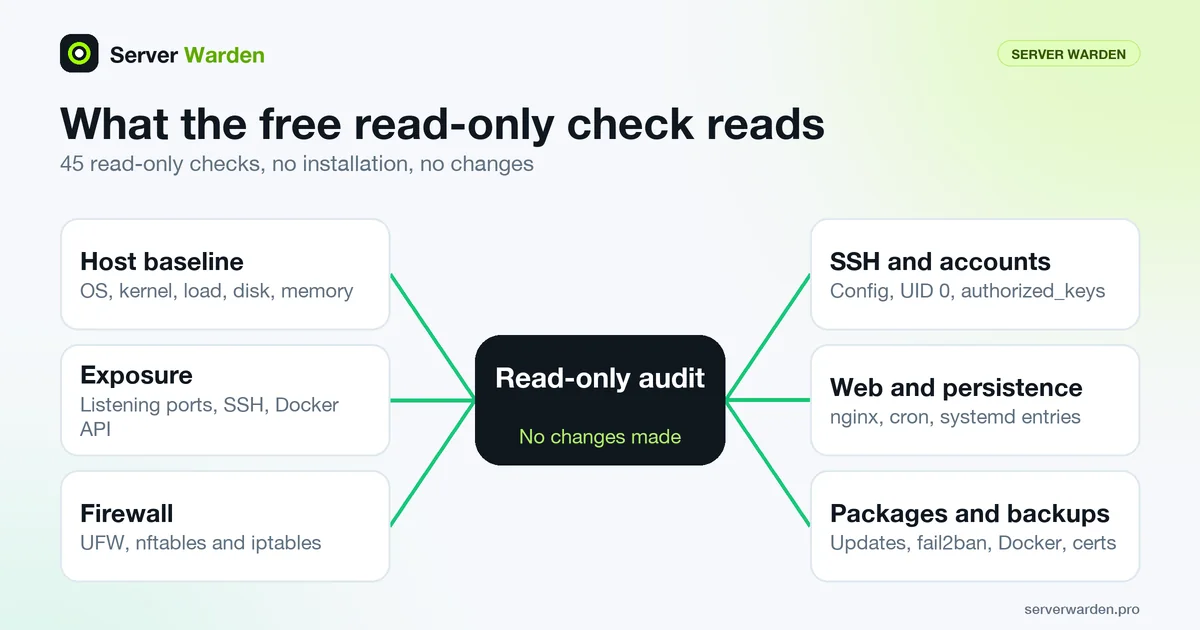
The product page describes the free audit as 45 read-only checks with no installation and no changes, producing a local HTML and TXT report with a risk score and recommendations. It calls it a one-shot diagnostic, not the Server Warden agent. The checks are grouped as follows:
- Host baseline: OS release, kernel, uptime and load, disk, memory and swap.
- Exposure: listening TCP sockets, public SSH exposure, Docker TCP API, database and service ports.
- Firewall: UFW, nftables and iptables.
- SSH and accounts: failed-login signals, effective SSH configuration, UID 0 users, sudo and admin groups, authorized_keys permissions.
- Web, filesystem and persistence: nginx version and configuration test, sensitive paths, world-writable files, cron and systemd entries.
- Packages, Docker and resilience: update signal, fail2ban, Docker socket permissions, backup freshness, Let's Encrypt certificates and disk pressure.
According to the product FAQ, it does not change firewall rules, ban IPs or edit nginx configuration, and it uploads nothing without your explicit consent. The demo page shows the run command; if you prefer to read a script before running it with root rights, download it first:
curl -fsSL https://serverwarden.pro/check.sh -o check.sh
less check.sh
sudo bash check.sh
Reading the report and acting on it safely
A read-only scan sits at the low-risk end of the technical assessment methods described in NIST SP 800-115, the agency's guide to planning and conducting technical security tests and examinations. The risk begins when you start fixing things, so work in a careful order.
Start with whatever an outsider can reach: listening sockets, SSH settings, database ports and the Docker API. The guides on exposed databases, Docker hosts, SSH hardening and the firewall cover the usual findings. Change one thing at a time, and keep an existing SSH session open while you do. Before restarting the SSH daemon, validate the file: sshd -t checks the configuration and keys without applying them.
Afterwards, run the check again and compare the two reports. Remember what it is: a snapshot of one moment. It cannot tell you what happens next week, and it does not watch your server. Keep the first report, since it is your baseline for the checklist, and consider a scheduled repeat so drift is noticed. If something in the report looks like an active compromise rather than a weak setting, stop and switch to the incident response process before changing anything.
Related terms: Managed security, DIY security, VPS, File integrity monitoring.
Frequently asked questions
Can a read-only audit break anything on my server?
No, by definition. It only inspects and reports on the current state without changing configuration, banning anything, or deleting data.
Is a read-only audit enough on its own to secure a server?
No. It establishes a baseline and identifies issues, but fixing those issues is a separate, necessary next step.
How long does a typical read-only audit take?
It varies by server complexity, but because it only reads existing state rather than making changes, it is usually fast compared to a full remediation process.
Does the free check upload my server data?
According to the Server Warden product page, it does not upload anything without your explicit consent. It collects the facts needed for the report and writes a local HTML and TXT file that you keep.
How is the free check different from the Server Warden agent?
The product page describes the audit as a one-shot read-only diagnostic and states it is not the Server Warden agent. The agent is the ongoing protection layer; the audit only inspects the server once and reports.
Want to see where your own server stands?
Run the free, read-only server check, or open the Security Lab and watch the detect, contain, recover, verify loop in action.
Get your free server checkOpen the Security Lab