Patch window
A patch window is a predefined, agreed time period during which updates are tested and applied to production servers, used to avoid surprise changes at unpredictable times.
Why predictability matters more than speed here
A patch window is less about applying updates as fast as possible and more about applying them at a time everyone has agreed to and prepared for, so an unexpected restart or brief service interruption does not catch anyone off guard.
Balancing patch windows against critical fixes
A scheduled weekly or monthly patch window works for routine updates, but a critical security fix, especially one already being actively exploited, usually justifies breaking the normal schedule rather than waiting for the next planned window.
For how to schedule patch windows around real uptime needs, see our server patch management guide.
Running a window on a VPS: before, during, after
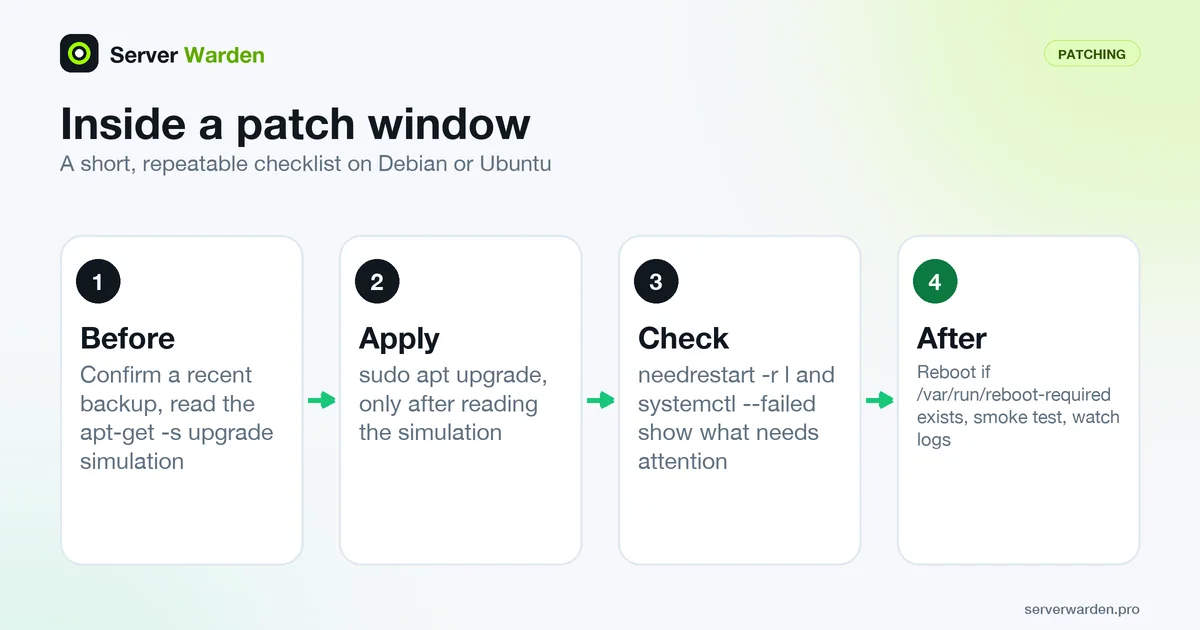
A window works best as a short, repeatable checklist. On Debian or Ubuntu it can look like this:
sudo apt update
sudo apt-get -s upgrade      # simulate, changes nothing
sudo apt upgrade
sudo needrestart -r l        # services still on old libraries
systemctl --failed           # units that did not come back
Before you start, confirm a recent backup or snapshot exists (the 3-2-1 backup guide covers what to keep), and read the simulated upgrade so a surprise such as a database or kernel package does not catch you mid-window. The apt-get man page confirms that -s performs a simulation without changing the system. Afterwards, restart what needs it, reboot if /var/run/reboot-required exists, load the site or API once as a smoke test, and watch the logs for a while using the monitoring guide.
If unattended-upgrades is active, it runs on its own timers. Use systemctl list-timers 'apt-daily*' to see when, and set Unattended-Upgrade::Automatic-Reboot-Time to the same quiet hour as your window so that a reboot never lands at a random moment.
When to break the window, and how to catch up
NIST's SP 800-40 Rev. 4 treats emergency patching as the same process as routine patching on a much faster schedule. Even in an emergency it suggests trying the patch on a small number of canary systems first, for anywhere from a few minutes to a few hours, with the wider rollout following within hours or days depending on urgency. For a small business that can simply mean patching the least critical server first.
Good triggers for an out-of-cycle window are a vendor critical advisory for software you run, or a new entry on the CISA KEV catalog that matches your stack. If no fix exists yet, the same document describes emergency mitigation as a temporary measure, so see zero-day exploit for what that looks like.
The opposite failure is quiet: skipped windows. NIST recommends allowing flexibility on timing but forcing installation once a grace period ends. Write down every postponed window with a date, and treat a second consecutive skip as a reason to act, because a growing backlog makes the next emergency harder.
Related terms: Patch management, unattended-upgrades, Kernel live patching, N-day exploit.
Frequently asked questions
How often should a patch window be scheduled?
Weekly or monthly is common for routine updates, though the right cadence depends on how much change tolerance a given service has.
Should critical security fixes wait for the next patch window?
Generally no. Fixes for actively exploited or severe vulnerabilities usually warrant an expedited, out-of-cycle patch rather than waiting for the scheduled window.
Does a patch window need to include a reboot?
Only when the specific updates being applied require one, such as certain kernel updates; many routine package updates do not need a reboot at all.
If unattended-upgrades handles security updates, do I still need a patch window?
Yes. Automatic reboots are off by default, so a kernel or library update can sit installed but inactive, and updates from outside the allowed origins are not installed automatically. The window is where you confirm restarts, reboot on purpose and review everything the automation skips.
How long should a patch window last?
There is no standard duration. Allow enough time for a backup check, the updates, restarts, a smoke test and a rollback if something fails. Time a first run on your least critical server and size the window from that.
Want to see where your own server stands?
Run the free, read-only server check, or open the Security Lab and watch the detect, contain, recover, verify loop in action.
Get your free server checkOpen the Security Lab