iptables
iptables is the original Linux firewall tool, built on the kernel's netfilter framework. Still widely used, but gradually being replaced by nftables, its more efficient and easier to audit successor.
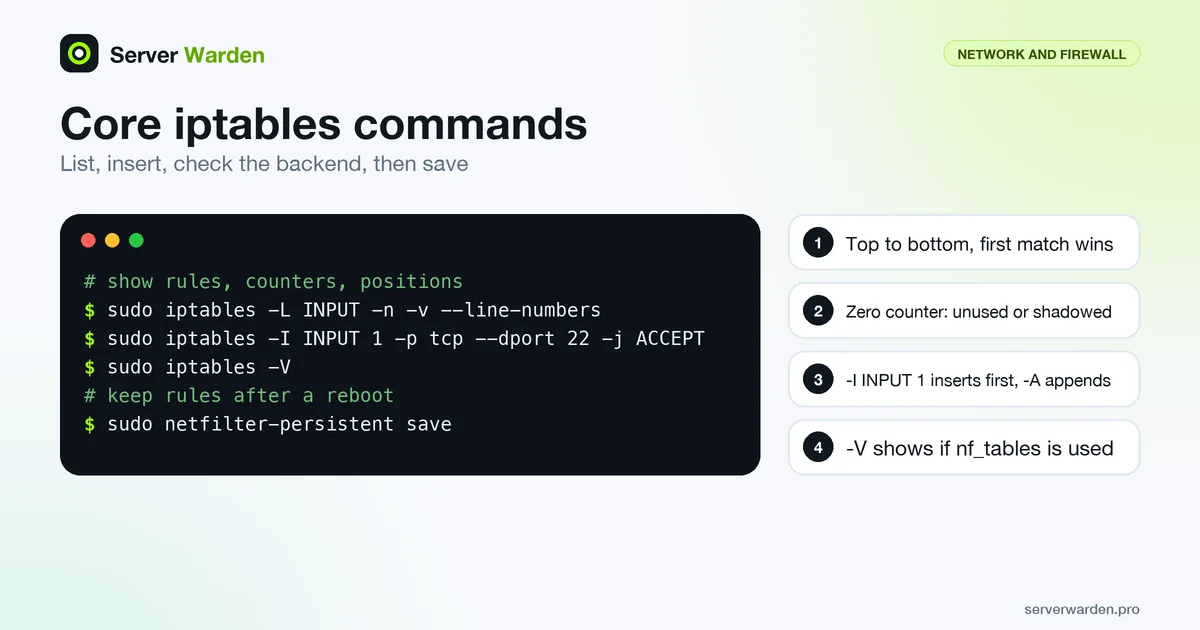
Why it is still widely used despite being older
iptables has been the default Linux firewall for over two decades, so most existing documentation, scripts and automation tooling across the internet assume it, even on distributions that now ship nftables underneath.
The rule-ordering trap
iptables processes rules top to bottom and stops at the first match. A broad "allow" rule placed above a more specific "deny" rule silently makes the deny rule useless, which is one of the most common self-inflicted firewall misconfigurations.
Our Linux firewall guide compares iptables with nftables and ufw and shows when each makes sense.
Reading and changing the live rule set
Start by listing the rules with counters and rule numbers. The iptables(8) manual page says -n avoids slow reverse DNS lookups, -v adds counters and interface names, and --line-numbers shows each rule's position:
sudo iptables -L INPUT -n -v --line-numbers
sudo iptables -S
The -S form prints rules in the same style as iptables-save, which is handy for copying. The packet counters tell you whether a rule is ever matched: a rule that stays at zero after days of traffic is either unnecessary or shadowed by an earlier rule, the ordering trap described above.
Position matters when you add rules. -A appends to the end of the chain, while -I INPUT 1 inserts at the head, which is the default for -I. Use -C to check whether an identical rule already exists, so scripts do not add duplicates; it changes nothing and reports the result through its exit code.
sudo iptables -I INPUT 1 -p tcp --dport 22 -j ACCEPTFinally, check the backend. The xtables-nft documentation notes that the version string from iptables -V shows when the tool uses nf_tables.
Saving, testing and persisting rules
Rules loaded with iptables live in memory. iptables-save dumps them as text, and iptables-restore loads them back. Two behaviours from the iptables-restore manual are worth knowing: without --noflush it deletes the existing contents of each table it restores, and --test parses the ruleset without committing it. That makes a safe pre-check possible:
sudo sh -c 'iptables-restore --test < /etc/iptables/rules.v4'On Debian and Ubuntu, the Debian wiki recommends the iptables-persistent package, which reads IPv4 rules from /etc/iptables/rules.v4 and IPv6 rules from rules.v6. After a working change, store the live rules with:
sudo netfilter-persistent saveThat command asks the plugins to save the currently loaded rules to persistent storage. IPv6 is a separate rule set handled by ip6tables, so check both. Finally, do not mix the nft and legacy tools on one machine: the nftables project warns that using both at the same time can lead to unexpected results. Pick one backend and stay with it; the nftables entry explains where that backend is heading.
Related terms: nftables, ufw, Firewall, Default deny policy.
Frequently asked questions
Is iptables being phased out?
On modern distributions, nftables is technically doing the packet filtering underneath even when you interact with the iptables command, through a compatibility layer.
Do iptables rules survive a reboot by default?
No. Rules exist only in memory unless you explicitly save them and configure them to be restored automatically at boot, typically through iptables-persistent on Debian-based systems.
What is the simplest safe default policy?
Set the default policy on the INPUT chain to DROP, then explicitly allow only the specific ports and services you actually need.
How can I tell whether an iptables rule is actually used?
List the chain with iptables -L -n -v and read the packet and byte counters. A rule whose counters stay at zero is not matching any traffic, either because nothing needs it or because an earlier rule catches the packets first.
How do I check whether iptables on my server uses nftables underneath?
Run iptables -V. On systems where the command is the nf_tables variant, the version string says so. On Debian you can switch between the nft and legacy variants with update-alternatives, but you should not use both at once.
Want to see where your own server stands?
Run the free, read-only server check, or open the Security Lab and watch the detect, contain, recover, verify loop in action.
Get your free server checkOpen the Security Lab