DIY security
DIY security is handling all server hardening, monitoring and incident response internally with existing staff and time, rather than paying for a managed service.
What it demands that is easy to underestimate
DIY security is not just the initial setup of a firewall and SSH hardening. It means someone on staff consistently keeping up with patch releases, monitoring logs, and being available to respond when something goes wrong, indefinitely, not just once.
When it stops making sense
As the cost of staff time spent on security work, or the cost of a missed update or unnoticed incident, grows past what a managed service would cost, DIY security starts costing more than it appears to save.
Our managed security vs DIY guide lays out where self-managed security works and where it does not.
A maintenance routine you can actually keep
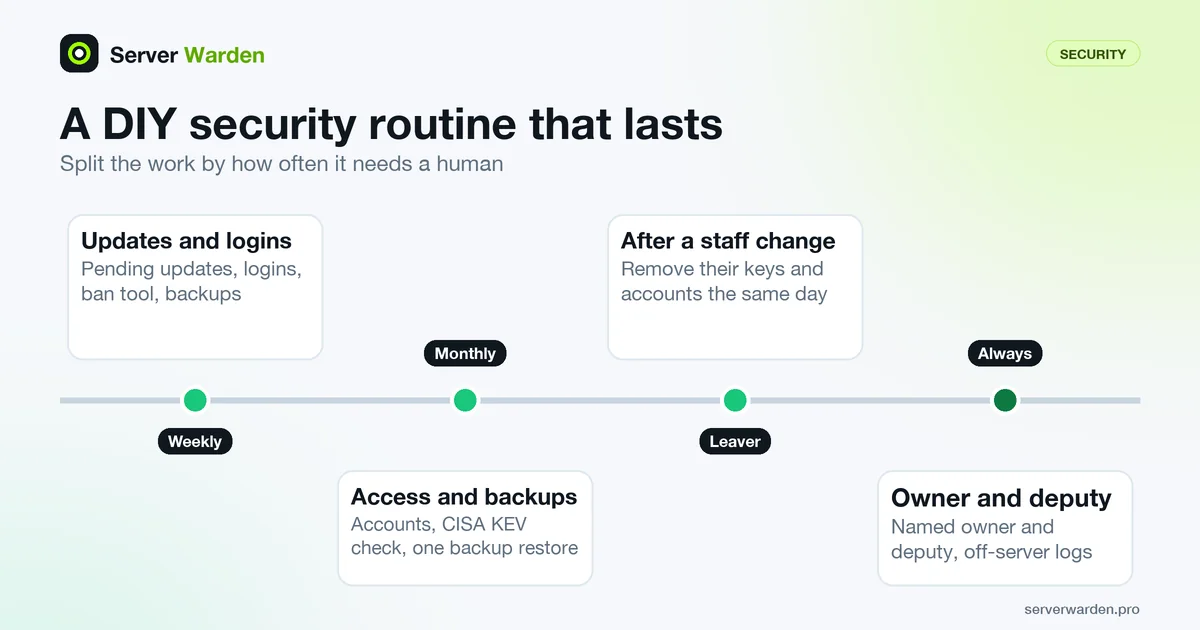
DIY security fails less from missing knowledge than from missing rhythm. A short, fixed routine beats an ambitious one you abandon. As a starting point, split the work by how often it needs a human:
- Weekly: look at pending updates, recent logins and failed logins, and confirm your ban tool and backups are still running.
- Monthly: review who can log in (accounts and authorized_keys), check the software you run against the CISA KEV catalog, and restore one backup to prove it works.
- After every staff change: remove the leaving person's keys and accounts the same day.
apt list --upgradeable
last -a | head -20
sudo lastb | head -20
On Debian family systems the first command lists pending package updates; last reads the login record in /var/log/wtmp and lastb reads the failed login record in /var/log/btmp, according to the util-linux manual. On the RHEL family, use dnf check-update instead of the first command.
CISA's Cross-Sector Cybersecurity Performance Goals are a useful yardstick for what belongs on the list: they include mitigating known exploited vulnerabilities, revoking departed users' access, system backups, log collection and an incident response plan.
Making DIY survive a bad week
The weak point of DIY security is usually one person. If that person is ill, on holiday or simply busy for a month, patching and log review stop without anyone noticing. A few inexpensive safeguards help:
- Name an owner and a deputy. The CPGs list named cybersecurity leadership under governance for a reason: a task with no owner does not get done. The deputy needs documented break-glass access, such as the provider console, stored securely.
- Write the runbook while calm. One page: where the servers are, how to restore, who to call. The incident response definition and the breach guide give the skeleton.
- Make problems come to you. Alerts that arrive in a channel someone reads beat logs nobody opens. See the monitoring guide.
- Keep a copy of logs off the server, so an intruder cannot erase the trail (see SIEM).
- Get an outside view now and then. The free read-only check described on the product page runs 45 read-only checks, installs nothing and writes a local report, which makes a handy cross-check on your own routine.
Related terms: Managed security, Patch management, Incident response.
Frequently asked questions
Is DIY security a bad choice?
Not inherently. For a team with the time, skills and consistency to maintain it properly, DIY security can work well; the risk is in underestimating the ongoing effort it actually requires.
What is the biggest risk with DIY security in practice?
Inconsistency over time. Initial setup is often done well, but patching, monitoring and incident response tend to slip as other priorities compete for the same person's time.
Can DIY security and a managed service be combined?
Yes. Many teams handle day-to-day administration themselves while using a managed service or periodic read-only audit specifically for ongoing monitoring and verification.
What is the first sign that DIY security is slipping?
Usually pending updates that keep piling up, and logs or alerts that nobody has opened for weeks. Both are visible in a few minutes with a list of upgradable packages and a look at recent logins.
Can a read-only audit replace monitoring in a DIY setup?
No. The Server Warden free check is described as a one-shot read-only diagnostic and not the agent, so it gives a snapshot of one moment. It is a good periodic cross-check, but continuous watching is a separate job.
Want to see where your own server stands?
Run the free, read-only server check, or open the Security Lab and watch the detect, contain, recover, verify loop in action.
Get your free server checkOpen the Security Lab