Application-layer attack (Layer 7)
An application-layer attack (Layer 7) is a DDoS attack that targets the web application itself with requests that look legitimate, making it harder to distinguish from real traffic than a simple flood.
Why this is the hardest DDoS category to filter
Because the requests themselves follow normal protocol rules and often resemble genuine visitor behavior, distinguishing attack traffic from a real, if unusually large, spike in legitimate use requires looking at patterns over time rather than any single request in isolation.
Where a WAF fits in
A web application firewall sits in front of the application specifically to inspect and rate-limit this kind of traffic based on request patterns, which is a different job from a network-level firewall that only sees connections, not the requests inside them.
Our DDoS protection guide for small businesses covers rate limiting and filtering for this kind of traffic.
Finding the abused endpoint in your logs
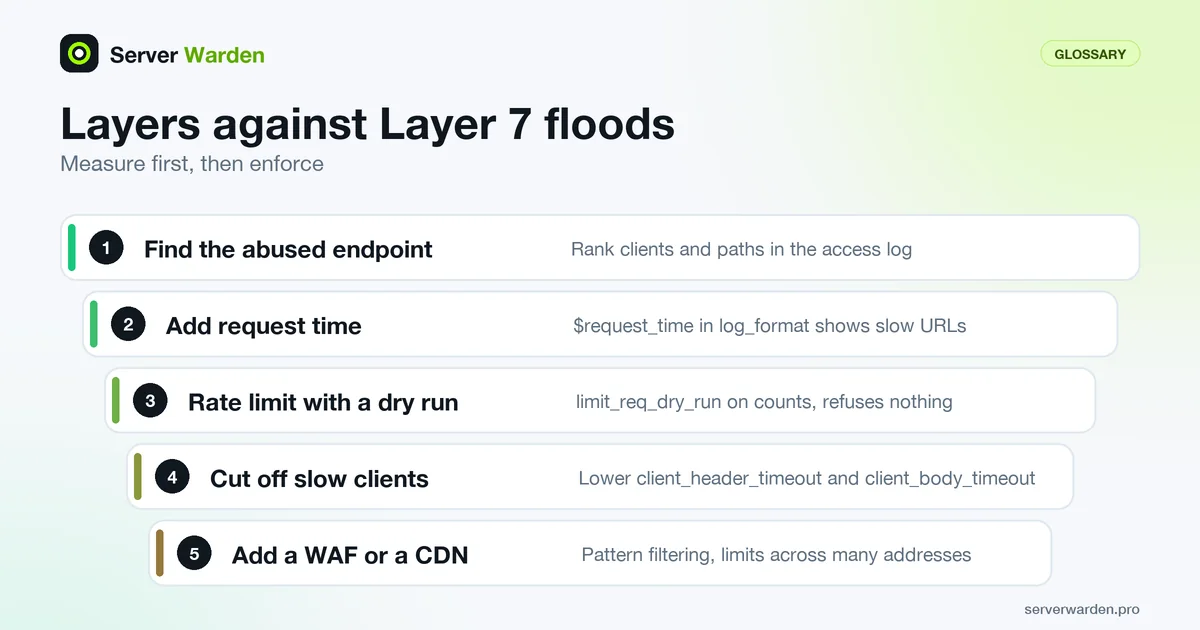
An application-layer attack is a pattern in requests, so the access log is your best instrument. In nginx's default combined format the client address is the first field and the request path is the seventh, which makes two one-liners enough:
awk '{print $1}' /var/log/nginx/access.log | sort | uniq -c | sort -rn | head
awk '{print $7}' /var/log/nginx/access.log | sort | uniq -c | sort -rn | head
The first ranks clients, the second ranks paths. A flood usually shows up as a few expensive URLs, such as search, login or an uncached report, receiving far more hits than the rest of the site. To see which endpoints are slow rather than just popular, add $request_time (request processing time in seconds, a standard variable from the nginx log module) to a custom log_format and sort on it. Do this before changing anything, because the endpoint you find decides the fix: cache it, put a limit on it, or move it behind authentication. The log monitoring guide shows how to keep this kind of check running instead of doing it once during an outage.
nginx limits that blunt Layer 7 floods
Start with measurement, then enforce. The limit_req module has a dry-run switch for exactly this, and the values below are examples to tune against your own traffic:
limit_req_zone $binary_remote_addr zone=search:10m rate=2r/s;
limit_conn_zone $binary_remote_addr zone=perip:10m;

location /search {
    limit_req zone=search burst=10;
    limit_req_status 429;
    limit_req_dry_run on;
    limit_conn perip 20;
}
By documented defaults, rejected requests get status 503, burst is 0, and in dry-run mode excess requests are counted but not refused. Remove limit_req_dry_run once the numbers look safe. Be careful with per-address limits when many real users share one address, for example behind a company or mobile gateway.
Slow attacks hold connections open instead of sending many requests. The core module defaults for client_header_timeout and client_body_timeout are 60 seconds each, and a lower value closes stalled clients sooner with a 408. Combine these controls with fail2ban and, for pattern-based filtering, a WAF.
Related terms: WAF, Rate limiting, Protocol attack, limit_req, SQL injection, CORS (cross-origin resource sharing).
Frequently asked questions
Is this the same thing as a regular website getting a lot of legitimate traffic at once?
The traffic pattern can look similar at first, which is exactly why application-layer attacks are hard to catch quickly; the difference usually shows up in the source diversity and request patterns over a longer window.
What is a common target for this type of attack?
Login pages, search functionality, and any endpoint that triggers expensive server-side work per request, since those maximize damage per request sent.
Does a network firewall stop application-layer attacks?
Not effectively on its own, since the traffic passes standard network-level checks; a WAF or application-level rate limiting is generally required.
What is a layer 7 attack?
A layer 7 attack is another name for an application-layer attack: a DDoS attack that targets the web application layer of the OSI model, using requests that follow normal protocol rules and look legitimate, rather than raw connection or bandwidth floods.
How do you defend against application-layer attacks?
With a combination of a web application firewall, rate limiting on expensive endpoints such as login and search, and monitoring that looks at request patterns over time rather than any single request in isolation.
What is the difference between a layer 3/4 attack and a layer 7 attack?
A layer 3/4 (network or protocol) attack tries to exhaust bandwidth or connection state, and is usually filtered by the network before it reaches the application. A layer 7 attack sends fewer, more targeted requests that look like real traffic, so it has to be caught by inspecting the requests themselves.
How can I find which URLs an application-layer attack is hitting?
Count requests per path in the access log, for example with awk on the seventh field of the combined format, and compare against your normal traffic. Adding the request time to the log format also reveals which endpoints are slow, since those are the cheapest to exhaust.
Does limiting requests per IP address stop a distributed attack?
Only partly. A per-address limit stops one noisy client, but an attack spread over thousands of addresses stays under it, so you also need a CDN or WAF in front of the server and limits on the expensive endpoints themselves.
Want to see where your own server stands?
Run the free, read-only server check, or open the Security Lab and watch the detect, contain, recover, verify loop in action.
Get your free server checkOpen the Security Lab